Need help?
Do you have a question about the JVC XS-N6111PBA and is the answer not in the manual?
General safety guidelines for operating and maintaining the JVC Bluetooth Party Speaker, including warnings against water immersion and heat exposure.
Detailed technical data including speaker unit, input sensitivity, frequency response, power output, and dimensions.
Information on the audio file formats supported by the speaker, specifically for USB playback.
Details on power on/off, USB, microSD, AUX inputs, microphone, instrument inputs, and charging port.
Adjustments for microphone echo, volume, and instrument volume.
Controls for mode selection, microphone priority, recording, and track navigation.
Master volume, bass, mid-range, and treble adjustment sliders.
Detailed description of all buttons on the remote control for various functions.
Instructions on how to properly charge the speaker's built-in rechargeable battery.
Guidance on setting the power switch to the 'On' position to activate the speaker.
Step-by-step guide to pairing a Bluetooth device with the JVC XS-N6111PBA speaker.
Instructions for connecting and adjusting a wired microphone to the speaker.
Steps for connecting and adjusting a guitar or other ¼" instrument.
Guidance on inserting batteries and connecting a wireless microphone.
Instructions for connecting a USB stick for music playback and recording.
Steps for inserting and playing music from a microSD card.
How to record audio from music sources and microphones onto a USB device.
Instructions for scanning, storing, and selecting FM radio stations.
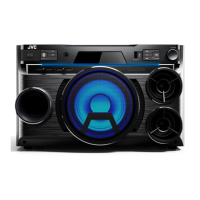
The JVC XS-N6111PBA is a Bluetooth Party Speaker designed for indoor use, offering a range of audio playback options and features for an enhanced listening experience. This speaker is a versatile audio system, capable of connecting to various devices and supporting multiple input methods.
The primary function of the JVC XS-N6111PBA is to provide high-quality audio playback from a variety of sources. It acts as a central hub for your music, whether streamed wirelessly via Bluetooth, played from USB or microSD cards, or connected via an AUX input. Beyond simple music playback, it incorporates features that make it suitable for parties and events, such as microphone and instrument inputs, allowing for karaoke or live performance applications. The built-in FM radio further expands its utility, providing access to local broadcasts. The speaker is designed to be portable, featuring a built-in rechargeable battery, making it suitable for use in different indoor locations without constant access to a power outlet.
The speaker offers a comprehensive set of usage features, accessible both directly on the unit and via a remote control.
To power on the speaker, the On/Off switch on the unit must be set to the "On" position. For charging, the unit should be turned "Off" and connected to a power adaptor via the DC15V, 2A charging port. A red charging indicator lights up during charging and turns blue when fully charged. It is crucial to remove the power adaptor once charging is complete to prevent overcharging.
Connecting a Bluetooth device is straightforward. Users press the Mode Button until "BLUE" appears on the LCD screen. Then, they navigate to their device's Bluetooth settings, search for "XS-N6111," and connect. A connection sound confirms successful pairing, and the device will display "connected." Volume can be adjusted on both the connected device and the speaker's master volume control.
For USB devices, simply plug a FAT32 formatted USB stick into the USB input. The LCD will display "USB," and the built-in MP3 player will automatically begin playing the next MP3 song. Similarly, for microSD cards, insert a FAT32 formatted card into the microSD input. The LCD will show "TF," and the MP3 player will start playing. Users can navigate tracks using the next, previous, and play/pause buttons. A repeat function allows for continuous playback of the current song or all songs on the device.
The AUX input allows for connection of external audio devices using a standard audio cable.
To use the FM radio, press the mode button until "FM" appears on the LCD display. Pressing the Play/Pause button on the unit or the Scan button on the remote control initiates an automatic scan for available FM radio stations, which are then saved. Users can select preset stations using the previous and next station buttons.
The speaker features inputs for both wired microphones (1/4") and instruments (1/4"). For wired microphones, connect the microphone to the 1/4" Microphone Input, ensure it's in the "ON" position, and adjust the microphone volume and echo effect as desired. For instruments, connect the 1/4" plug to the Instrument Input, ensure the instrument is "ON," and adjust the instrument volume. A wireless microphone is also included, requiring 2x AA batteries. It's recommended to start with minimum microphone volume and adjust as needed, avoiding holding the microphone too close to the speaker to prevent whistling.
The speaker supports recording onto a FAT32 formatted USB stick. To start recording, press and hold the record button until a beep is heard. Music from connected devices and microphone vocals will be recorded. To stop recording, press and hold the record button again until a beep. Recordings are saved to the USB device and can be played back by pressing the record button.
The speaker provides various audio adjustments to tailor the sound. Bass, Mid, and Treble sliders are available for Bluetooth, USB, microSD, FM, and AUX modes, allowing users to fine-tune the frequency response. The Echo effect is specifically applicable to microphone input, adding reverberation to vocals. The remote control also offers an Equaliser button to switch between preset sound modes like Rock, Jazz, Classic, Pop, Normal, and Scene.
The remote control provides convenient access to most of the speaker's functions. It requires 2x AAA batteries (provided separately). The unit's On/Off switch must be in the "On" position for the remote to function. Remote control buttons include Mute, Power (On/Stand by), 0-9 Track Select, Record/Scan, Mode, Song Loop, Previous/Next Folder, Previous/Next Track, Play/Pause, Volume +/-, and Equaliser.
Proper maintenance ensures the longevity and optimal performance of the JVC XS-N6111PBA.
For cleaning the speaker, it is recommended to use a soft cloth with a small amount of diluted detergent. Harsh chemicals or abrasives should be avoided as they can damage the unit.
The speaker has a built-in rechargeable battery. To prolong battery life, avoid overcharging. Remove the power adaptor promptly once the charging indicator turns blue. For the remote control and wireless microphone, remove batteries if they will not be used for a long time to prevent leakage and damage. When replacing batteries, ensure all batteries are replaced at the same time and do not mix old and new batteries. Batteries should not be exposed to high temperatures, direct sunshine, or fire.
The speaker should not be immersed in water or other liquids and should not be used in very humid or dusty environments. It should also be protected from direct sunlight, heat, or fire, and kept away from flammable materials. The speaker is intended for indoor use only and should not be covered during use to ensure proper ventilation.
Users should read all instructions before use and retain them for future reference. The unit contains no user-serviceable parts and should not be dismantled. This product is not a toy, and children should be supervised to ensure they do not play with the unit. For battery disposal, users should contact their local council for information on proper disposal or recycling, as batteries should not be disposed of in household waste.
 General
| Type | Coaxial |
|---|---|
| Frequency Response | 35Hz - 22kHz |
| Impedance | 4 ohms |
| Cone Material | Polypropylene |
| Size | 6.5 inches |
| Peak Power | 300 Watts |
| Sensitivity | 90dB |
| Woofer | Yes |
| Power Handling | 300W Peak |


 To Next Page