EasyManua.ls Logo

JVC XS-N1129AA - User Manual

JVC XS-N1129AA
2 pages
Print Icon
To Next Page IconTo Next Page
Loading...
Register your product at jvctv.com.au/warranty-registration
5
Waterproof Bluetooth Speaker
XS-N1129AA/XS-N1129DA/XS-N1129GA
User Manual
Using the Hands-Free Function
When a smartphone is connected to your speaker follow the steps
below to take calls hands-free.
1. Press“ ”to pick up the call.
2. Press and hold“ ”for 2 sec to reject the call.
3. During a call: Press“ ”again to hang up the call.
Troubleshooting
The speaker doesn’t connect
to device
Speaker needs to be connected/re-paired to
device
A tone is heard every few
seconds
Speaker needs to be charged
The speaker will not power on Speaker needs to be charged
The speaker sound distorts at
high volume.
The device's volume needs to be lowered
Bluetooth connection does
not work up to 10 metres.
Avoid operating the wireless speaker in areas
of strong electromagnetic interference,such
as near induction cookers, large power fans,
motors, etc.
Move the speaker closer to your
Bluetooth-enabled device.
Fully charge the speaker and try again.
Problem Solution
Question and Answer IconNeed help?

Do you have a question about the JVC XS-N1129AA and is the answer not in the manual?

Summary

Using the Hands-Free Function

Pick Up Call

Instructions for answering an incoming call using the speaker's button controls.

Reject Call

Instructions for rejecting an incoming call by pressing and holding the speaker's button.

End Call

Instructions for hanging up an active call by pressing the speaker's button again.

Troubleshooting

Summary

Using the Hands-Free Function

Pick Up Call

Instructions for answering an incoming call using the speaker's button controls.

Reject Call

Instructions for rejecting an incoming call by pressing and holding the speaker's button.

End Call

Instructions for hanging up an active call by pressing the speaker's button again.

Troubleshooting

Overview

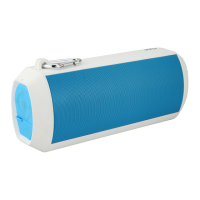
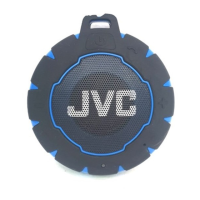
The JVC Waterproof Bluetooth Speaker (models XS-N1129AA, XS-N1129DA, XS-N1129GA) is designed for streaming music and hands-free phone calls when paired with smartphones, tablets, or other Bluetooth-enabled devices. It is an IP67-rated device, meaning it can be submerged in water up to 1 meter deep for short periods (up to 30 minutes). For optimal performance and safety, the charging port must be securely closed when used in wet environments, and the speaker should be completely dry before connecting the charging cable.

Technical Specifications:

  • Loudspeaker: 4Ω 5W
  • Built-in Battery: Li-ion 600mAh
  • Dimensions: 102x93x43 mm
  • SNR: 80 ± 3dB
  • Bluetooth Distance: Up to 10m
  • Charging Time: 2-3 hours (when completely drained)
  • Weight: 160 g
  • Speaker Diameter: 45 mm
  • Charging: DC5 V, 500mA

Usage Features:

Power On/Off:

  • To switch the unit on, press and hold the " " switch.
  • To switch the unit off, press and hold the " " switch again.

Pairing Bluetooth-enabled Devices:

  1. Ensure the wireless audio source is within three meters of the speaker.
  2. Press and hold the " " switch to power on the speaker. The LED light will blink blue, indicating pairing status.
  3. Navigate to the setting menu of your wireless audio source (refer to its user manual for details).
  4. Search for devices and select "XS-N1129".
  5. Once paired, the blue LED light will become solid, and you can begin streaming audio.

Hands-Free Function (when connected to a smartphone):

  • To pick up a call: Press " ".
  • To reject a call: Press and hold " " for 2 seconds.
  • To hang up a call (during a call): Press " " again.

Music Playback Controls:

  • Previous Track/Volume Down: Press and hold " " to access the last track in a playlist. Press " " to lower the volume.
  • Next Track/Volume Up: Press and hold " " to access the next track in a playlist. Press " " to increase the volume.
  • Play/Pause: When music is playing, press " " to play or pause a track.

Charging the Speaker:

  1. Connect one end of the included USB Charging Cable to the Charging Port on the speaker.
  2. Plug the other end of the USB Charging Cable into a suitable USB port on a computer or a suitable USB adaptor.
  3. A red LED light will illuminate while charging and turn off when fully charged.
  4. Ensure the unit is completely dry before charging.

LED Status Lights:

  • Charging:
    • Solid red LED: Charging
    • No red LED: Charge complete
  • Pairing to a Bluetooth-enabled device:
    • Rapid blinking blue LED: Not connected (ready to pair)
    • Solid blue LED: Connected

Maintenance Features and Safety Precautions:

  • Keep the product and its charging cable away from excessive heat.
  • Do not operate the device with a damaged cable or if it has malfunctioned or been damaged in any manner.
  • Do not disassemble the device; it contains no user-serviceable parts.
  • This product is not a toy; children should be supervised to ensure they do not play with the appliance.
  • Do not expose batteries to heat or fire as they may explode.
  • Do not dispose of batteries in household waste. Contact your local council for information on disposal and recycling.
  • Avoid operating the wireless speaker in areas of strong electromagnetic interference (e.g., near induction cookers, large power fans, motors).
  • Move the speaker closer to your Bluetooth-enabled device if connection issues arise.
  • Fully charge the speaker and try again if issues persist.

Troubleshooting:

  • Speaker doesn't connect to device: Speaker needs to be connected/re-paired to the device.
  • Tone heard every few seconds: Speaker needs to be charged.
  • Bluetooth connection does not work up to 10 meters: Avoid strong electromagnetic interference, move the speaker closer to the device, or fully charge the speaker.
  • Speaker will not power on: Speaker needs to be charged.
  • Speaker sound distorts at high volume: The device's volume needs to be lowered.

Register your product at jvctv.com.au/warranty-registration.
JVC XS-N1129AA Specifications

General IconGeneral
BrandJVC
ModelXS-N1129AA
CategorySpeakers
LanguageEnglish

Related product manuals