EasyManua.ls Logo

JVC TK-1280E - Page 21

JVC TK-1280E
82 pages
Print Icon
To Next Page IconTo Next Page
To Previous Page IconTo Previous Page
Loading...
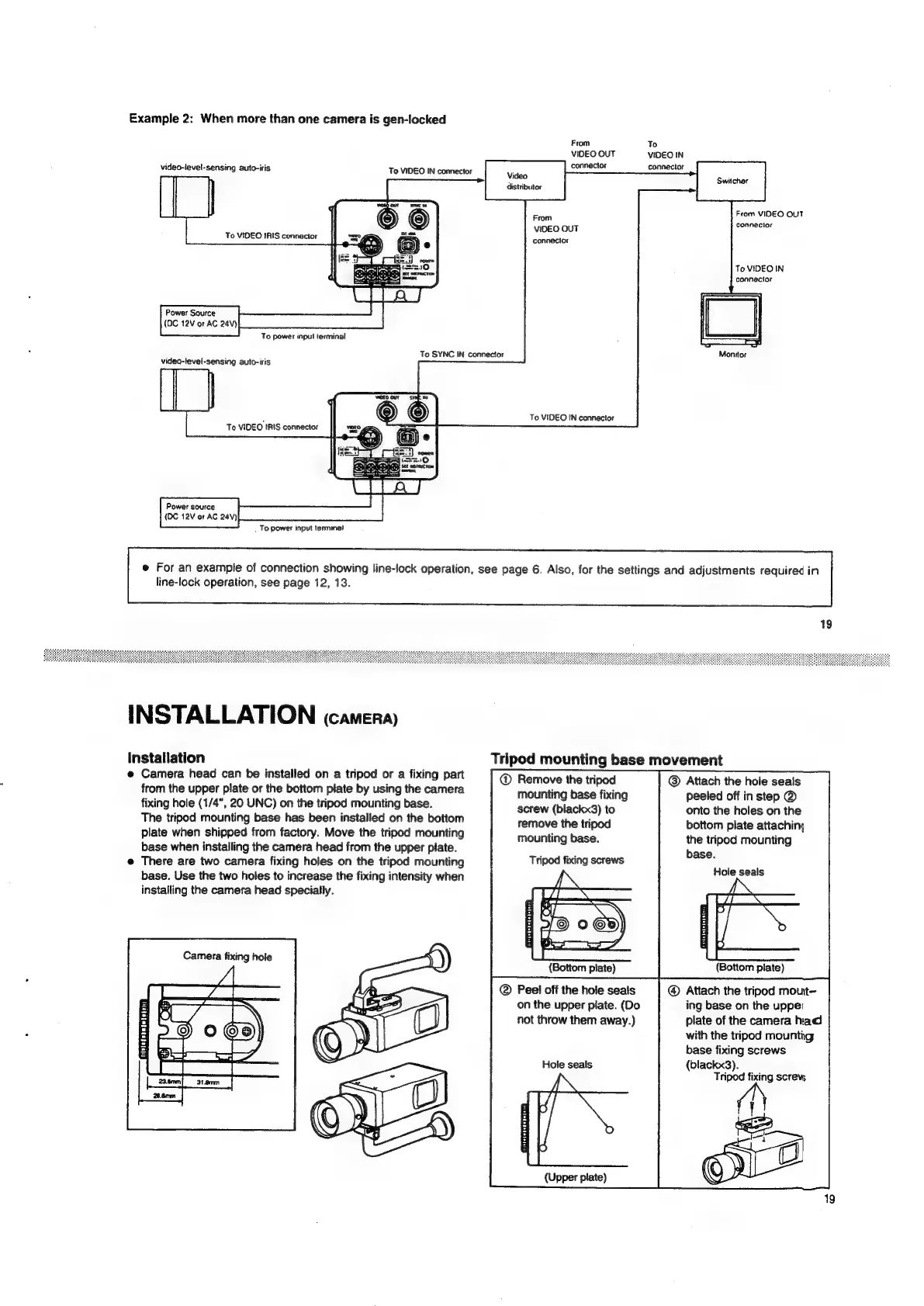
Example
2:
When
more
than
one
camera
is
gen-locked
From
To
VIDEO
OUT
VIDEO
IN
video-level-sensing
auto-iris
To
VIDEO
IN
connector
connector
connector
Video
distributor
From
ViDEO
OUT
connector
From
VIDEO
OUT
connecior
To
VIDEO
IRIS
connector
To
VIDEO
IN
connector
Power
Source
(DC
12V
or
AC
24V)
video-level-sensing
auto-iris
To
power
input
terminal
To
SYNC
IN
connector
Monitor
To
VIDEO
IN
connector
Power
source
(OC
12V
of
AC
24V)
e
For
an
example
of
connection
showing
line-lock
operation,
see
page
6.
Also,
for
the
settings
and
adjustments
required
in
line-lock
operation,
see
page
12,
13.
To
power
input
terminal
INSTALLATION
(camera)
Installation
Tripod
mounting
base
movement
e
Camera
head
can
be
installed
on
a
tripod
or
a
fixing
part
Remove
the
tripod
@
Attach
the
hole
seals
from
the
upper
plate
or
the
bottom
plate
by
using
the
camera
mounting
base
fixing
peeled
off
in
step
@
fixing
hole
(1/4",
20
UNC)
on
the
tripod
mounting
base.
screw
(blackx3)
to
onto
the
holes
on
the
The
tripod
mounting
base
has
been
installed
on
the
bottom
remove
the
tripod
bottom
plate
attaching
plate
when
shipped
from
factory.
Move
the
tripod
mounting
mounting
base.
the
tripod
mounting
base
when
installing
the
camera
head
from
the
upper
plate.
base.
e@
There
are
two
camera
fixing
holes
on
the
tripod
mounting
toi
;
base.
Use
the
two
holes
to
increase
the
fixing
intensity
when
er
seal
installing
the
camera
head
specially.
Tripod
fixing
screws
Camera
fixing
hole
(Bottom
plate)
®
Peel
off
the
hole
seals
on
the
upper
plate.
(Do
not
throw
them
away.)
(Bottom
plate)
@
Attach
the
tripod
mout—
ing
base
on
the
upper
plate
of
the
camera
had
with
the
tripod
mounting
base
fixing
screws
(blackx3).
Tripod
fixing
screvs
(N
ae
oC
Hole
seals
(Upper
plate)
19

Related product manuals