EasyManua.ls Logo

JVC TK-1280E - Page 22

JVC TK-1280E
82 pages
Print Icon
To Next Page IconTo Next Page
To Previous Page IconTo Previous Page
Loading...
INSTALLATION
(camera)
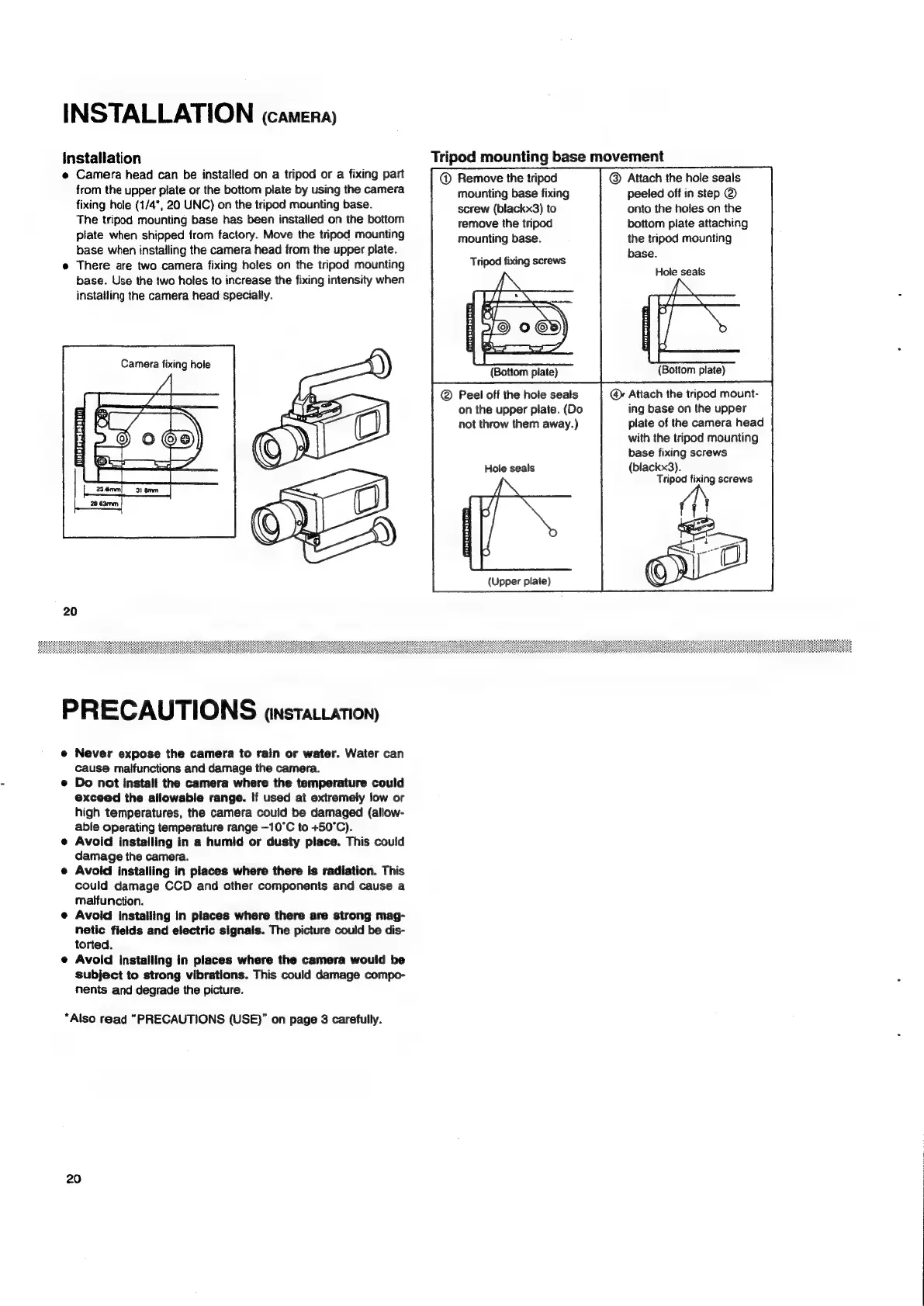
installation
@
Camera
head
can
be
installed
on
a
tripod
or
a
fixing
part
from
the
upper
plate
or
the
bottom
plate
by
using
the
camera
fixing
hole
(1/4",
20
UNC)
on
the
tripod
mounting
base.
The
tripod
mounting
base
has
been
installed
on
the
bottom
plate
when
shipped
from
factory.
Move
the
tripod
mounting
base
when
installing
the
camera
head
from
the
upper
plate.
e
There
are
two
camera
fixing
holes
on
the
tripod
mounting
base.
Use
the
two
holes
to
increase
the
fixing
intensity
when
installing
the
camera
head
specially.
Camera
fixing
hole
ae
Aas
©
;
+)
oe
20
PRECAUTIONS
anstatcation)
e
Never
expose
the
camera
to
rain
or
water.
Water
can
cause
malfunctions
and
damage
the
camera.
Do
not
install
the
camera
where
the
temperature
could
exceed
the
allowable
range.
If
used
at
extremely
low
or
high
temperatures,
the
camera
could
be
damaged
(allow-
able
operating
temperature
range
—10°C
to
+50°C).
e
Avoid
installing
in
a
humid
or
dusty
place.
This
could
damage
the
camera.
e
Avoid
installing
in
places
where
there
is
radiation.
This
could
damage
CCD
and
other
components
and
cause
a
maifunction.
e
Avoid
installing
In
places
where
there
are
strong
mag-
netic
fields
and
electric
signals.
The
picture
could
be
dis-
torted.
e
Avoid
installing
in
places
where
the
camera
would
be
subject
to
strong
vibrations.
This
could
damage
compo-
nents
and
degrade
the
picture.
*Also
read
“PRECAUTIONS
(USE)”
on
page
3
carefully.
20
Tripod
mounting
base
movement
@
Remove
the
tripod
mounting
base
fixing
screw
(blackx3)
to
remove
the
tripod
mounting
base.
Tripod
fixing
screws
(Bottom
plate)
Peel
off
the
hole
seals
on
the
upper
plate.
(Do
not
throw
them
away.)
Hole
seals
(Upper
plate)
Attach
the
hole
seais
peeled
off
in
step
@
onto
the
holes
on
the
bottom
plate
attaching
the
tripod
mounting
base.
Hole
seals
(Bottom
plate)
@
Attach
the
tripod
mount-
ing
base
on
the
upper
plate
of
the
camera
head
with
the
tripod
mounting
base
fixing
screws
(blackx3).
Tripod
fixing
screws

Related product manuals