EasyManua.ls Logo

JVC TK-1280E - Page 32

JVC TK-1280E
82 pages
Print Icon
To Next Page IconTo Next Page
To Previous Page IconTo Previous Page
Loading...
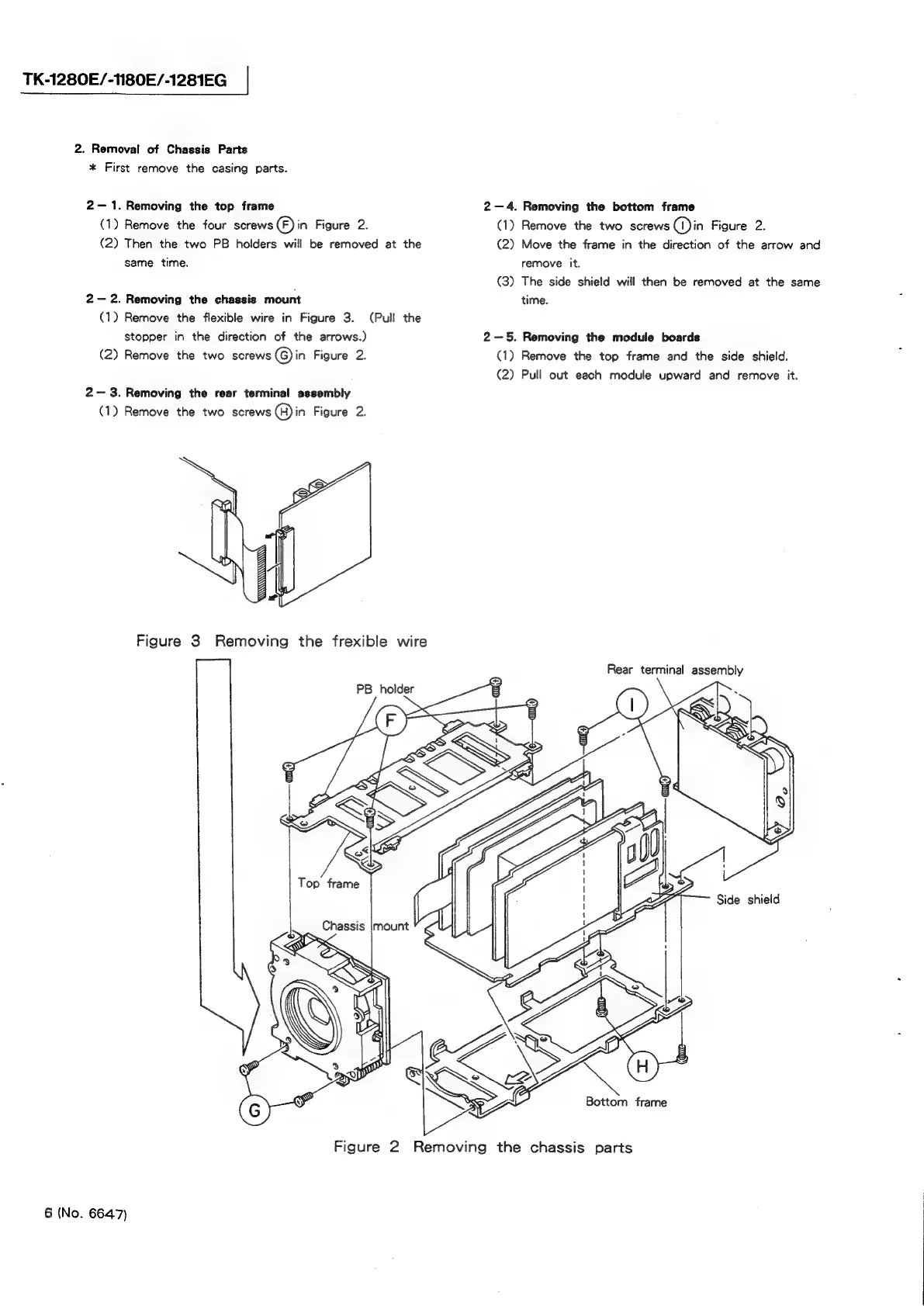
TK-1280E/-1N180E/-1281EG
2.
Removal
of
Chassis
Parts
*
First
remove
the
casing
parts.
2—
1.
Removing
the
top
frame
(1)
Remove
the
four
screws
(F)
in
Figure
2.
(2)
Then
the
two
PB
holders
will
be
removed
at
the
same
time.
2—
2.
Removing
the
chassis
mount
(1)
Remove
the
flexible
wire
in
Figure
3.
(Pull
the
stopper
in
the
direction
of
the
arrows.)
(2)
Remove
the
two
screws
(G)
in
Figure
2.
2—
3.
Removing
the
rear
terminal
assembly
(1)
Remove
the
two
screws
@)in
Figure
2.
Figure
3
Removing
the
frexible
wire
PB
holder
2-4.
Removing
the
bottom
frame
(1)
Remove
the
two
screws
(I)in
Figure
2.
(2)
Move
the
frame
in
the
direction
of
the
arrow
and
remove
it.
(3)
The
side
shield
will
then
be
removed
at
the
same
time.
2-5.
Removing
the
module
boards
(1)
Remove
the
top
frame
and
the
side
shield.
(2)
Pull
out
each
module
upward
and
remove
it.
Rear
terminal
assembly
Bottom
frame
Figure
2
Removing
the
chassis
parts
6
(No.
6647)

Related product manuals