Menu Setting Procedure
1
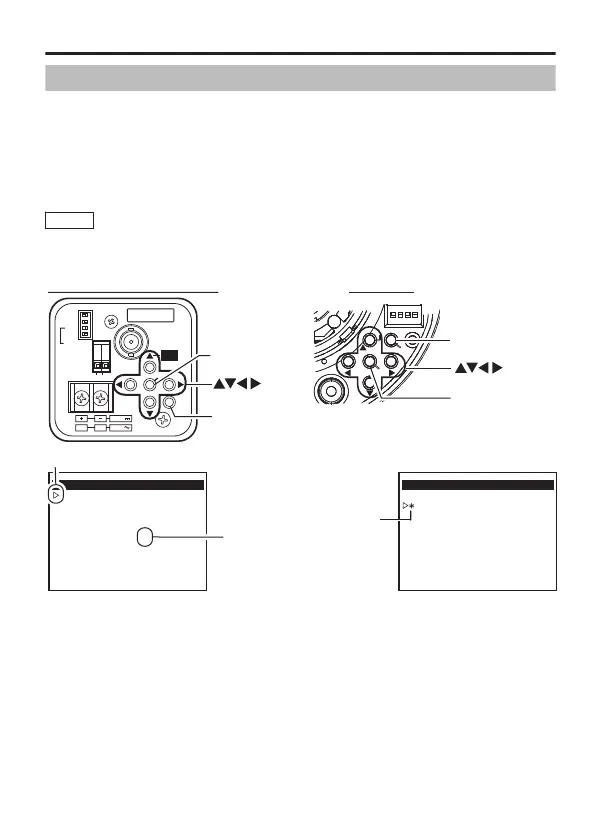
Press the [MENU] button.
2
Set the cursor (E) to a desired menu item with the [ J / K ]
button.
3
Change the setting with the [ H / I ] button.
When a setting has been changed, a change mark (Z) is displayed.
4
Press the [MENU] button to exit the setting.
Memo
To display the sub-menu, set the cursor (E) to an item with sub-menu
and press the [SET] button.
.
.
SET
MANUAL
SEE INSTRUCTION
GNDAUX
ONLY
(
E TYPE
)
ISOLATED POWER
(
U TYPE
)
CLASS 2 ONLY
MENU
OUT
VIDEO
ON
CRT
ON
ON
AES OFF
LCD
BLC OFF
D/N OFF
MONITOR TYPE
DC12V
AC24V
1 2
ADJUST
FOCUS
SET button
MENU button
BASIC MENU
WHITE BALANCE
AGC
SENSE UP
CAMERA TITLE
ADVANCED MENU..
ATW-W
HIGH
OFF
- - -
button
Cursor
Sub-menu
BASIC MENU
WHITE BALANCE
AGC
SENSE UP
CAMERA TITLE
ADVANCED MENU..
ATW-W
OFF
OFF
- - -
Change mark
TK-C9200/9201/9300/9301 TK-C2201
SET
MENU
F.
ADJ
button
MENU button
SET button
Menu Setting Procedure
4


 To Next Page
 Loading...











