EasyManua.ls Logo

JVC UX-1 - Page 9

JVC UX-1
72 pages
Print Icon
To Next Page IconTo Next Page
To Previous Page IconTo Previous Page
Loading...
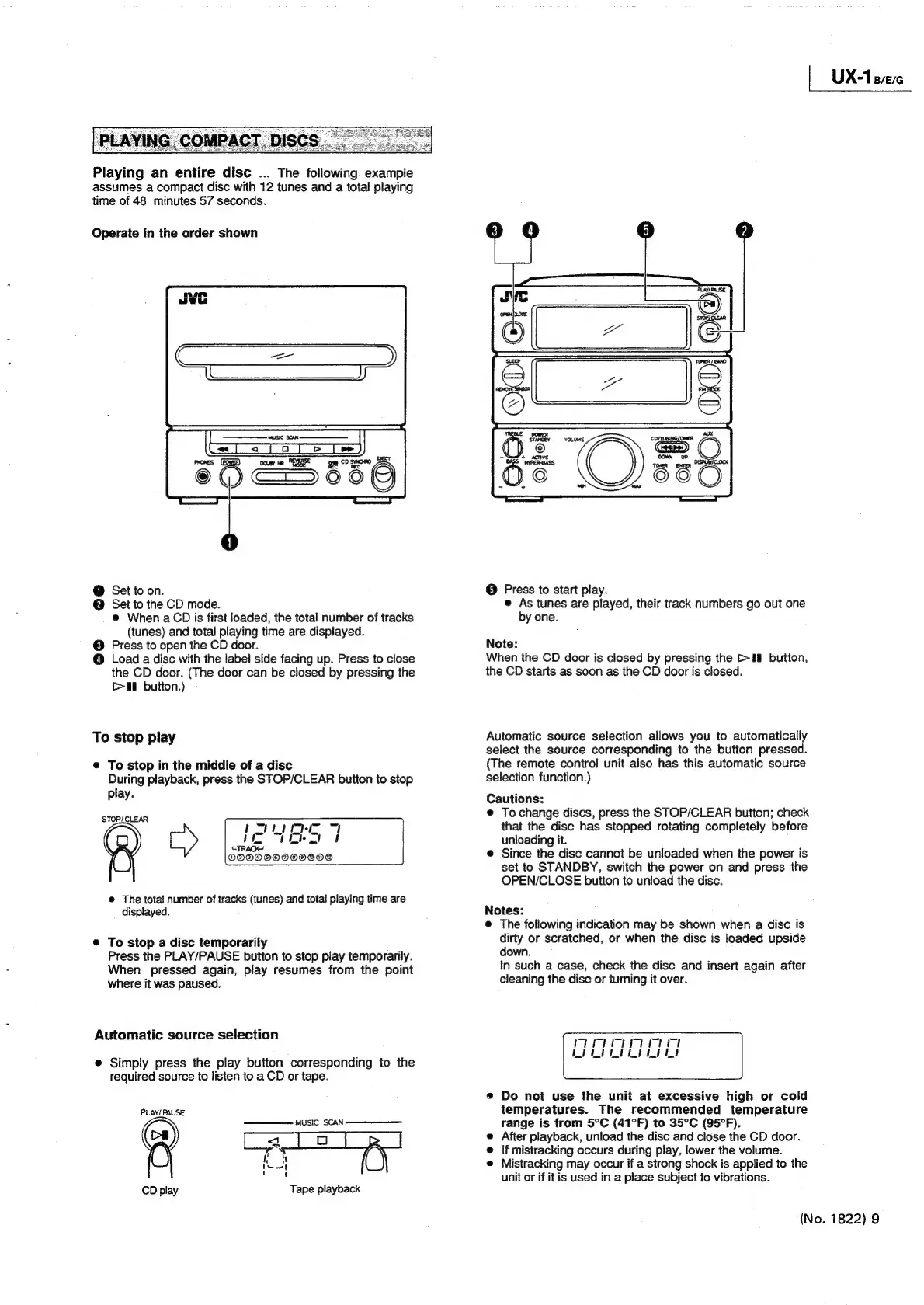
Playing
an
entire
disc
...
The
following.
exampie
assumes
a
compact
disc
with
12
tunes
and
a
total
playing
time
of
48
minutes
57
seconds.
Operate
in
the
order
shown
@
Set
to
on.
@
Set
to
the
CD
mode.
@
When
a
CD
is
first
loaded,
the
total
number
of
tracks
(tunes)
and
total
playing
time
are
displayed.
©
Press
to
open
the
CD
door.
©
Load
a
disc
with
the
label
side
facing
up.
Press
to
close
the
CD
door.
(The
door
can
be
closed
by
pressing
the
[>I
button.)
To
stop
play
@
To
stop
in
the
middle
of
a
disc
During
playback,
press
the
STOP/CLEAR
button
to
stop
play.
STOPLCLEAR
®
9
©
The
total
number
of
tracks
(tunes)
and
total
playing
time
are
displayed.
POLI
i
Ver
CTRACK
DOOOOOOOOOO®
e
To
stop
a
disc
temporarily
Press
the
PLAY/PAUSE
button
to
stop
play
temporarily.
When
pressed
again,
play
resumes
from
the
point
where
it
was
paused.
Automatic
source
selection
e
Simply
press
the
play
button
corresponding
to
the
required
source
to
listen
to
a
CD
or
tape.
PLAY/
PAUSE
—_—\——
Music
SCAN
(a)
a
a
ae
@
e:
)
'
t
CD
play
Tape
playback
@
Press
to
start
play.
©
As
tunes
are
played,
their
track
numbers
go
out
one
by
one.
Note:
When
the
CD
door
is
closed
by
pressing
the
>Hi
button,
the
CD
starts
as
soon
as
the
CD
door
is
closed.
Automatic
source
selection
allows
you
to
automatically
select
the
source
corresponding
to
the
button
pressed.
(The
remote
contro!
unit
also
has
this
automatic
source
selection
function.)
Cautions:
©
To
change
discs,
press
the
STOP/CLEAR
button;
check
that
the
disc
has
stopped
rotating
completely
before
unloading
it.
@
Since
the
disc
cannot
be
unloaded
when
the
power
is
set
to
STANDBY,
switch
the
power
on
and
press
the
OPEN/CLOSE
button
to
unload
the
disc.
Notes:
®
The
following
indication
may
be
shown
when
a
disc
is
dirty
or
scratched,
or
when
the
disc
is
loaded
upside
down.
In
such
a
case,
check
the
disc
and
insert
again
after
cleaning
the
disc
or
turning
it
over.
@
Do
not
use
the
unit
at
excessive
high
or
cold
temperatures.
The
recommended
temperature
range
is
from
5°C
(41°F)
to
35°C
(95°F).
e
After
playback,
unload
the
disc
and
close
the
CD
door.
If
mistracking
occurs
during
play,
lower
the
volume.
@
Mistracking
may
occur
if
a
strong
shock
is
applied
to
the
unit
or
if
it
is
used
in
a
place
subject
to
vibrations.
(No.
1822)
9
UX-laevc

Related product manuals