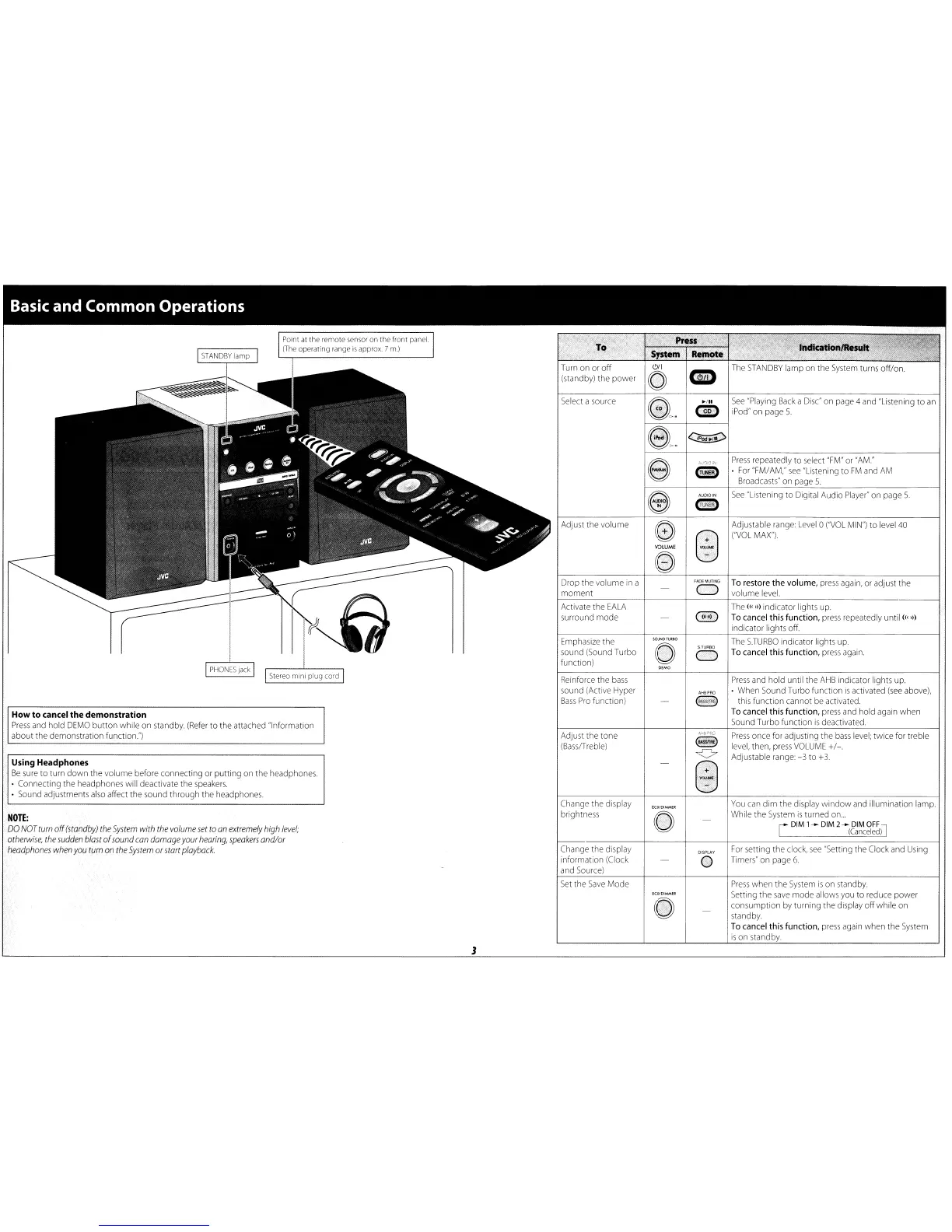
How
to
cancel
the
demonstration
Press
and hold
DEMO
button
while on standby. (Refer
to
the
attached "Information
about
the demonstration function.")
Using Headphones
Be
sure to turn
down
the volume before connecting or
putting
on
the
headphones.
• Connecting the headphones will deactivate
the
speakers.
• Sound adjustments also affect the sound through the headphones.
See
"Listening
to
Digital Audio Player" on page
5.
Press
repeatedly
to
select "FM" or "AM."
•
For
"FM/AM,"
see
"Listening
to
FM
and
AM
Broadcasts" on page
5.
Adjustable range Level 0
("VOL
MIN") to level 40
('VOL MAX")
See
"PlaYing
Back
a Disc" on page 4 and "Listening to
an
iPod" on page
5.
AUDIO
IN
6)
o
VOLUME
o
<'>/1
OJ
Select a source
Drop the volume in a
FADE
MUllNG
To restore
the
volume,
press
again, or adjust the
moment
0
volume level.
Activate the
EALA
The
«(I
,j)
indicator lights up.
surround
mode
@ To cancel
this
function,
press repeatedly until
«,
,j)
indicator lights off.
Emphasize the
0
S,TURBO
The
S.TURBO
indicator lights up.
sound (Sound Turbo
0
To cancel this
function,
press
again.
function)
Reinforce
the
bass
Press
and
hold
until the
AHB
indicator lights
up
.
sound (Active Hyper
AHBPRO
• When Sound Turbo function
is
activated
(see
above),
Bass
Pro
function)
8
this function cannot be activated.
To cancel
this
function,
press
and hold again when
Sound Turbo function
is
deactivated.
Adjust the tone
~~fjP!-lG
Press
once for adjusting the
bass
level; twice for treble
(BasslTreble)
8
level, then, press
VOLUME
+/-.
<>
Adjustable range:
-3
to +3.
tB
Change the display
fCD/DIMMER
You
can
dim
the
display
window
and illumination lamp.
brightness
0
While the System
is
turned on
...
r
DIM
1-
DIM2-DIMOFF~
(Canceled)
Change the display
DISPLAY
For
setting the clock,
see
"Setting the Clock and Using
information (Clock
0
Timers" on page
6.
and Source)
Set
the
Save
Mode
Press
when
the
System
is
on standby.
ECOIDI!M\ER
Setting
the
save
mode
allows you to reduce
power
0
consumption by turning the display
off
while on
standby.
To cancel
this
function,
press
again
when
the System
is
on standby.
J
Stereo
mini
plug
cord
I
PHONES
jaCk
I
NOTE:
DO
NOT
turn
off
(standby)
the
System
with
the
volume
set
to
an
extremely
high
level;
otherwise,
the
sudden
blast
of
sound
can
damage
your
hearing,
speakers
and/or
headphones
when
you
turn
on
the
System
or
start
ployback.


 To Next Page