Notes on the power cord
o When you
are
away on travel or otherwise for an extended period
of
time,
remove the plug from the wall outlet.
• When unplugging the System from the wall outlet, always pull the plug,
not
the
power cord
• Do
not
handle the power cord
with
wet
hands.
• Disconnect the power cord before cleaning the System or moving
the
System.
· Do
not
alter, twist or pull
the
power
cord, or
put
anything heavy on
it,
which
may
cause
fire,
electric shock, or
other
accidents.
· If the cord
is
damaged, consult a dealer and have the power cord replaced
with
a
new one.
Avoid moisture, water, dust, and high temperatures
· Do not place the System
in
moist or dusty places.
o If water gets inside the System, turn
off
the power and remove the plug from the
wall outlet. then consult your dealer. Using
the
System
in
this state may cause a
fire or electrical shock.
• Do
not
expose the System
to
direct sunlight or place it near a heating device.
Notes on installation
· Select a place which
is
level, dry and neither
too
hot
nor
too
cold-between
5"C
(41°F) and
35°C
(95'F)
· Do
not
Install the System
in
a place subject to vibrations.
• Do
not
put
heavy objects on the System.
To prevent malfunction or
damage
of
the
System
· Do
not
Insert any metallic objects, such
as
wires, hairpins, coins, etc.
into
the
System.
· Do
not
block the vents.
Maintenanc~
There are no user-serviceable parts inside.
If
anything goes wrong, unplug
the power cord and consult your dealer.
Precautions
'.
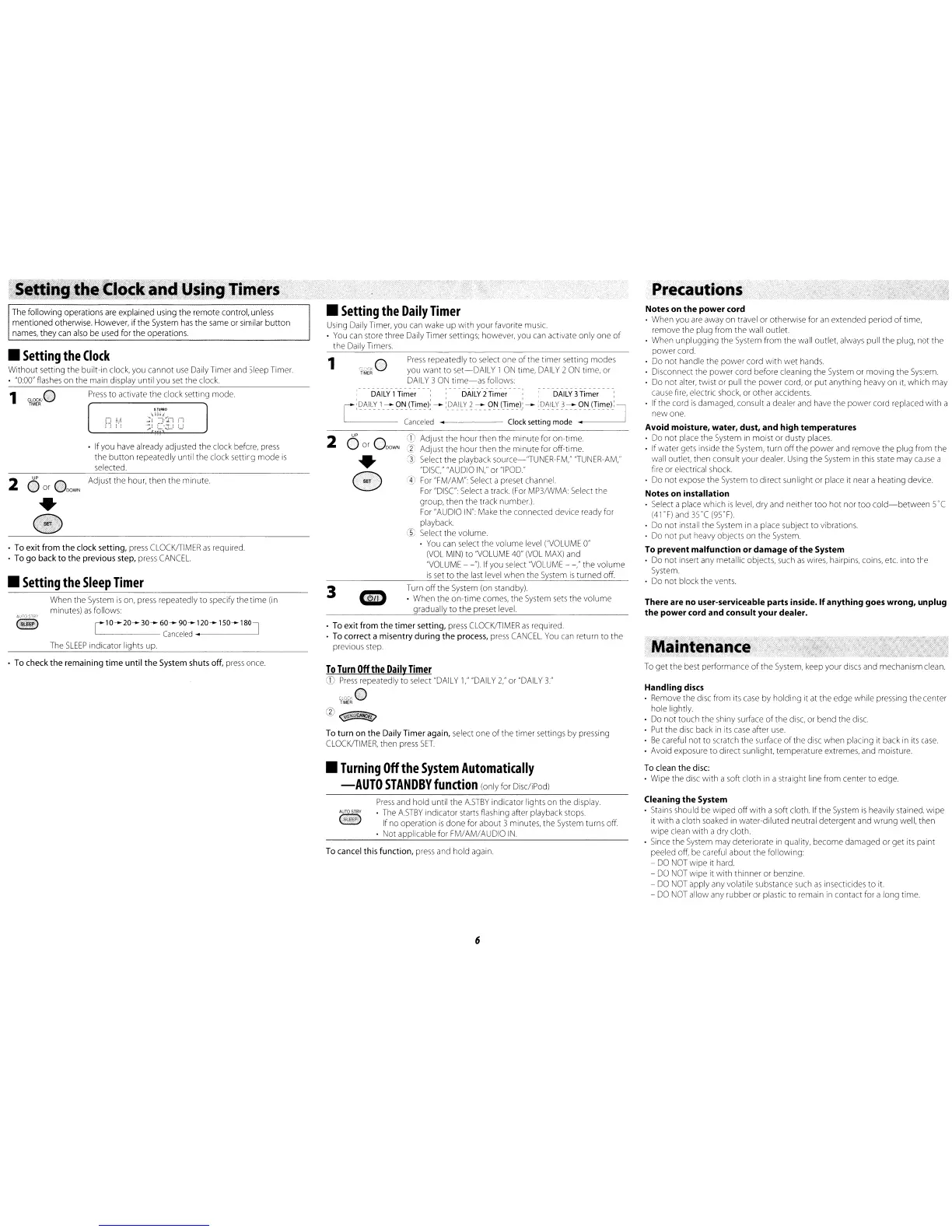
Press
repeatedly to select one
of
the timer setting modes
you want
to
set-DAILY
1
ON
time,
DAILY
2
ON
time, or
DAILY
3
ON
time-as
follows:
Turn
off
the System (on standby).
. When the
on·time
comes, the System
sets
the volume
gradually
to
the preset level.
•
G
,
DAILY
1
Timer,
DAILY
2
Timer
,DAILY
3Timer ,
[
:[)~~LY.l.~
?.N.
~T!':l~~
-
:D.AILY
~
~
?.N.r.:r!':l~);
-
:r~~I~~?~
?i'J.r.:r~':l~)~
J
-
Canceled
•
Clock
setting mode
~.---
2 a
UP
a
CD
Adjust the hour then
the
minute for on·time.
or
DOWN
rI.
Adjust
the
hour then
the
minute for off·time.
G)
Select the playback source-"TUNER·FM," "TUNER·AM,"
"DISC
"AUDIO
IN,"
or
"IPOD."
®
For
"FM/AM": Select a preset channel.
For
"DISC' Select a track
(For
MP3/WMA Select the
group, then the track number.)
For
"AUDIO
IN"
Make the connected device ready for
playback
~
Select the volume.
o You can select the volume level
("VOLUME
0"
(VOL
MIN) to
"VOLUME
40"
(VOL
MAX)
and
"VOLUME
-
-'llf
you select
"VOLUME
-
-,"
the volume
is
set
to
the last level when the System
is
turned off.
1
3
•
Setting
the
Daily
Timer
Using Daily Timer, you
can
wake
up
with
your favorite music.
•
You
can
store three Daily Timer settings, however, you can activate only one
of
the Daily Timers.
o To
exit
from
the
timer
setting, press
CLOCKITIMER
as
required.
• To correct a misentry
during
the
process,
press
CANCEL.
You
can return
to
the
previous step.
When the System
is
on, press repeatedly to specify the time (in
minutes)
as
follows:
AUTOS1flY
(§)
r10-+-
20-+- 30-+- 60-+- 90-+-120-+-150-+-180l
L
Canceled
~.
----.J_
The
SLEEP
indicator lights up.
The following operations
are
explained using the remote control, unless
mentioned otherwise. However,
if
the
System
has
the same or similar
button
names,
they
can also be used for
the
operations.
If you have already adjusted the clock before,
press
the
button
repeatedly until the clock setting
mode
is
selected.
1
ClocK/0
Press
to activate the clock setting mode.
TIMER
· To exit
from
the
clock setting, press
CLOCKITIMER
as
required
• To
go
back
to
the
previous step, press
CANCEL.
•
Setting
the
Clock
Without setting the built·in clock, you cannot
use
Daily Timer and Sleep Timer.
o
"0:00"
flashes on the main display until you
set
the clock.
•
Setting
the
Sleep
Timer
2
O
UP
a Adjust the hour, then the minute.
or
DOWN
•
E)
• To check
the
remaining
time
until
the
System shuts off,
press
once.
To
Turn
Off
the
Daily
Timer
CD
Press
repeatedly
to
select "DAILY
1,"
"DAILY
2:' or
"DAIL
Y
3."
):I~~~O
@
<§""@[~
To
turn
on
the
Daily Timer again, select one
of
the timer settings by pressing
CLOCKITIMER,
then press
SET
•
Turning
Off
the
System
Automatically
-AUTO
STANDBY
function
(only for Disc/iPod)
To
get the best performance
of
the System, keep your discs and mechanism clean.
Handling
discs
• Remove the disc from its
case
by
holding it at the edge while pressing
the
center
hole lightly.
• Do
not
touch the shiny surface
of
the
disc, or bend the disc.
• Put the disc back
in
its
case
after
use
·
Be
careful
not
to
scratch the surface
of
the disc when placing it back in its
case.
· Avoid exposure to drrect sunlight. temperature extremes, and moisture.
To clean
the
disc:
· Wipe the disc
with
a soft cloth in a straight line from center to edge.
Press
and hold until
the
ASTBY
indicator lights on the display.
AUTOSTBY
•
The
ASTBY
indicator starts flashing after playback stops.
~
If
no
operation
is
done
for
about
3 minutes, the System turns off.
• Not applicable for FM/AM/AUDIO
IN.
To cancel this function,
press
and hold again.
Cleaning the System
o Stains should be wiped
off
with
a soft cloth. If the System
is
heaVily stained,
wipe
it
with
a cloth soaked in water·dlluted neutral detergent and wrung well, then
wipe
clean
with
a dry cloth.
o Since the System may deteriorate
in
quality, become damaged or get its paint
peeled off, be careful about
the
follOWing:
-
DO
NOT
wipe it hard.
-
DO
NOT
wipe it
with
thinner or benzine.
-
DO
NOT
apply any volatile substance such
as
insecticides to it.
-
DO
NOT
allow any rubber or plastic to remain in contact for a long time.
6


 To Next Page
 Loading...