Press
to store the station.
Press
to activate the
preset
number entry mode.
•
Finish
the
follOWing
steps
while
the
indication
on
the
display
IS
fiashlng.
Turn
the
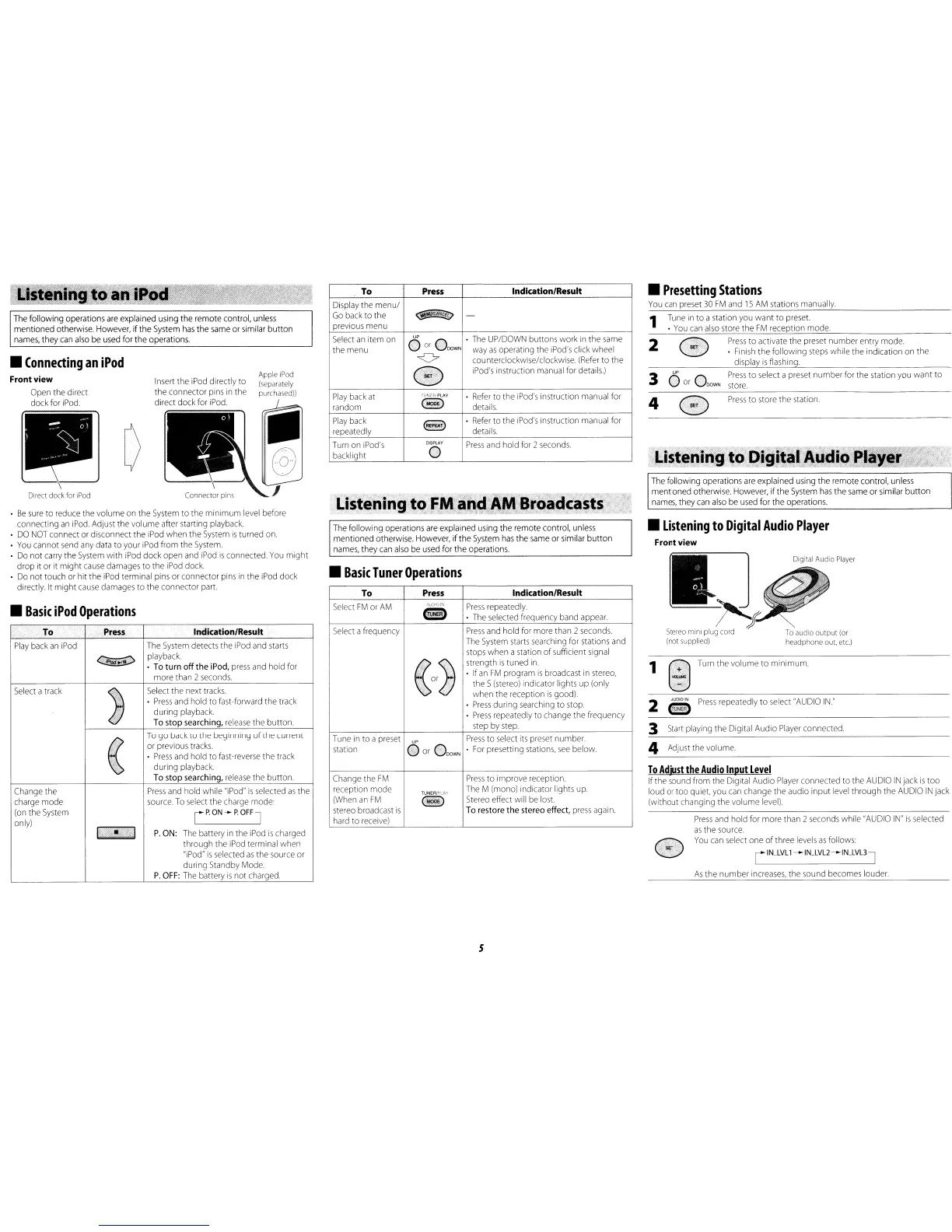
volume to minimum.
O
UP
0
Press
to
select
a
preset
number
for
the station
you
want to
or
_
DOWN
store.
Tune
in
to a station
you
want to
preset.
•
You
can
also
store
the
FM
reception mode.
2
4
3
Press
and
hold
for
more than 2
seconds
while
"AUDIO
IN"
is
selected
as
the
source.
You
can
select
one of three
levels
as
follows:
To
Adjust
the
Audio
Input
Level
If the
sound
from
the Digital Audio
Player
connected to the
AUDIO
IN
jack
is
too
loud
or
too quiet.
you
can
change the audio input
level
through the
AUDIO
IN
jack
(without changing the volume
level)
3
Start
playing the Digital Audio
Player
connected.
The
following operations
are
explained
using
the remote control,
unless
mentioned otherwise. However, If the
System
has
the
same
or similar button
names,
they
can
also
be
used
for the operations.
4
Adjust
the
volume.
2
S
Press
repeatedly to
select
"AUDIO
IN."
TUNER
rIN_LVL1-IN_LVL2-IN_LVL3]
As
the
number
increases,
the
sound
becomes
louder.
1
•
Presetting
Stations
You
can
preset
30
FM
and
15
AM
stations
manually.
•
Listening
to
Digital
Audio
Player
Front view
a;Jf~O"'"~'
Stereo
mini
plug cord
To
audio
output
(or
(not supplied) headphone out, etc.)
1
The
following operations
are
explained using the remote control,
unless
mentioned otherwise.
However,
ifthe
System
has
the
same
or similar button
names,
they
can
also
be
used
for
the operations.
Lis~eoirig
toFM and
AM
B(dadcasts
. "
"'
.•
'J".
_'"
.<C"
.C:
.~
,..
..
•
Basic
Tuner
Operations
To
Press
Indication/Result
Display
the menu/
~2?L>
Go
back
to the -
previous
menu
Select
an
item
on
UP
·
The
UP/DOWN
buttons work
in
the
same
the menu
o
or
OOOWN
way
as
operating
the
iPod's
click wheel
<:> counterclockwise/clockwise.
(Refer
to the
G
iPod's
instruction
manual
for
details.)
Play
back
at
rU~H:+tPLAY
Refer
to the
iPod's
instruction
manual
for
random
@
details.
Play
back
8
•
Refer
to the
iPod's
instruction
manual
for
repeatedly
details.
Turn
on
iPod's
DISPLAY
Press
and
hold
for
2
seconds.
backlight
0
To
Press
Indication/Result
Select
FM
or
AM
MjDrO:~-'
Press
repeatedly.
@)
·
The
selected
frequency
band
appear.
Select
afrequency
Press
and
hold
for
more
than 2
seconds.
The
System
starts
searching
for
stations
and
stops
when a station of sufficient
signal
«m~
strength
is
tuned
in
•
If
an
FM
program
is
broadcast
in
stereo,
the S
(stereo)
indicator lights up (only
when
the
reception
is
good).
·
Press
during
searching
to
stop.
·
Press
repeatedly to change the frequency
step
by
step
Tune
in
to a
preset
UP
Press
to
select
its
preset
number.
station
o
or
OOOWN
·
For
presetting
stations,
see
below.
Change
the
FM
Press
to improve reception.
reception mode
TUNEAlPL(,V
The
M (mono) indicator lights
up
(When
an
FM
@
Stereo
effect will
be
lost.
stereo
broadcast
is
To
restore the stereo effect,
press
again.
hard
to
receive)
Apple iPod
(separately
purchased))
Insert
the
iPod
directly to
the connector
pins
in
the
direct dock
for
iPod.
The
following operations
are
explained using the remote control,
unless
mentioned otherwise.
However,
ifthe
System
has
the
same
or
similar
button
names,
they
can
also
be
used
for the operations.
•
Be
sure
to
reduce
the
volume
on
the
System
to the minimum
level
before
connecting
an
iPod.
Adjust the volume after starting
playback.
•
DO
NOT
connect
or
disconnect the
iPod
when
the
System
is
turned
on.
•
You
cannot
send
any
data
to your
iPod
from the
System.
•
Do
not
carry
the
System
with
iPod
dock open
and
iPod
is
connected.
You
might
drop it
or
it might
cause
damages
to the
iPod
dock.
•
Do
not touch
or
hit the
IPod
terminal
pins
or connector
pins
in
the
iPod
dock
directly.
It
might
cause
damages
to the connector
part.
To
Press
Indication/Result
Play
back
an
iPod
The
System
detects
the
iPod
and
starts
Q2E!V
playback.
•
To
turn off the
iPod,
press
and
hold
for
more
than 2
seconds.
Select
a
track
~
Select
the
next
tracks
•
Press
and
hold to fast-forward the
track
during
playback.
To
stop searching,
release
the button.
«
To
go
back
to
the
beginning of the current
or
previous
tracks.
•
Press
and
hold to
fast-reverse
the
track
during playback
To
stop searching,
release
the button.
Change
the
Press
and
hold while
"iPod"
is
selected
as
the
charge
mode
source.
To
select
the
charge
mode:
(on
the
System
rPON-POFFJ
only)
I
•
I
P.ON:
The
battery
in
the
iPod
is
charged
through
the
iPod
terminal when
"iPod"
is
selected
as
the
source
or
during
Standby
Mode.
P.
OFF:
The
battery
is
not charged
•
Basic
iPod
Operations
Direct dock for
iPod
•
Connecting
an
iPod
Frontview
Open
the
direct
dock
for
iPod.
5


 To Next Page
 Loading...