Durrng
stops,
press
until the
PRGM
(program) indicator lights up
before playing.
Press
to program the selected group/track.
Press
until the
RND
(random) indicator lights up before
you
start
playback.
Playback
starts
in
random
order.
Random
Play
ends
when
all
tracks
are
played
back.
.
For
MP3IWMA
files
Select
agroup number, then a track
number.
.
For
CD
Select
a track number.
or
OOOWN
Repeat
steps
2
and
3 to program other
tracks
you
want.
.
If
you
try to program a
51
st
track,
"FULL"
will
appear.
~III
The
tracks
are
played
back
in
the programmed
order.
G)
2 6
4
RESUME
Play
When
you
stop the playback
by
one of the following operations, this
System
stores
the beginning
of
the stopped track
on
the
disc.
- Pressing.
once
- Changing the
source
When
you
start
playback
again,
playback
starts
from the
stored
position.
To
clear the stored position, open the
disc
tray.
.
When
you
clear
the stored position
and
start
playback,
playback
starts
from the
beginning of the first
track.
NOTE:
This
function
does
not
work
in
Program
Play
and
Random
Play.
2
~f11
G)
5
•
Playing
at
Random-Random
Play
Operations
for
Program
Play
(while
not
playing)
·
To
check the programmed contents,
press
I
••
or~.
•
To
add tracks,
repeat
steps
2
and
3
above.
•
To
erase
the last programmed track,
press
CANCEL.
·
To
erase
the entire program,
press
and
hold
CANCEL
for
about 2
seconds.
•
To
exit from program play,
press
MODE.
-
The
stored
program
is
kept.
•
Programming
the
Playing
Order-Program
Play
Operations
for
Random
Play
·
To
skip a track,
press~.
·
To
go back
to
the beginning
of
the current track,
press
I
••.
·
To
exit from random play,
press
MODE
while playback
is
stopped.
Press
repeatedly
to
specify
the
repeat
mode
as
follows:
[REPTRK
-
REPGRP-
REP
ALL-
REP
OFF
J
REP
TRK:
Repeats
the current
(or
specified)
track.
[~1]
REP
GRP:
Repeats
all
tracks
in
the current group (MP3IWMA
only).[~]
REP
ALL:
Repeats
all
tracks.
[~
ALL]
REP
OFF:
Normal playback
NOTES:
• If
no
disc
is
inserted,
"NO
DISC
appears
on
the
main
display
• IfMP]/WMA
flies
are
not
recorded
on
the
disc,
"NO
PLAY"
appears
on
the
main
display
•
Basic
Disc
Operations
To Press Indication/Result
Play
back
the
disc
· Current
track
number
and
elapsed
playing
time
appear.
~III
For
MP3/WMA
files:
Before
current
track
G)
number
and
elapsed
playing time
appear,
the
tag
information
appears
if it
is
recorded
• During
playback,
press
again
to
pause.
Stop
playback
CD
· While playback
is
stopped, total
track
number
and
total playing time
(for
MP3IWMA
files,
group number
and
track
number)
appear.
Select
atrack
~
Select
the next
tracks.
~
To
go
back
to the beginning of the current or
previous
tracks
Select
a group
UP
Select
the next groups while playback
is
(MP3/WMA
only)
0
stopped.
OOOWN
Select
the
prevIous
groups while playback
is
stopped.
Forward
search/
~
Press
and
hold to fast-forward the track during
Reverse
search
playback
To
stop searching,
release
the button.
~
Press
and
hold to
fast-reverse
the track during
playback.
To
stop searching,
release
the button.
•
Playing
Repeatedly-Repeat
Play
1 8
Press
to open the
disc
tray.
Press
to
close
the
disc
tray
.
When
using
an
8
cm
disc,
place
it
on
the inner
circle of the
disc
tray.
..
g
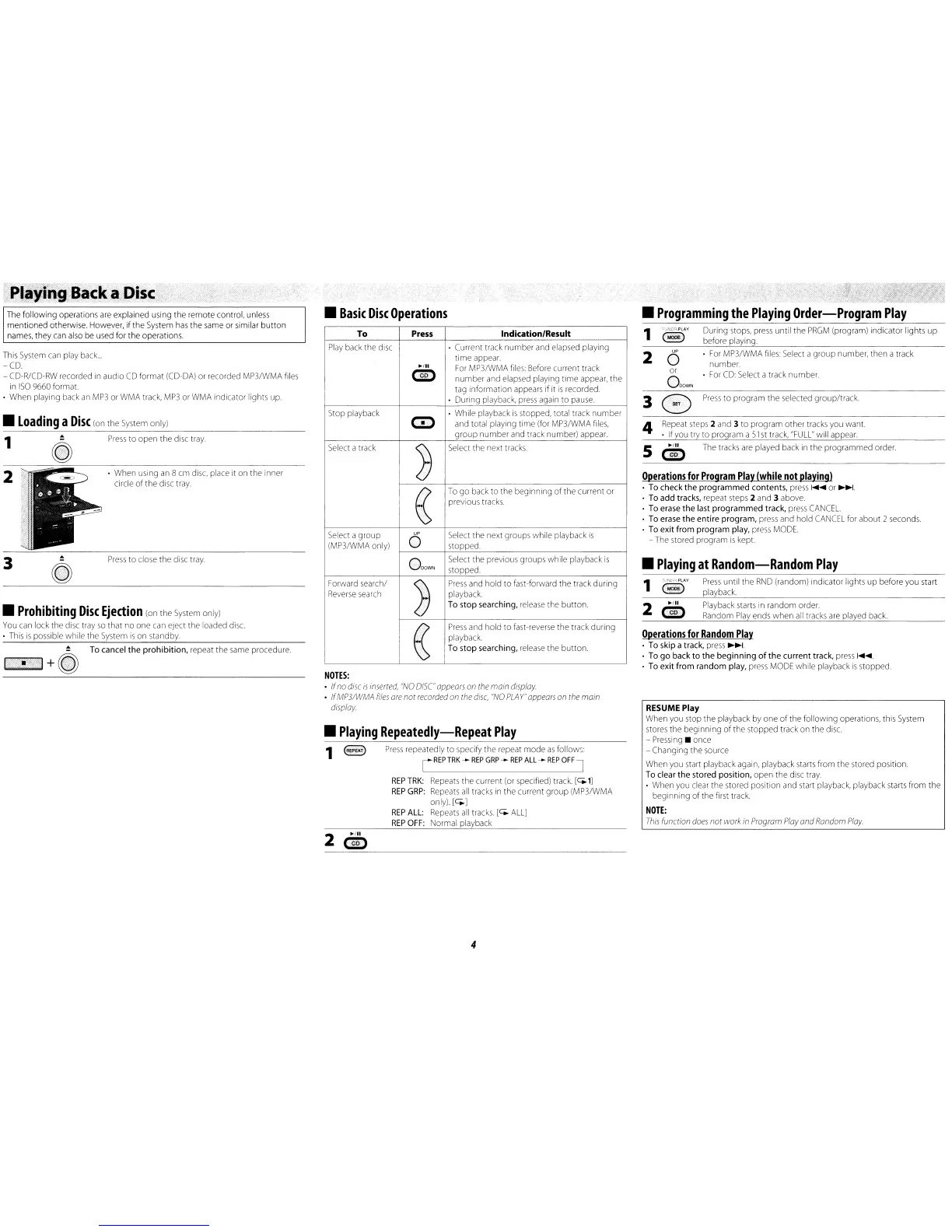
The
following operations
are
explained using the remote control,
unless
mentioned otherwise. However, if the
System
has
the
same
or
similar button
names,
they
can
also
be
used
for the operations.
..
To
cancel the prohibition,
repeat
the
same
procedure
'.
I+Q)
2
"Playing
Back
a
Disc
3
•
Loading
a
Disc
(on
the
System
only)
This
System
can
play
back
...
-CD
-
CD-R/CD-RW
recorded
in
audio
CD
format
(CD
..
DA)
or recorded MP3/WMA
files
in
ISO
9660
format.
·
When
playing
back
an
MP3
or
WMA
track,
MP3
or
WMA
indicator lights up
1
•
Prohibiting
Disc
Ejection
(on
the
System
only)
You
can
lock
the
diSC
tray
so
that no one
can
eject the loaded
disc.
•
This
is
possible while the
System
is
on
standby.
4


 To Next Page
 Loading...