''l:earrUng
Mote
about
This
System
Basic
and
Common
Operations
(see
page
3)
• Pressing one
of
the source buttons also turns on the System
and starts playing back
if
the source
is
ready or connected.
Playing
Back
a
Disc
(see
page 4)
• This System cannot play "packet write" discs.
•
For
MP3IWMA playback
...
-
In
this manual, "file" and "track" are interchangeably used
for MP3IWMA operations.
- This System can show the
Tag
data (Version
1).
- MP3IWMA discs
are
required a longer readout
time
than
regular
CDs.
(It depends on the complexity
of
the
group/
file configuration.)
- Some MP3IWMA files cannot be played back and will be
skipped. This result from their recording processes and
conditions.
- When making MP3IWMA discs,
use
ISO
9660
Levell
or
Level 2 for the disc
format
- This System
can
play back MP3IWMA files
with
the
extension code <.mp3> or <.wma> (regardless
of
the
letter
case-upper/lower).
- It
is
recommended that you make each MP3/WMA file
at
a
sampling rate
of
44.1
kHz
and at
bit
rate
of
128
kbps. This
System cannot play back files made at
bit
rate
of
less
than
64
kbps.
- Playback order
of
MP3IWMA tracks may be different from
the one you have intended while recording. If a folder
does
not
include MP3IWMA tracks,
they
are
ignored.
• This System can recognize
up
to
99 groups
in
a disc. The
total
number
of
groups and tracks (in a disc) that can be
recognized by the System
is
512 (for MP3IWMA).
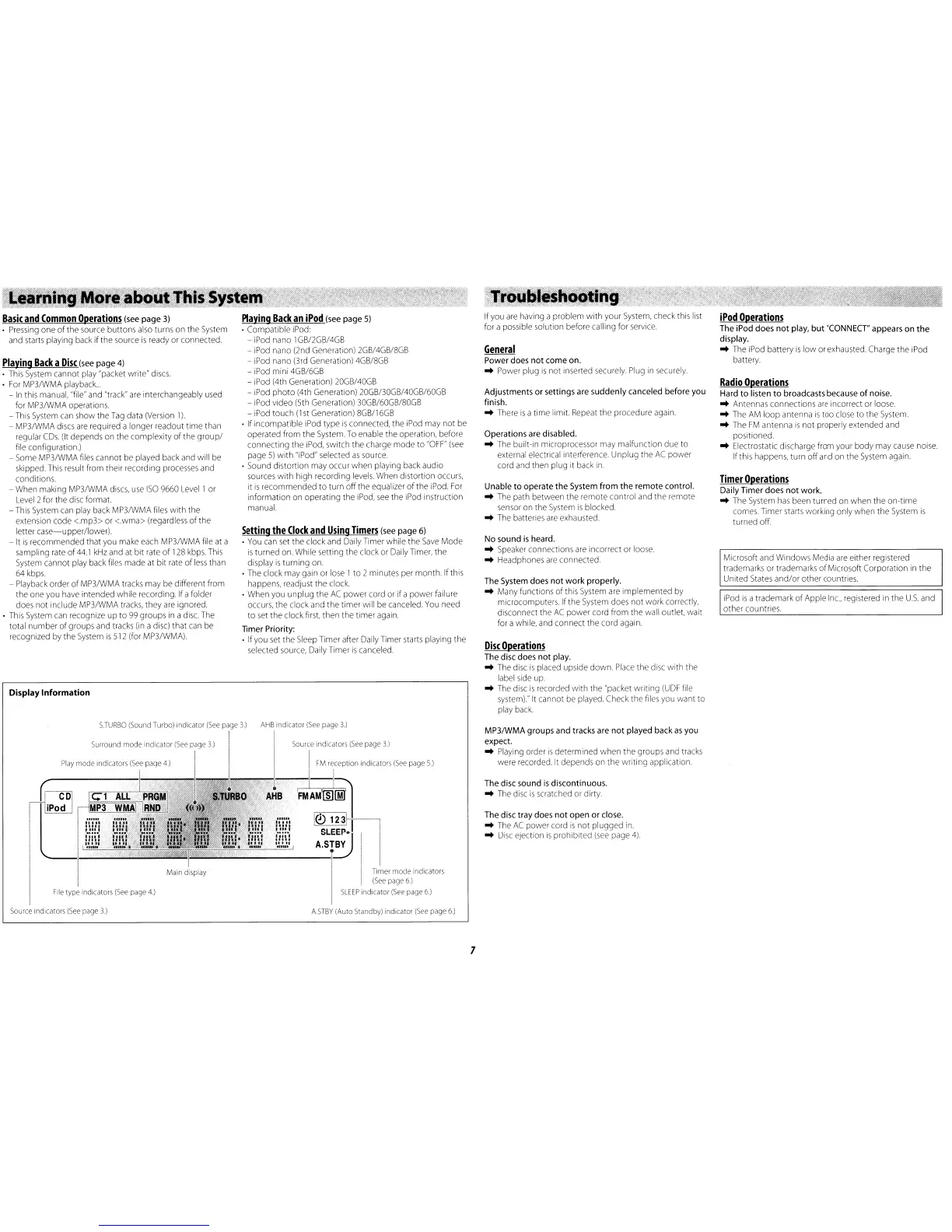
Display Information
Playing
Back
an
iPod
(see page
5)
• Compatible iPod:
- iPod nano 1GB/2GB/4GB
- iPod nano (2nd Generation) 2GB/4GB/8GB
- iPod nano (3rd Generation)
4GB/8GB
- iPod mini 4GB/6GB
- iPod (4th Generation) 20GB/40GB
- iPod
photo
(4th Generation)
2OGB/3OGB/40GB/60GB
- iPod video (5th Generation) 30GB/60GB/80GB
- iPod
touch
(1
st Generation) 8GB/16GB
• If incompatible iPod type
is
connected, the iPod may
not
be
operated from
the
System. To enable the operation, before
connecting the iPod, switch the charge
mode
to
"OFF"
(see
page
5)
with
"iPod" selected
as
source.
· Sound distortion may occur when playing back audio
sources
with
high
recording levels. When distortion occurs,
it
is
recommended
to
turn
off
the equalizer
of
the iPod. For
information on operating the iPod,
see
the iPod instruction
manual.
Setting
the
Clock
and
Using
Timers
(see page 6)
•
You
can
set the clock and Daily Timer while the
Save
Mode
is
turned on. While setting the clock or Daily Timer, the
display
is
turning on.
· The clock may gain or lose 1 to 2 minutes per month. Ifthis
happens, readjust the clock.
• When you
unplug
the
AC
power
cord or
if
a power failure
occurs, the clock and
the
timer will be canceled. You need
to
set the clock first, then the timer again.
Timer
Priority:
· Ifyou
set
the Sleep Timer after Daily Timer starts playing
the
selected source, Daily Timer
is
canceled.
If you are having a problem
with
your System, check this list
for a possible solution before calling for service.
General
Power does
not
come
on.
..
Power plug
is
not
inserted securely. Plug in securely.
Adjustments
or
settings are
suddenly
canceled before you
finish.
..
There
is
a time
limit
Repeat the procedure again.
Operations are disabled.
..
The built-in microprocessor may malfunc ion due to
external electrical interference.
Unplug
the
AC
power
cord and then plug it back in.
Unable
to
operate
the
System
from
the
remote
control.
..
The path between the remote control and the remote
sensor on the System
is
blocked.
..
The batteries
are
exhausted.
No sound
is
heard.
..
Speaker connections
are
incorrect or loose.
..
Headphones
are
connected.
The System does
not
work
properly.
..
Many functions
of
this System are implemented by
microcomputers. Ifthe System does
not
work correctly,
disconnect the
AC
power
cord from the wall outlet, wait
for a while, and connect the cord again.
Disc
Operations
The disc does
not
play.
..
The disc
is
placed upside
down.
Place the disc
with
the
label side
up
.
..
The disc
is
recorded
with
the "packet writing
(UDF
file
system)." It cannot be played. Check the files you want
to
play back.
iPod
Operations
The iPod does
not
play,
but
"CONNECT" appears
on
the
display.
..
The iPod battery
is
low
or exhausted. Charge
the
iPod
battery.
Radio
Operations
Hard
to
listen
to
broadcasts because
of
noise.
..
Antennas connections
are
incorrect or loose.
..
The
AM
loop
antenna
is
too
close to the System.
..
The
FM
antenna
is
not
properly extended and
pOSitioned.
..
Electrostatic discharge from your
body
may cause noise.
Ifthis happens, turn
off
and
on
the System again.
Timer
Operations
Daily
Timer
does
not
work.
..
The System
has
been turned on when the
on-time
comes. Timer starts working only when the System
is
turned off.
Microsoft and Windows Media
are
either registered
trademarks or trademarks
of
Microsoft Corporation
in
the
United States
and/or
other countries
iPod
is
a trademark
of
Apple
Inc.,
registered in the US. and
other
countries.
MP3IWMA
groups
and
tracks are
not
played back
as
you
expect.
..
Playing order
is
determined
when
the groups and tracks
were recorded. It depends
on
the writing application.
The disc sound
is
discontinuous
.
..
The disc
is
scratched or dirty.
The disc tray does
not
open
or
close.
..
The
AC
power cord
is
not
plugged in.
..
Disc
ejection
IS
prohibited
(see
page
4)
AHB
indicator
(See
page
3.)
File
type
indicators
(See
page
4.)
Source
indicators
(See
page
3.)
I
FM
reception
indicators
(See
page
5.)
tPo~D
i.H!.!
nUl
ifm
(I'm.
!]!i)
~i!.i
,
..
IA~~
I_I
:._g_~._!
.;...:
"-
t~_}._l!_:_::_:.!._}.:_1
_'_L_I.1_!
_'
__
~_Js_s~ful'
'1
Timer
mode
indicators
(See
page
6)
SLEEP
indicator
(See
page
6)
ASTBY
(Auto
Standby)
indicator
(See
page
6.)
Source
indicators
(See
page
3.)
7


 To Next Page
 Loading...