EasyManua.ls Logo

JZAQ BT30 - Settings and Support; Audio and Language Settings; User Support and Tips

JZAQ BT30
8 pages
Print Icon
To Next Page IconTo Next Page
To Previous Page IconTo Previous Page
Loading...
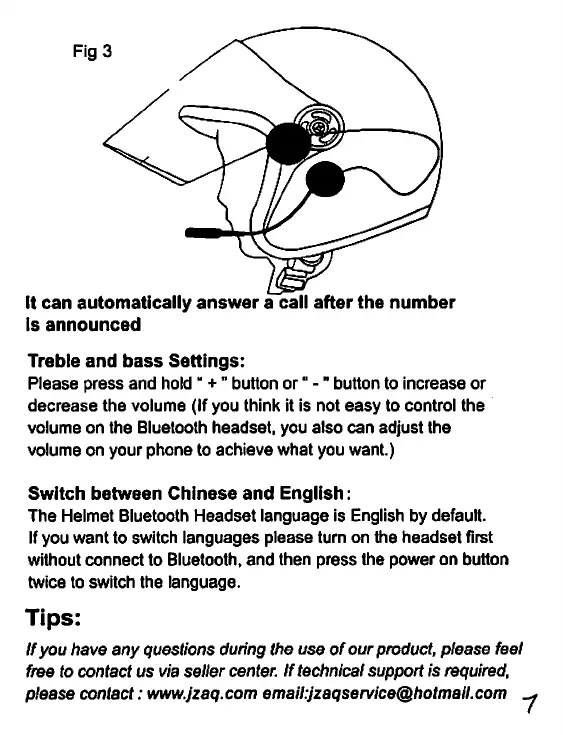
It
can
automatically
answer
a
call
after
the
number
Is
announced
Treble
and
bass
Settings:
Please
press
and
hold
+
’’
button
or"
-"
button
to
increase
or
decrease
the
volume
(If
you
think
it
is
not
easy
to
control
the
volume
on
the
Bluetooth
headset,
you
also
can
adjust
the
volume
on
your
phone
to
achieve
what
you
want.)
Switch
between
Chinese
and
English:
The
Helmet
Bluetooth
Headset
language
is
English
by
default.
If
you
want
to
switch
languages
please
turn
on
the
headset
first
without
connect
to
Bluetooth,
and
then
press
the
power
on
button
twice
to
switch
the
language.
Tips:
If
you
have
any
questions
during
the
use
of
our
product,
please
feel
free
to
contact
us
via
seller
center.
If
technical
support
is
required,
please
contact:
www.jzaq.com
email:jzaqservice@hotmail.com
.
1