EasyManua.ls Logo

JZAQ BT30 - Advanced Usage and Setup; Power Saving and Connectivity; Installation and Accessories

JZAQ BT30
8 pages
Print Icon
To Next Page IconTo Next Page
To Previous Page IconTo Previous Page
Loading...
It
means
the
power
is
low,
please
charge
it.
Power
Save
Mode
The
device
will
be
off
automatically
after
5
minutes
no
working
device
pairing
it.
1
Drive-2
Mode
The
phone
support
two
simultaneous
pairing:
First
pair
the
phone
1
with
the
Helmet
Headset
and
then
disconnect
the
phone
1's
Bluetooth;
After
pairing
the
Helmet
Headset
with
mobile
phone
2,
open
the
Bluetooth
of
mobile
phone
1
and
click
connect
"BT30"
to
connect
two
mobile
phones
at
the
same
time;
Now
phone
1
and
phone
2
paired
with
Helmet
Headset
together
and
support
to
answer
any
call
from
two
phones
(Note:
phonel
and
phone
2
can
not
answer
calls
at
the
same
time.)
Installing
Step
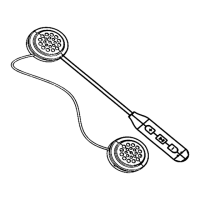
Step1
Take
out
the
Helmet
Headphone
from
the
color
box.
stick
the
“Magic
Tape
“on
both
earphones.
Step2
Tear
off
the
3M
tape
paper
of
the
earphones,
and
stick
it
into
the
helmet
ear
position
of
both
sides,
before
stick
it,
please
align
the
position
well,see
Fig3.
Accessories
1*
Helmet
Headphone
2*
Detachable
Clip
r
USB
Cable
1’
User
Manual
6