17
2
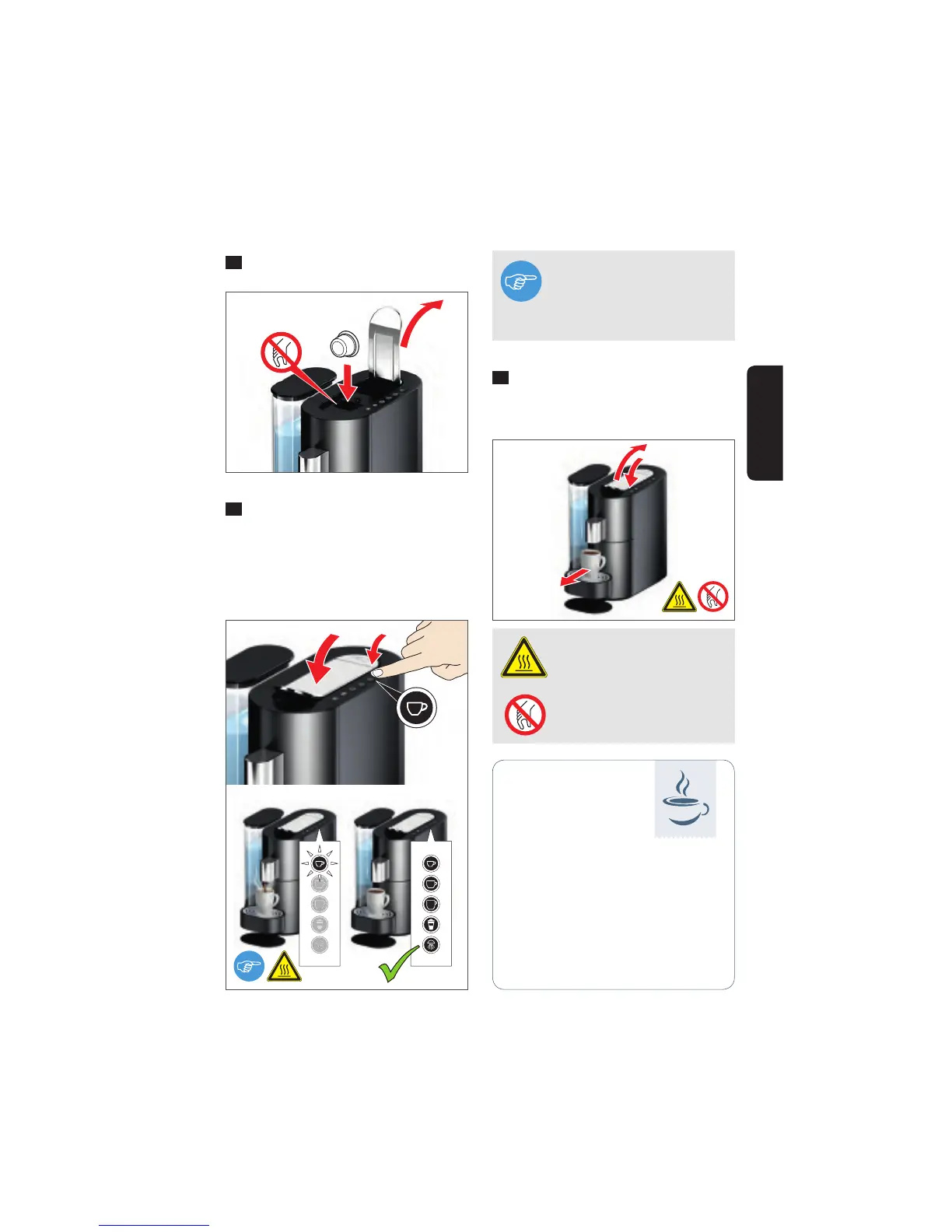
Open the lever and insert a capsule.
3
Close the lever completely and start
the brewing process by pressing the re-
quired cup size (example: "Small cup").
The button will blink during the selected
brewing process, and all the button sym-
bols will illuminate when it is complete.
4
Open the lever to activate capsule
ejection. Close the lever again and remove
your drink.
WARNING Very hot water –
scalding hazard.
PROHIBITED Do not reach
inside – injury hazard.
Coffee brewed to your personal
tastes:
K-fee – your system offers a wide
range of coffee and speciality capsu-
les with a variety of taste profi les and
strenghts for your enjoyment.
Tips
for more enjoyment
NOTE
You can stop the brewing pro-
cess by pressing any of the
buttons.
2
4
3
English




 To Next Page