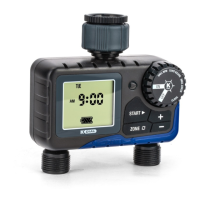
The K-Rain K Dial Digital Tap Timer (KR5001) is a residential watering device designed for use with normal household water pressures. It allows users to program desired watering requirements, which the device will then repeat weekly. The timer is equipped with a digital display and a main dial for easy programming and operation.
Function Description
The K Dial Tap Timer automates watering schedules. Users can set specific start times, watering days, and run times. Once programmed, the device will automatically water according to the set schedule. It also features a manual watering option for immediate, temporary watering sessions. The timer is designed to be installed directly onto a tap.
Important Technical Specifications
- Daily Scheduling: Supports watering on Monday, Tuesday, Wednesday, Thursday, Friday, Saturday, and Sunday.
- Watering Duration: Can be set from 1 minute up to 12 hours and 59 minutes.
- Watering Frequency: Any day.
- Working Pressure: Operates within a range of 50-800 kPa.
- Maximum Flow Rate: 25 L/min.
- Connections: Features a 25mm BSP inlet and a 20mm BSP outlet.
- Working Temperature: Suitable for temperatures ranging from 3°C to 50°C.
- Batteries: Requires 2x AAA alkaline batteries (not included).
- Product Code: KR5001.
- Warranty: Comes with a 2-year replacement guarantee.
Usage Features
Setup and Clock Setting
- Battery Installation: Requires 2x 1.5V AAA alkaline batteries. The battery status is displayed on the screen, and it's recommended to replace batteries annually or when the indicator drops below 2 bars.
- Clock Setting: The main dial is turned to "CLOCK" to set the current time. Minutes flash first, adjusted with '+' or '-' buttons, then saved with "START". Hours then flash, adjusted with '+' or '-' buttons, and saved with "START". The current day can also be selected and saved. The display returns to the clock after 2 minutes of inactivity. Removing batteries resets all clock and schedule settings.
Scheduling
The K Dial supports up to four different start times per day.
- Setting Start Time: Turn the main dial to "START TIME". The hours will flash, allowing adjustment with '+' or '-' buttons, then saved with "START". Minutes are set similarly. This process can be repeated for "START 2", "START 3", and "START 4". To disable a start time, hold '+' and '-' simultaneously.
- Setting Water Days: Turn the main dial to "DAYS". By default, every day is toggled on. "START" is pressed to select a day (MON flashes first), then '+' or '-' toggles watering on or off for that day. A checkmark indicates an active watering day. This is repeated for all days of the week. Users should check local regulations before setting watering days.
- Setting Run Time: Turn the main dial to "RUN TIME". The minutes will flash, adjusted with '+' or '-' buttons, then saved with "START". Hours are set similarly. The run time applies to all set start times. To disable run time, hold '+' and '-' simultaneously. To reactivate, hold '+' and '-' simultaneously again.
Operation
- Automatic Watering: After setting the CLOCK, START TIME, DAYS, and RUN TIME, turn the main dial to "ON". The display will show the current day, time, and battery status. Watering will occur automatically on selected days at designated start times for the set run times. When watering begins, the display shows the remaining watering time and a sprinkler animation. To suspend automatic watering without losing settings, turn the main dial to "OFF". All watering schedules will run as planned if the main dial is not switched to "OFF".
- Manual Watering: For immediate watering, turn the main dial to "ON" and press "START". The default duration is 10 minutes, but this can be adjusted from 1 to 99 minutes using '+' or '-' buttons. Holding '+' allows scrolling through longer times. During manual watering, a manual watering indicator is displayed, the time separator flashes, and a sprinkler animation appears. To stop manual watering, turn the main dial to "OFF". To ensure pre-set schedules are active, turn the main dial back to "ON".
Maintenance Features
- Cold Weather: The K Dial Tap Timer should be removed from the tap and stored indoors during winter to prevent damage from freezing conditions.
- Batteries: Batteries should be removed during periods of non-use, though this will erase all settings. It is crucial not to mix old and new batteries, avoid using rechargeable batteries, and replace batteries annually to prevent battery leakage, which can cause corrosion and damage to the timer.
- Other Precautions:
- Do not use the timer on tanks or other low-pressure systems.
- Use clean mains water only.
- Do not install horizontally.
- Keep the tap timer out of freezing conditions to prevent damage to internal components.
The K-Rain K Dial Tap Timer is supplied and serviced by Holman Industries. Support is available via email (info@k-rain.com.au) or phone (08 9416 9999). Users are encouraged to register their product online for an extended warranty and to receive product information and special offers.

 Need help?

 To Next Page
 General