EasyManua.ls Logo

K-Rain K-DIAL KR5002 - User Manual

K-Rain K-DIAL KR5002
9 pages
Print Icon
To Next Page IconTo Next Page
Loading...
DUAL OUTLET DIGITAL TAP TIMER
2
WARRANTY
KR5002
User
M anual
Question and Answer IconNeed help?

Do you have a question about the K-Rain K-DIAL KR5002 and is the answer not in the manual?

Summary

Overview

Main Components

Identifies and lists the physical parts of the K Dial Tap Timer with their corresponding numbers for easy reference.

Additional Functions

Details extra features like display return to clock after inactivity and the effect of battery removal on settings.

Specifications

Lists technical details including scheduling, watering duration, pressure, flow rate, connections, and operating temperature.

Setup

Battery Installation

Step-by-step instructions on how to correctly install AAA batteries into the tap timer's compartment.

Clock

Guides on setting the system time, including AM/PM and the current day, on the tap timer display.

Scheduling

Start Time

Details how to program the specific times for watering each zone per day, supporting up to 4 start times per zone.

Water Days

Explains how to select the specific days of the week for each zone to perform its watering schedule.

Run Time

Guides on setting the duration, in minutes and hours, for how long each zone will water.

Operation

Automatic Watering

Describes how the timer operates automatically based on the programmed start times, water days, and run times.

Manual Watering

Instructions for manually activating watering for specific zones immediately, independent of programmed schedules.

Maintenance

Cold Weather

Advice on protecting the tap timer from freezing conditions, recommending removal from tap during winter.

Batteries

Guidance on battery removal during non-use, recommended battery types, and avoiding mixing old and new batteries.

Other Precautions

Lists important precautions such as avoiding low-pressure systems and horizontal installation for optimal performance.

Warranty

Summary

Overview

Main Components

Identifies and lists the physical parts of the K Dial Tap Timer with their corresponding numbers for easy reference.

Additional Functions

Details extra features like display return to clock after inactivity and the effect of battery removal on settings.

Specifications

Lists technical details including scheduling, watering duration, pressure, flow rate, connections, and operating temperature.

Setup

Battery Installation

Step-by-step instructions on how to correctly install AAA batteries into the tap timer's compartment.

Clock

Guides on setting the system time, including AM/PM and the current day, on the tap timer display.

Scheduling

Start Time

Details how to program the specific times for watering each zone per day, supporting up to 4 start times per zone.

Water Days

Explains how to select the specific days of the week for each zone to perform its watering schedule.

Run Time

Guides on setting the duration, in minutes and hours, for how long each zone will water.

Operation

Automatic Watering

Describes how the timer operates automatically based on the programmed start times, water days, and run times.

Manual Watering

Instructions for manually activating watering for specific zones immediately, independent of programmed schedules.

Maintenance

Cold Weather

Advice on protecting the tap timer from freezing conditions, recommending removal from tap during winter.

Batteries

Guidance on battery removal during non-use, recommended battery types, and avoiding mixing old and new batteries.

Other Precautions

Lists important precautions such as avoiding low-pressure systems and horizontal installation for optimal performance.

Warranty

Overview

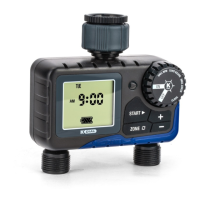
The K Dial Tap Timer (model KR5002) is a dual-outlet digital tap timer designed for residential watering applications. It allows users to program desired watering requirements, which will then repeat weekly. The device operates with normal household water pressures and features a user-friendly interface with a main dial and a digital display.

Function Description:

The K Dial Tap Timer automates garden watering by allowing users to set specific start times, watering days, and run times for up to two independent zones. It supports up to four different start times per day per zone. An additional "ZONE 1+2" setting allows for sequential watering of both zones, providing an extra four start times if both zones are watered on the same day. The device features both automatic and manual watering modes. In automatic mode, watering occurs based on the programmed clock, start times, water days, and run times. Manual watering allows for immediate, temporary watering sessions, independent of the pre-set schedules, with a duration adjustable from 1 to 99 minutes. The display provides real-time information, including the current day, time, battery status, remaining watering time, and the active zone. A sprinkler animation indicates active watering.
Important Technical Specifications:

  • Daily Scheduling: MON TUE WED THU FRI SAT SUN
  • Watering Duration: 1 minute to 12 hours 59 minutes
  • Watering Frequency: Any day
  • Working Pressure: 50-800 kPa
  • Maximum Flow Rate: 25 L/min
  • Connections: 25mm BSP inlet / 20mm BSP outlet
  • Working Temperature: 3°C to 50°C
  • Batteries: 2x AAA alkaline (not included)
  • Warranty: 2-year replacement guarantee

Usage Features:

  • Main Dial Navigation: The main dial is used to switch between different settings: CLOCK, START TIME, WATER DAYS, RUN TIME, and ON/OFF.
  • Digital Display: A clear digital display shows all programming information, current time, and operational status.
  • Battery Installation: Requires 2x AAA alkaline batteries. The battery status is indicated by an icon on the display.
  • Clock Setting: Users can set the current time (hours and minutes) and day of the week. The display flashes to guide the user through the setting process.
  • Start Time Setting: Up to four distinct start times can be programmed for each zone (ZONE 1, ZONE 2, or ZONE 1+2). Start times can be disabled by holding down the '+' and '-' buttons simultaneously.
  • Water Days Setting: Users can select specific days of the week for watering for each zone. Days can be toggled on or off individually.
  • Run Time Setting: The duration of watering can be set for each zone, ranging from 1 minute to 12 hours and 59 minutes. Run times apply to all start times within a zone. Run times can also be disabled.
  • Zone Selection: The 'ZONE' button allows users to cycle through and select ZONE 1, ZONE 2, or ZONE 1+2 for programming or manual operation.
  • Manual Watering: Activated by turning the main dial to ON and then selecting the desired zone. The duration can be adjusted, and watering starts by pressing 'START'.
  • Automatic Return to Clock: The display automatically returns to the clock after 2 minutes of keypad or schedule inactivity.
  • Off Mode: Turning the main dial to OFF suspends all automatic watering without losing settings and stops manual watering immediately.

Maintenance Features:

  • Battery Replacement: It is recommended to renew batteries every spring or at least once per year. The battery icon on the display indicates power status, and users are advised not to let it drop below two bars.
  • Cold Weather Precautions: The tap timer should be removed from the tap and stored indoors during winter to prevent freezing, which can damage internal components.
  • Battery Type: Only use alkaline batteries; do not mix old and new batteries, and do not use rechargeable batteries, as leakage can cause corrosion and damage.
  • Water Source: Use clean mains water only.
  • Installation: Do not install horizontally.
  • Resetting Settings: Removing the AAA batteries will reset all clock and schedule settings.

K-Rain K-DIAL KR5002 Specifications

General IconGeneral
BrandK-Rain
ModelK-DIAL KR5002
CategoryTimer
LanguageEnglish

Related product manuals