11
12
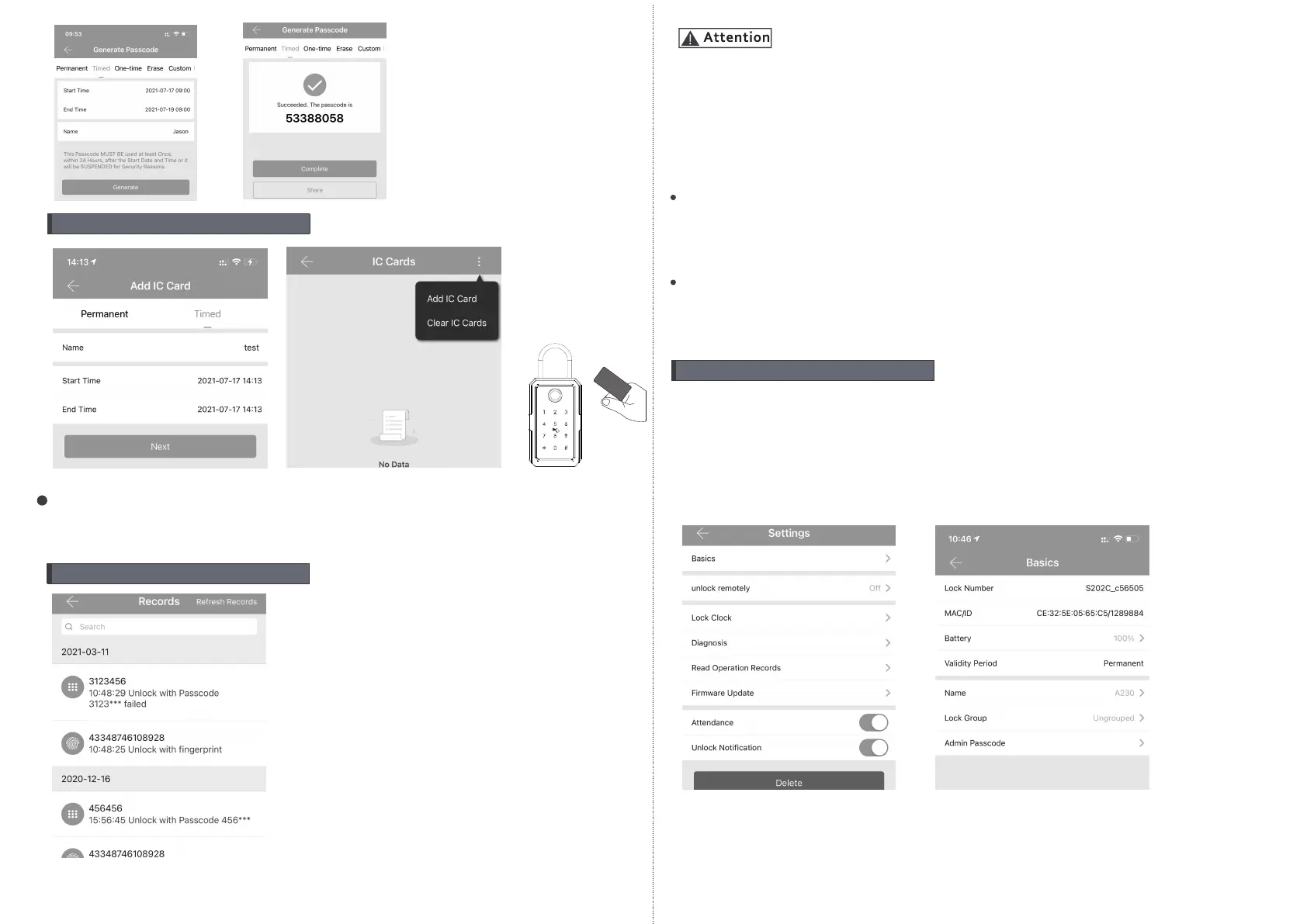
5.Issue IC Card
There is tag card for this lock, which you can issue the IC card
next the door lock, also you can clear the IC card upon your
requirement.
6.Unlock Record Query
Each time the ordinary user unlocks the door lock with the ekey
sent by the administrator, one record will be generated
automatically and send to the administrator’s phone APP.
If one lock has been added by one phone, it can not be added by
another new phone unless:
1.The previous administrator delete it from his APP next to the lock.
2.The reset button on the lock is long pressed for initialization
(2 seconds).
Deleting the passcode must be operated next to the lock.
Enter the software interface and click the “≡” button to add the lock
as the pop-up list suggest.
Enter the device interface and click to check the “Setting” button
to check the device information.
you can check the lock information for lock clock/diagnosis /
unlock records and firmware update operations etc. More
information you can refer the below photos:
Sm
a
rt
K
eyc
a
r
d
7.Lock Settings



 To Next Page