13 Wolf Warrior X User Manual 14Wolf Warrior X User Manual
How to use the instrument panel
WOLF WARRIOR X
Caution
MODE COMMENT
TIME
Time since powering on the scooter.
TRIP
Distance travelled since powering on the scooter.
ODO
Total distance travelled.
VOL
Current battery voltage.
CHA
Number of times battery has been charged (only full discharges
are counted)
PSETTINGS
P0
Tire diameter 10. Do not change.
P1
System voltage. Default 60V. Do not change.
P2
Motor magnetic pole setting. Default 15. Do not change.(Mantis 10)
Motor magnetic pole setting. Default 10. Do not change.(Mantis 8)
P3
Speed signal selection. Default is 0. Do not change.
P4
Distance / speed unit. 0=km, 1=miles
P5
Start setting. 1=non-zero start (Kick-and-Go), accelerator won’t work if scooter is not in motion; 0
=immediate start (CAUTION while using this)
P6
Cruise control. 0=cruise control OFF, 1=cruise control ON. Advanced riders only.
P7
Initial acceleration. 0=strong power, 5=least power.
P9
Motor torque. 1=50% of max. torque, 2=75% of max. torque, 3=max. torque
PA
Electric (regenerative) braking strength (E-ABS). 0=None, 1=Weak, 2=Medium, 3=strong.
PB
Display brightness (0=off, 5=highest illumination)
PC
Scooter auto-turn off time in minutes (1-30 minutes).
PD
ABS (anti-lock braking system) setting. 0=ABS off, 1=ABS on (as in a car, the brake
engages and disengages rapidly to prevent the wheel from blocking)
WARNING: Due to increased vibration and force and on scooter components when using
ABS, frequently check that all bolts are properly fastened.
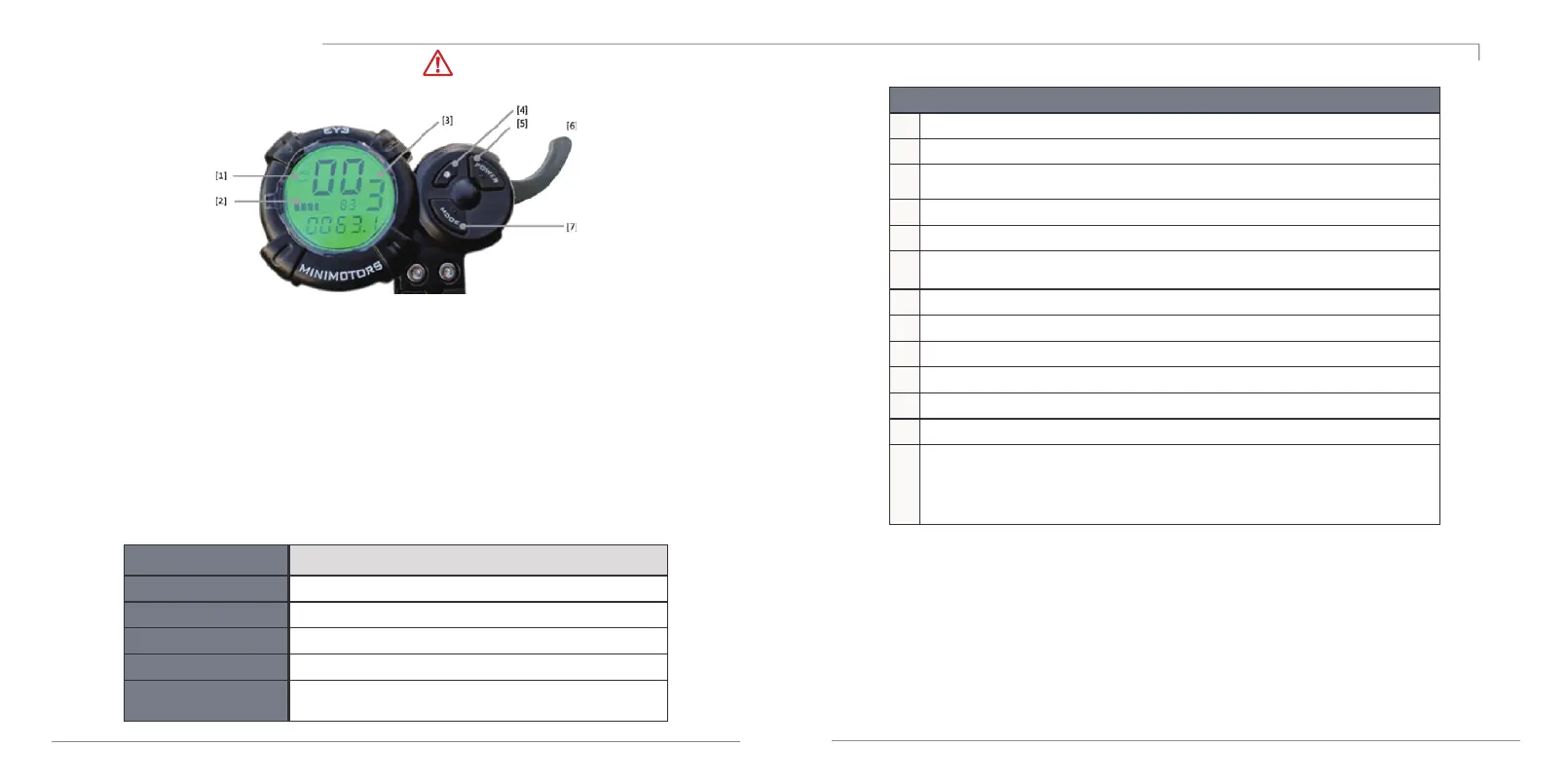
1.Speedometer: Shows the speed at which you are travelling.
2.Battery Indicator: Shows the level of the battery. Charge your scooter frequently,
do not let it run out of battery. As a rough guideline, charge at or below 2 bars.
3.Gear: Shows the selected gear.
4.Gear selector: Press to set gear (1=slow, 2=medium, 3=fast).
5.Power Button: To turn the scooter on or off, press button for 2 seconds.
6.Accelerator: Pull to accelerate. The stronger you pull, the faster it accelerates.
The scooter is delivered in “Non-Zero Start” setting (Kick-And-Go is ON).
The accelerator only works if the scooter is already in motion.
7.Mode Button:Press to select various display options:
Cruise Control. Cruise control allows you to maintain your driving speed automatically without continuing to
hold down the accelerator. In order to enter Cruise Control, activate it first in the P-settings [P6].
While driving, keep the accelerator steady for 3-5 seconds until Cruise Control kicks in and scooter travels at a
constant speed without driver holding down the accelerator. When you activate the brakes, Cruise Control will
be cancelled. CAUTION: Ride in a position where you can immediately access the brake to cancel Cruise
Control if necessary.



 To Next Page