4
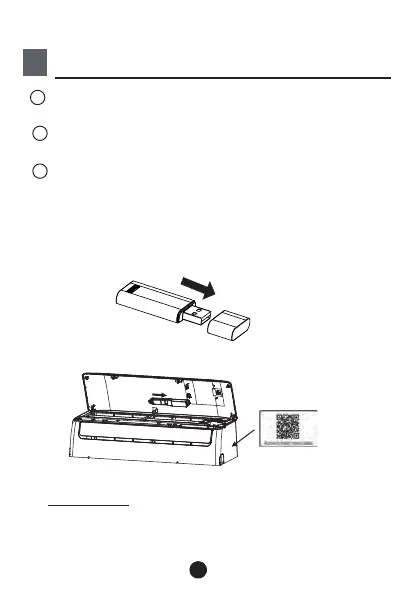
Remove the protective cap of the smart kit
(wireless module)
Open the front panel and insert the smart kit
(wireless module) into the reserved interface.
Insert
Attach the QR code packed with Smart kit
(wireless module) to the side panel of the
machine, ensure it is convenience to be scanned
by the mobile phone. Alternatively, user can take
picture of the QR Code and save it into their own
phones.
1
2
3
:This interface is only compatible with
SMART KIT(wireless module) provided by the
manufacturer.



 To Next Page