Need help?
Do you have a question about the Kaiser Baas PhotoScanner and is the answer not in the manual?
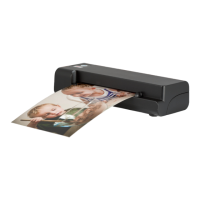
Lists the main capabilities of the Kaiser Baas PhotoScanner, including scan size, resolution, and file formats.
Explains how to turn on the scanner, access the settings menu, and format the SD card for optimal use.
Guide to changing language settings and configuring scan modes like color, resolution, and file type.
Instructions for calibrating the scanner to ensure optimal scanning quality before use.
Details how to choose scanning resolution (150, 300, 600 dpi) and save formats (JPG, PDF).
Guidance on using photo sleeves for scanning, including preparation and insertion into the scanner.
Instructions on initiating a scan, viewing previews, and using on-board controls after scanning.
Provides essential notes and best practices for successful scanning, including handling documents and file naming.
How to access playback mode, preview, rotate, delete scanned files, and use zoom functionality.
Step-by-step guide for cleaning the scanner's rollers using the provided cleaning tool.
Details on inserting and using the roller cleaning tool to clean the scanner rollers.
Instructions on how to safely clean the scanner lens using the provided lens cleaner.
Addresses common issues with scanned image clarity and lines, suggesting checks for prints and calibration.
Provides solutions for when a photo or document gets stuck in the feeding slot.
Explains the 'Memory Card Lock' message and how to resolve it by adjusting the SD card tab.
Discusses normal scanner warmth and when to be concerned about overheating.
Information on how to purchase additional photo sleeves for the scanner.
 General
| Color Depth | 24-bit |
|---|---|
| Image Sensor | CIS (Contact Image Sensor) |
| Interface | USB 2.0 |
| Power Source | USB powered |
| Connectivity | USB |
| Supported Media | Photos |
| Output Formats | JPEG |
| Scan Resolution | 1800 dpi |

 To Next Page