7 8
Set up your X2 Camera
Welcome to your new KB Action Camera.
Before you get shooting, please review
the User Guide carefully to ensure you
get the maximum performance out of
your camera.
Battery Charging
We recommend that you fully charge
your camera before use.
A full charge is approximately 2.5 hours
using a 5V 0.5/1A Charger.
The charging indicator LED light on the
top of the camera will be RED when
charging and will be OFF when charged.
For further important information about
the battery, see the Battery Guide.
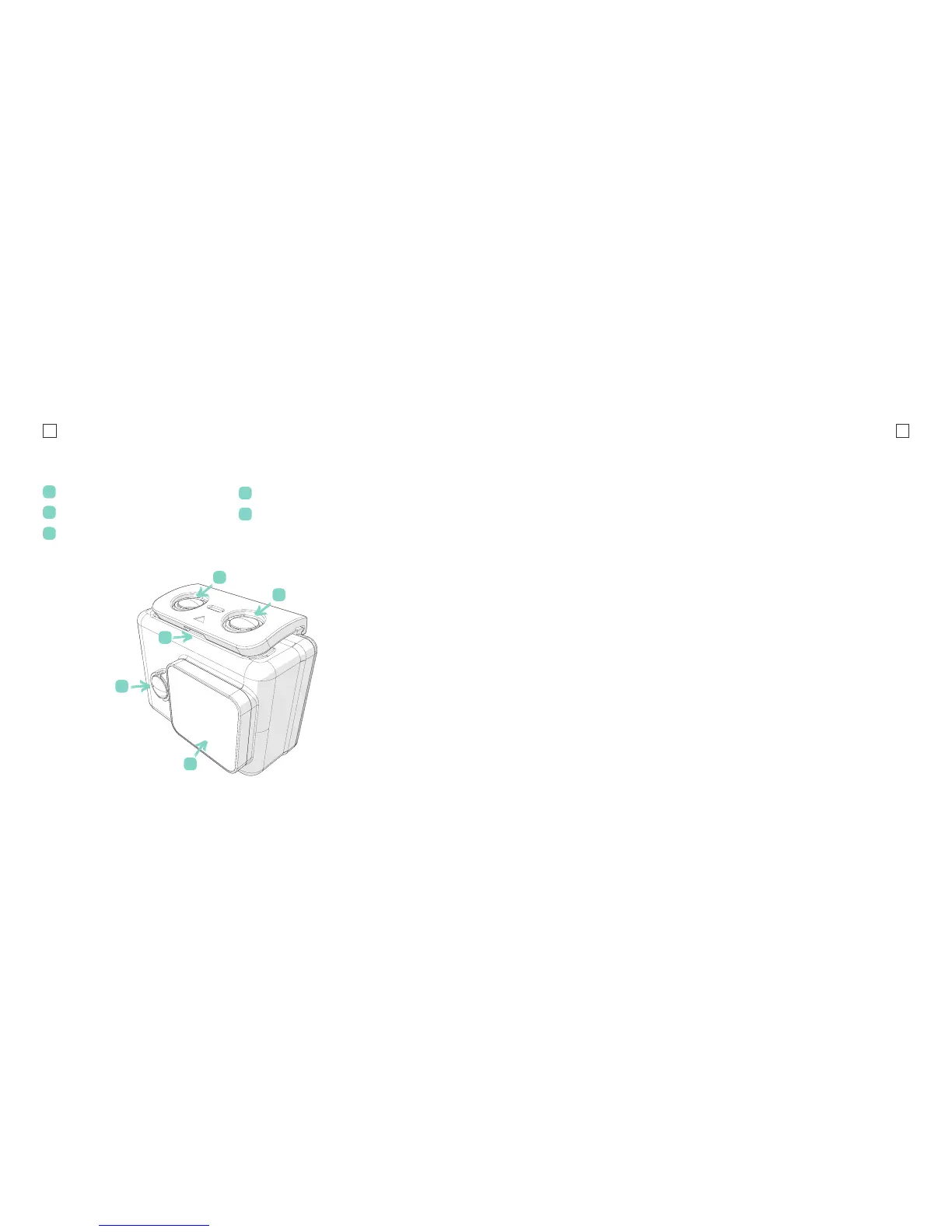
Product Diagram (Case)
Case Latch
Power/Menu Button
REC/OK
Wi-Fi
Waterproof Case Lens
A
B
D
C
E
MicroSD Card Compatibility
Your camera requires a MicroSD Card
(not included).
Kaiser Baas recommends the use of a
brand name Class 10 or higher MicroSD
Card. Any content recording higher than
1080P@60FPS will require a Class UHS-1
or higher card.
There is only one correct way to insert
the MicroSD card. Do not force the card
into the slot as it may damage the camera
and card.
The maximum card size is 32gb.
You can nd the list of recommended
MicroSD cards for this camera at:
www.kaiserbaas.com/support
B
C
D
E
A



 To Next Page