EasyManua.ls Logo

Kaiweets KM601s - Function Buttons; Power and Mode Selection

Kaiweets KM601s
26 pages
Print Icon
To Next Page IconTo Next Page
To Previous Page IconTo Previous Page
Loading...
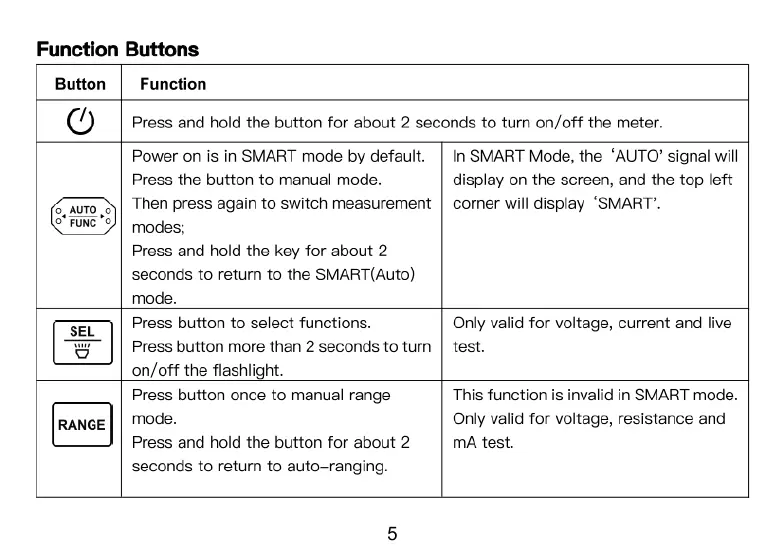
Function
Buttons
Button
Function
O
Press
and
hold
the
button
for
about
2
seconds
to
turn
on/off
the
meter.
Power
on
is
in
SMART
mode
by
default.
Press
the
button
to
manual
mode.
Then
press again
to
switch
measurement
modes;
Press
and
hold
the
key
for
about
2
seconds
to
return
to
the
SMART(Auto)
mode.
In
SMART
Mode,
the
‘AUTO’
signal
will
display
on the
screen,
and
the
top
left
corner
will
display
‘SMART".
Press
button
to
select
functions.
Press
button
more
than
2
seconds
to
tum
on/off
the
flashlight.
Only
valid
for
voltage,
current
and
live
test.
Press
button
once
to
manual
range
mode.
Press
and
hold
the
button
for
about
2
seconds
to
retum
to
auto-ranging.
This
function
is
invalid
in
SMART
mode.
Only
valid
for
voltage,
resistance
and
mA
test.

Related product manuals