EasyManua.ls Logo

Kaiweets KM602 - Page 5

Kaiweets KM602
19 pages
Print Icon
To Next Page IconTo Next Page
To Previous Page IconTo Previous Page
Loading...
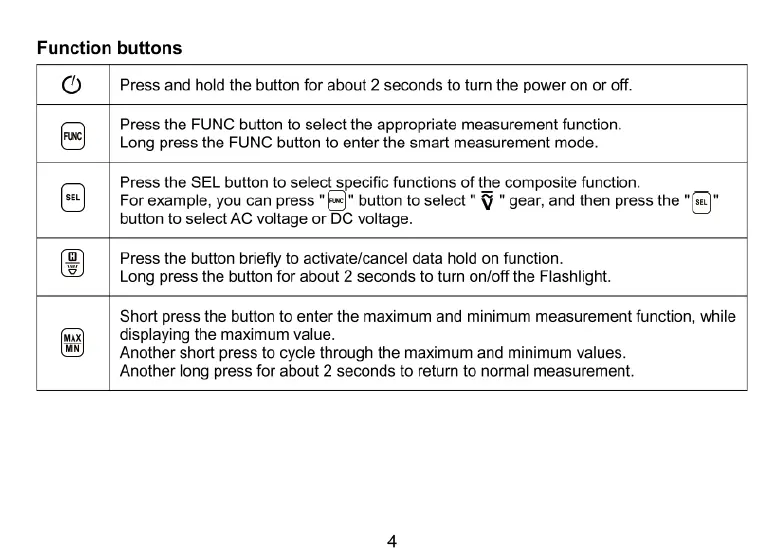
Function
buttons
O
Press
and
hold
the
button
for
about
2
seconds
to
turn
the
power
on
or
off.
Press
the
FUNC
button
to
select
the
appropriate
measurement
function.
Long
press
the
FUNC
button
to
enter
the
smart
measurement
mode.
Press
the
SEL
button
to
select
specific
functions
of
the
composite
function.
For
example,
you can
press
"f]"
button
to
select
"
§
"
gear,
and
then
press
the
button
to
select
AC
voltage
or
DC
voltage.
Press
the
button
briefly
to
activate/cancel
data
hold
on
function.
Long
press
the
button
for
about
2
seconds
to
turn
on/off
the
Flashlight.
Short
press
the
button
to
enter
the
maximum
and
minimum
measurement
function,
while
displaying
the
maximum
value.
Another
short
press
to
cycle
through
the
maximum
and
minimum
values.
Another
long
press
for
about
2
seconds
to
return
to
normal
measurement

Related product manuals