Need help?
Do you have a question about the Kaiweets VT200 and is the answer not in the manual?
Life-threatening voltages are tested; special care is required when using this device.
Always test the voltage tester on a known circuit to ensure it works correctly before use.
Wear safety shoes and keep fingers behind the anti-slip guard when checking uninsulated contacts to prevent shock.
Do not use if damaged or faulty; limit use to 1000V and protect from water, humidity, and heat.
Voltage may be present without indication; weak fields may not be detected. No liability for misuse.
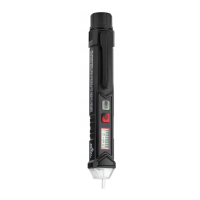
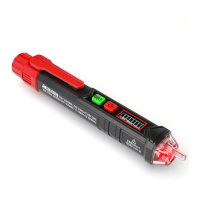
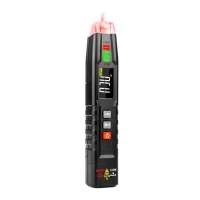
Details the probe, flashlight, signal indicator, LED display, power button, sensitivity switch, and battery cover.
Turn the tester on/off using the power key; it auto-powers off after 3 minutes of non-use.
Hold tester near AC voltage; beep and indicator light confirm detection, varying with signal intensity.
Operates in low-sensitivity mode (48-1000V AC) with specific audible and visual indicators.
Activates high-sensitivity mode (12-1000V AC) for increased detection range and sensitivity.
Distinguish wires by signal intensity; high sensitivity mode is recommended for identification.
Turn the LED flashlight on/off by pressing and holding the green button; it auto-shuts off after 3 minutes.
Power LED flashes below 2.5V; tester auto-turns off below 2.3V.
Details voltage range (12-1000V AC), operating conditions, security level, and battery type (2x1.5V AAA).
Instructions for safely removing and inserting batteries, noting terminal orientation.
Clean with a soft, slightly damp cloth; avoid chemicals, abrasives, alcohol, or solvents.
Guarantees electronic test and measurement devices for three years from the date of purchase.
The KAIWEETS VT200 is a non-contact voltage tester designed for safe and efficient electrical testing. This device allows users to detect the presence of AC voltage without direct contact, making it a valuable tool for both professionals and DIY enthusiasts. Its primary function is to identify live wires and check for voltage in circuits, ensuring safety before commencing any electrical work.
The VT200 operates on the principle of detecting electrostatic fields generated by AC voltage. When the tester's probe is brought near an AC voltage source, it senses this field and provides an indication to the user. This non-contact method significantly reduces the risk of electric shock, as there is no need to touch bare conductors.
The device features a dual-range sensitivity mode, allowing it to detect voltage across a broad spectrum. In low-sensitivity mode, it can detect voltages from 48V to 1000V AC, suitable for general electrical checks. For more precise or weaker signal detection, the high-sensitivity mode extends the detection range down to 12V AC, also up to 1000V. This dual capability makes the VT200 versatile for various applications, from checking household wiring to industrial electrical systems.
A key feature of the VT200 is its ability to distinguish between null (neutral) and live wires. By observing the intensity of the detected signal, users can differentiate between these two types of wires. Live wires typically produce stronger signals, while neutral wires result in weaker signals. For optimal accuracy in this identification process, it is recommended to use the high-sensitivity mode and keep individual cables as far apart as possible to avoid signal interference.
The tester provides both audible and visual indications of voltage presence. When voltage is detected, a beep sounds, and a signal indicator lights up. The intensity of the voltage signal is reflected in the speed of the beeping and the illumination of the signal indicator. A faster beep and a more intensely lit indicator suggest a stronger voltage signal, which typically correlates with proximity to the voltage source. Conversely, a weaker signal results in slower beeping and less intense illumination. The LED display further enhances visual feedback, showing different patterns depending on the detected voltage range and sensitivity mode. For instance, in high-frequency voltage detection, the red tip illuminates continuously, and the LED display flashes or shows a strong/weak indication.
Operating the VT200 is straightforward. To turn the device on, the user simply presses the power key. A confirming beep sounds, and the signal indicator lights up, signifying that the tester is ready for use. The device is designed with energy conservation in mind; it automatically powers off after 3 minutes of non-use or if no voltage signal is detected, helping to extend battery life. To manually turn off the tester, the power button can be pressed again.
Before each use, it is crucial to verify the tester's functionality on a known live circuit. This step ensures that the device is working correctly and provides accurate readings, thereby enhancing user safety.
The VT200 also incorporates a built-in LED flashlight, which can be activated by pressing and holding the green sensitivity button for more than 2 seconds. This feature is particularly useful when working in dimly lit environments, providing illumination to the work area. The flashlight can be turned off by repeating the same action.
The sensitivity switch, also the green button, allows users to toggle between low-sensitivity and high-sensitivity modes. When the tester is first turned on, it defaults to low-sensitivity mode. A brief press of the green button switches it to high-sensitivity mode, indicated by a specific visual cue on the LED display. This flexibility allows the user to adapt the tester's sensitivity to the specific testing scenario.
A low battery indicator is integrated into the device to alert users when the battery power is running low. If the battery voltage drops below 2.5 volts, the power LED will flash. Should the voltage fall further to below 2.3 volts, the tester will automatically turn off to prevent inaccurate readings and protect the device.
Maintaining the KAIWEETS VT200 is simple and ensures its longevity and reliable performance. The device is designed for indoor use and should be protected from water, high air humidity, and excessive heat to prevent damage.
For cleaning, only a soft, slightly damp cloth should be used. It is important to avoid harsh chemicals, abrasives, alcohol, ammonia, or any cleaners containing solvents, as these can damage the device's casing or internal components. After cleaning, ensure the device is completely dry before storage or subsequent use.
Battery replacement is a user-friendly process. The battery cover can be removed by pressing a snap and pushing it off the body. The tester uses two 1.5V AAA batteries. When inserting new batteries, ensure the positive terminal is oriented towards the tip of the tester. After replacing the batteries, push the cover back until it locks securely. It is critical not to use the tester to check electricity before the battery cover is fully locked to prevent electric shock.
The device comes with a three-year warranty, covering electronic test and measurement devices from the date of purchase, which underscores the manufacturer's confidence in its quality and durability. This warranty provides peace of mind for users regarding potential defects or malfunctions.
In summary, the KAIWEETS VT200 is a robust and user-friendly non-contact voltage tester equipped with features that prioritize safety, versatility, and ease of use. Its dual-range sensitivity, clear indicators, and practical additions like the LED flashlight make it an indispensable tool for anyone working with electrical circuits. Proper maintenance, as outlined, will ensure the device continues to perform reliably over its lifespan.
 General
| Continuity Buzzer | Yes |
|---|---|
| Data Hold | Yes |
| Distance to Spot Ratio | 12:1 |
| Display | LCD |
| Current Range | AC/DC 0-10A |
| Temperature Range | -40°C to 1000°C |
| Emissivity | 0.1~1 adjustable |
| Response Time | <0.5S |
| Wavelength | 8-14μm |
| Resolution | 0.1°C/0.1℉ |
| Safety Rating | CAT III 1000V, CAT IV 600V |

 To Next Page