9
10
Step5
2.4GHzWi-Firequired.
EnterSSIDandWi-Fipassword,thenuseyour
KamiWire-FreeOutdoorCameratoscantheQRcode.
Step6
WhentheQRcodeissuccessfullyscanned,tap
"NextStep".Youwillhearthevoiceprompt"Pairing
issuccessful"shortly.
YourKamiWire-FreeOutdoorCameraisnowready
touse.
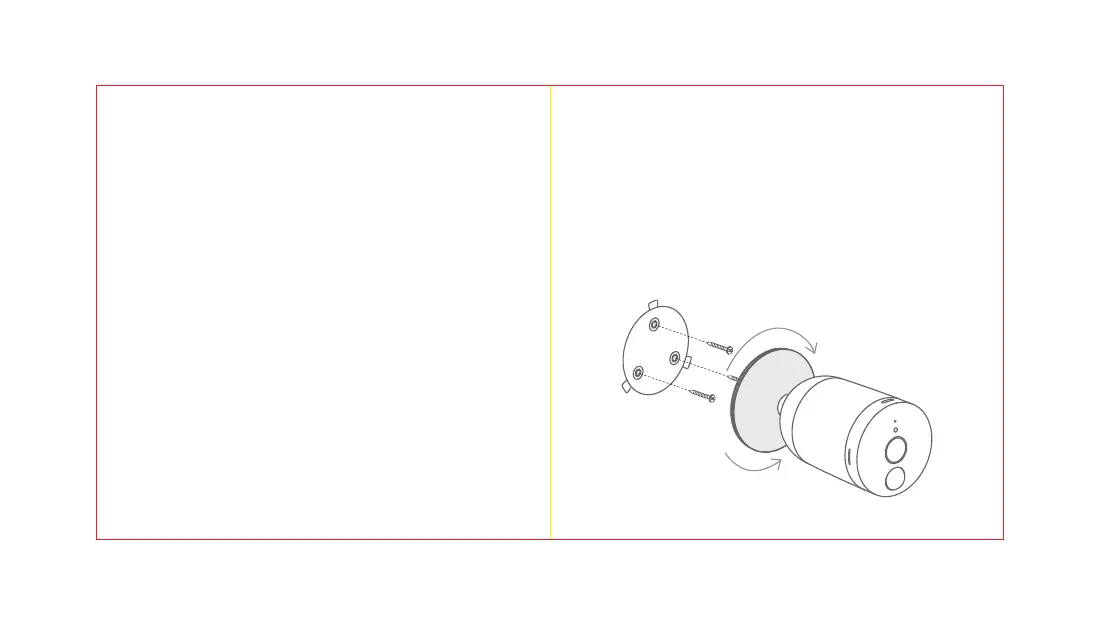
Step1
Usetheprovidedanchorsandscrewstomountthe
wallmountbase.Ifthewalliswooden,youcan
screwthemountdirectly.
5.Mountinginstructions
(Makesurethecorrectsideofthewallmountbasefacesthewall.)
Attachyourcameratothecamerabaseand
secureitbyrotatingclockwise.
Rotateclockwise
tomount
Rotate
counterclockwise
tounmount


 To Next Page