EasyManua.ls Logo

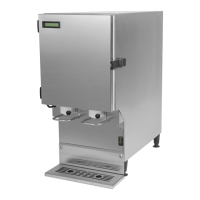
KanPak CDG-211 - User Manual

KanPak CDG-211
20 pages
Print Icon
To Next Page IconTo Next Page
Loading...
CDG Series
Liquid Dispensers
CDG-211 CDG-311
NORTH AMERICAN
OPERATORS MANUAL
KanPak LLC, 425 Main Street North, Southbury, CT 06488
Phone: 800.569.0826 or 203.264.7203 • Fax: 203.264.7292 • Email: kpservice@kanpak.us
www.kanpak.us
8-0500-0003 - 20121212

Questions and Answers

  • M
    Michael ClarkAug 1, 2025
    What to do if my KanPak Dispenser has no power, display, or lights?
    • M
      Mrs. Elizabeth JonesAug 1, 2025
      First, check the power control switch on the lower left side of the unit; turn it OFF, wait 5 seconds, then turn it ON. Next, see if the circuit breaker on the dispenser has tripped; it's also located on the lower left side, below the power control switch. If tripped (indicated by a white strip), depress the breaker button to reset it. Also, ensure the dispenser power cord is plugged into a functioning outlet, and depress the reset button of a GFI outlet if equipped. If there's still no power, have a qualified person check the in-store circuit-breaker to restore power to the circuit.
  • C
    Cody GonzalezAug 7, 2025
    Why is my KanPak CDG-211 leaking product?
    • A
      Alan WilliamsonAug 7, 2025
      A KanPak Dispenser might leak due to several reasons. First, make sure the valve door is fully closed and the thumbscrew is tightened securely. Then, check that the product tube is centered properly in the dispensing valve assembly. Finally, product accumulation within the valve assembly can also cause leaks, so clean the valve assembly and surrounding area.
  • W
    warrenmaryAug 13, 2025
    Why is my KanPak CDG-211 Dispenser not dispensing product?
    • A
      Amy MirandaAug 13, 2025
      If your KanPak dispenser isn't dispensing product, the product tube might not be inserted properly. Verify the product tube is installed correctly, and is not pinched, twisted or bent.
  • L
    lchenAug 19, 2025
    Why is the temperature of my KanPak Dispenser display/compartment too warm or too cold?
    • J
      James Johnson DDSAug 19, 2025
      If the display or compartment temperature is too warm or cold, start by removing any obstructions blocking the vents located on the top rear of the unit. If the defrost cycle has just completed, check the temperature again after 15 minutes. If there is ice or frost build-up in the compartment, perform the standard preventative maintenance as outlined. If these steps don't resolve the issue, the temperature control may require adjustment, and you should contact KanPak Equipment Service.
  • V
    Valerie HallAug 25, 2025
    What does ERR on the display or a flashing yellow LED mean on my KanPak CDG-211 Dispenser?
    • N
      ndanielAug 26, 2025
      When you see 'ERR' on the display or a flashing yellow LED, it means the unit requires servicing. Contact KanPak Equipment Service.

Summary

Inspection for Damage

Damage Inspection Process

Inspect shipping container and dispenser for damage upon receipt and report immediately.

Safety Information

General Safety Precautions

Essential safety rules for operating and maintaining the dispenser.

Specifications Overview

Product Model Specifications

Details on model types, product capacity, weight, and dimensions.

Unpacking and Reshipment

Dispenser Unpacking Procedure

Step-by-step instructions for safely unpacking the dispenser.

Reshipment Guidelines

Procedures and considerations for packaging the unit for reshipment.

Electrical and Servicing Requirements

Electrical Requirements

Specifications for power source, cord, and grounding for safe operation.

Servicing Qualifications

Mandates qualified technicians for electrical and refrigeration servicing.

Product Disposal

Environmental Disposal

Guidance on responsible recycling and disposal of the product.

Installation and Startup

Installation Location Factors

Considerations for placement, clearance, and level surface for the dispenser.

Initial Startup Procedure

Steps for powering on, initial run, and temperature verification.

Loading Product

Bag-In-Box Product Loading

Detailed instructions for loading pre-chilled Bag-In-Box products.

Operation and Maintenance

Basic Dispenser Operation

Simple steps for using the dispenser after initial setup.

Preventative Maintenance Schedule

Recommended daily, monthly, and bi-annual cleaning tasks.

Defrosting Procedure

Instructions for manual defrosting to clear frost or ice build-up.

Control System Reset

Procedure to reset the dispenser's control system.

Dispenser Display Information

LCD Display Functions

Understanding LCD messages for power, temperature, and cycles.

LED Indicator Guide

Interpreting Power, Ready, and Defrost LED status lights.

Troubleshooting Guide

Common Issue Resolution

Solutions for common problems like no power or dispensing issues.

Drawings

CDG-211 H Dimensions

Detailed dimensional drawings for the CDG-211 H model.

Drawings

CDG-211 V Dimensions

Detailed dimensional drawings for the CDG-211 V model.

Drawings

CDG-311 H Dimensions

Detailed dimensional drawings for the CDG-311 H model.

Drawings

CDG-311 HT Dimensions

Detailed dimensional drawings for the CDG-311 HT model.

Drawings

CDG-311 V Dimensions

Detailed dimensional drawings for the CDG-311 V model.

Parts Diagrams

CDG-211 H Parts Diagram

Exploded view and parts list for the CDG-211 H model.

Parts Diagrams

CDG-211 V Parts Diagram

Exploded view and parts list for the CDG-211 V model.

Warranty Information

Warranty Time Period and Coverage

Details on the one-year warranty duration and what it covers.

Warranty Claim Procedure

Steps to follow when initiating a warranty service request.

Warranty Exclusions List

Situations and conditions not covered by the product warranty.

KanPak CDG-211 Specifications

General IconGeneral
BrandKanPak
ModelCDG-211
CategoryDispenser
LanguageEnglish

Related product manuals