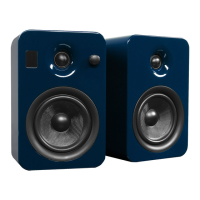
Need help?
Do you have a question about the Kanto YU2 and is the answer not in the manual?
Key safety instructions including warnings about water, cleaning, ventilation, and heat sources.
Precautions regarding power cords, mains socket outlets, and servicing by qualified personnel.
Information on FCC and Industry Canada compliance for digital devices.
Lists and illustrates all components included with the YU2 Powered Speakers.
Details the 3/4" Silk Dome Tweeter, 3" Kevlar Mid/Woofer Driver, and LED indicator.
Identifies controls and ports including ON/OFF switch, volume, AUX, USB, Subwoofer, and DC input.
Guidance on positioning speakers for optimal sound and connecting the active to passive speaker.
Instructions for connecting the AC/DC power supply and turning the unit on.
Essential safety notes on connecting cables, volume levels, and amplifier connections.
How to connect audio sources using 3.5mm AUX, RCA, and USB cables.
Explains the benefits of using the YU2's USB DAC for computer audio.
Visual guide demonstrating connections for various audio devices.
Instructions for connecting a powered subwoofer using the SUB OUT RCA port.
Discusses subwoofer crossover and volume controls, recommending Kanto models.
Troubleshooting steps for when the front panel lights are not illuminated.
Steps to resolve issues when the unit has power but no sound is produced.
Guidance on fixing problems where audio only comes from one speaker.
Tips for improving sound quality, including volume, wiring, and speaker placement.
Solutions for buzzing, hissing, or distorted audio output.
Troubleshooting steps for issues with the attached subwoofer's audio output.
Detailed technical specifications for the YU2 system, including drivers, power, dimensions, and weight.
Information regarding the disposal of electrical and electronic equipment.
Details the 24-month parts and labour warranty, coverage, and exclusions.
Overview of Kanto's bookshelf and desktop speaker systems, including YU2, SUB6, YU4, and SUB8.
Information on Kanto's line of audio and video cables, including types and colors.
Provides contact numbers for US/Canada and UK, and email for support.
The Kanto YU2 Powered Speakers are a compact and versatile audio system designed to enhance your listening experience, whether for desktop use, bookshelf placement, or as a standalone stereo system. These speakers are engineered to deliver remarkably bold and clean sound, with deep, thumping lows and clear, scintillating highs, surprising for their size. The YU2 system is flexible, capable of accepting two input sources and connecting to a subwoofer for enhanced low-frequency effects (LFE).
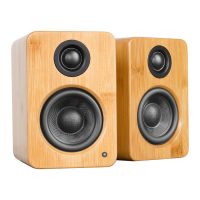
The YU2 system consists of an active speaker and a passive speaker. The active speaker houses the amplifier and all input/output connections, while the passive speaker connects to the active speaker via speaker wire. Each speaker features a 3/4" silk dome tweeter for crisp highs and a 3" Kevlar mid/woofer driver for rich mids and bass. An LED indicator on the front panel of the active speaker provides visual feedback on the speaker's status.
The rear panel of the active speaker is equipped with an ON/OFF switch that also functions as a volume control, allowing you to power the speakers on or off and adjust the audio level. For connecting the passive speaker, there are right channel output terminals with clearly marked positive (+) and negative (-) connections.
The YU2 offers multiple input options for connecting various audio sources. It includes a 3.5mm stereo mini-jack AUX input, which is ideal for connecting devices like media players, phones, or other audio sources with a standard headphone jack. A significant feature is the USB Audio Input Connector, which allows you to connect your computer directly to the speakers. This USB connection utilizes a high-quality built-in Digital-to-Analog Converter (DAC) that supports data streams up to 16-bit/48kHz resolution. By bypassing your computer's potentially noisy internal DAC, the YU2's DAC ensures a richer, distortion-free sound. When using the USB input, you'll need to select "USB Audio DAC" as the output device in your computer's audio settings.
For those who desire even deeper bass, the YU2 includes a Subwoofer Output (RCA connector). This allows you to connect a powered subwoofer, such as Kanto's sub6 or sub8, to augment the low-frequency response of the system. The DC Input Connection is where the external AC/DC power adapter plugs in, supplying power to the active speaker. Finally, a Bass Reflex Port on the rear panel helps to enhance bass response.
Setting up the YU2 speakers is straightforward. First, ensure the ON/OFF switch is in the OFF position. Connect the active speaker to the passive speaker using the provided speaker wire, matching the RED (+) and BLACK (-) terminals. If you need to place the speakers further apart than the supplied cable allows, it's recommended to use a heavier gauge speaker cable to minimize signal loss.
Once the speakers are connected to each other, you can connect your audio sources. For analog devices, use the 3.5mm stereo mini-jack AUX cable. For computer audio, connect a USB-A to USB-B cable from your computer to the YU2's USB input. Remember to adjust your computer's audio output settings to "USB Audio DAC" when using the USB connection. If you're connecting a turntable, ensure it has a built-in phono pre-amp or use an external one, as the YU2 does not have a dedicated phono input.
After all audio cables are connected, plug the AC/DC power supply into the active speaker and then into a wall outlet. Turn the Volume Control clockwise to the ON position, and then adjust the volume to your desired listening level.
For optimal sound performance, speaker placement is crucial. The YU2 speakers are designed for near-field listening but can also function in a larger room. Experiment with the distance between the two speakers and their distance from the rear wall. Positioning them too close or too far apart can negatively impact stereo imaging. For the best bass response, Kanto recommends placing the YU2 at least 20cm to 25cm (approximately 8 to 10 inches) from the rear wall. Room acoustics vary, so some experimentation may be necessary to find the most satisfying sound.
If you choose to add a subwoofer, connect a single RCA subwoofer cable from the YU2's SUB OUT to the AUDIO INPUT on your subwoofer. Most quality subwoofers offer crossover and volume controls, allowing you to customize the amount of bass to your preference.
The YU2 speakers are designed for durability and ease of use, requiring minimal maintenance.
By following these guidelines, you can ensure the longevity and optimal performance of your Kanto YU2 Powered Speakers.
 Speaker Components
| tweeter size | 3/4 inch |
|---|---|
| woofer size | 3 inch |
| nominal impedance | 4 Ohm |
Audio Specifications| sensitivity | 84 dB |
|---|---|
| power output | 25 Watts RMS per channel |
| total harmonic distortion | < 0.1% |
Frequency Response| crossover frequency | 2.5 kHz |
|---|---|
| frequency range | 20 Hz - 20 kHz ± 6 dB |
| frequency response | 80 Hz - 10 kHz |
Connectivity| input sensitivity | 450 mV |
|---|---|
| inputs | 1 x 3.5mm stereo mini-jack AUX, 1 x USB Audio |
| outputs | 1 x Subwoofer |
Power and Consumption| input voltage/frequency | AC 100V-240V 50/60 Hz (auto switching) |
|---|---|
| standby power consumption | < 0.5 W |
| amplifier type | Class D |
 Weight and Dimensions
| dimensions (each speaker) | W 3.9” x H 5.9” x D 5.3” (100 x 150 x 135mm) |
|---|---|
| net weight (active) | 3 lbs (1.4kg) |
| net weight (passive) | 2.8 lbs (1.3kg) |
| gross weight | 7.9 lbs (3.6kg) (boxed pair) |

 To Next Page