6
Supporting your digital lifestyle
™
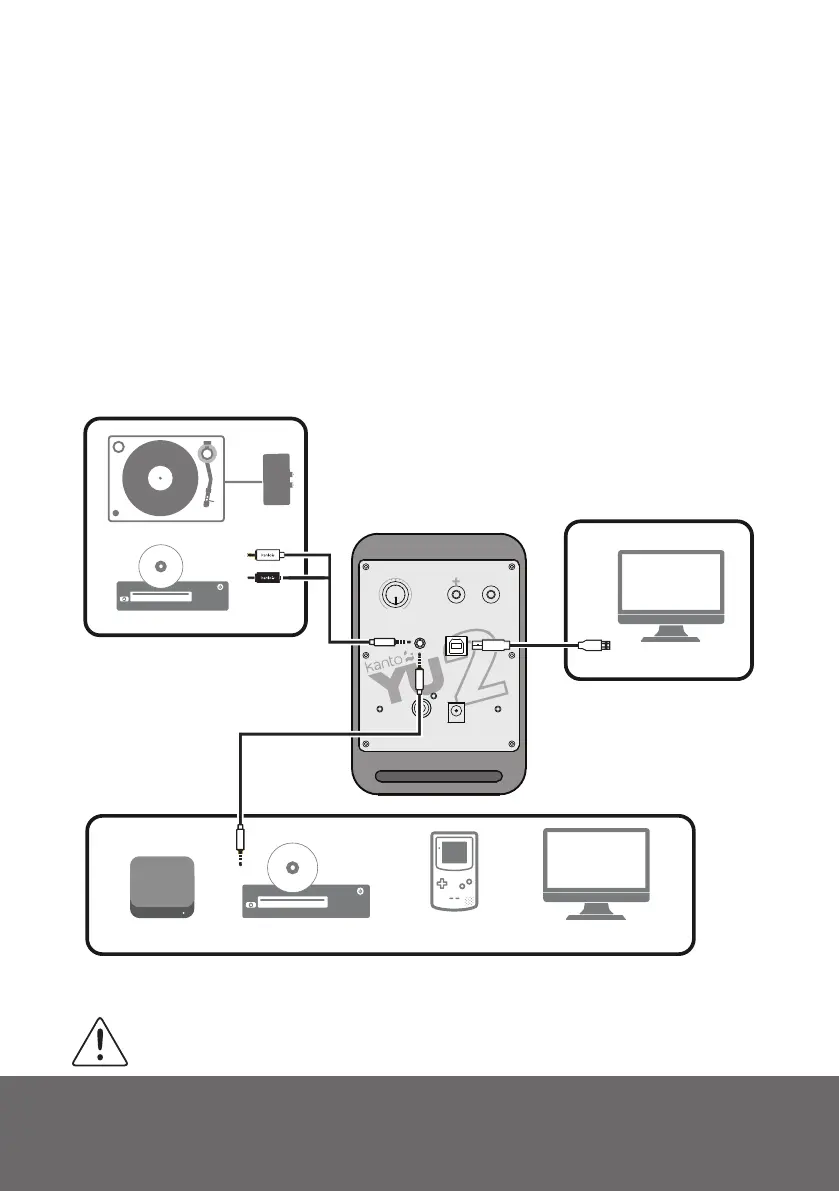
Connecting Audio Sources
Use the appropriate audio cable to connect your audio source components to your speakers.
• 3.5mm stereo mini-jack AUX cable
• Stereo RCA to 3.5mm stereo mini-jack AUX cable
• USB-A to USB-B cable
The YU2 features a high quality USB DAC (digital-to-analog converter) that supports data
streams up to 16-bit/48kHz resolution. When connecting your computer via USB connection,
you bypass the noisy bult-in DAC of the computer, and audio signals are instead decoded by
YU2’s DAC. This delivers rich and distortion-free sound to the speakers.
If you choose to connect your speakers via the USB interface, please ensure you have changed
the proper audio output settings in your computer - that is, audio signals are output to the YU2
speakers and not to your computer’s internal speakers. Select “USB Audio DAC” as the output
device in your computer audio settings.
ATTENTION
*Some models of turntables include a built-in Phono Pre-Amp.
USB
3.5MM - 3.5MM
RCA - 3.5MM
CD / DVD
PHONO
PRE-AMP*
TURNTABLE
−
Volume
+
OFF
MEDIA PLAYERS
CD / DVD / BLURAY
GAME CONSOLES
COMPUTER
COMPUTER


 To Next Page