EasyManua.ls Logo

Kantronics KPC-2 - Page 23

Default Icon
86 pages
Print Icon
To Next Page IconTo Next Page
To Previous Page IconTo Previous Page
Loading...
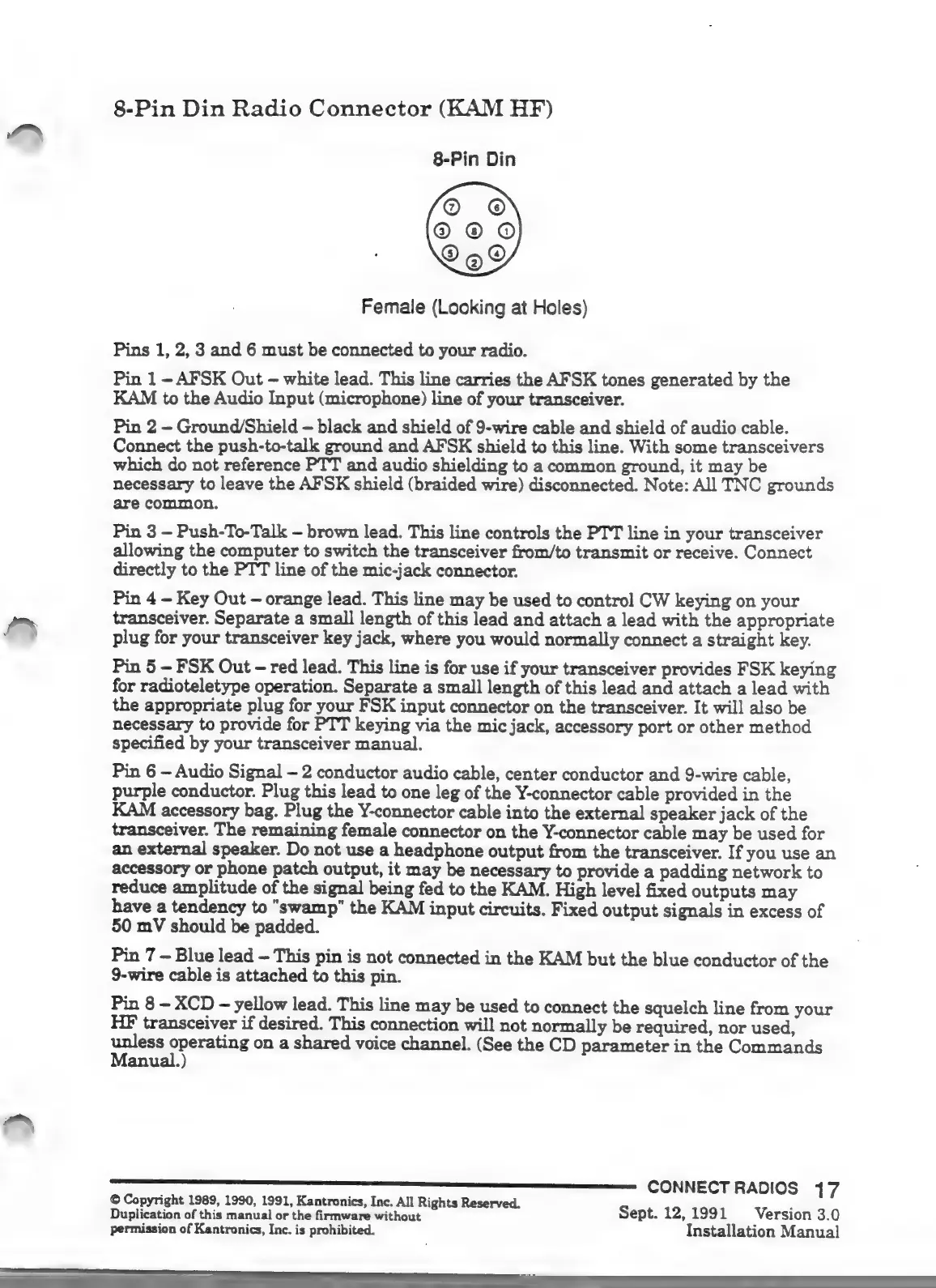
8-Pin
Din
Radio
Connector
(KAM
HF)
8-Pin
Din
Female
(Looking
at
Holes)
Pins
1,
2,
3
and
6
must
be
connected
to
your
radio.
Pin
1
-
AFSK
Out
-
white
lead.
This
line
carries
the
AFSK
tones
generated
by
the
KAM
to
the
Audio
Input
(microphone)
line
of
your
transceiver.
Pin
2
-
Ground
/
Shield
-
black
and
shield
of
9-wire
cable
and
shield
of
audio
cable.
Connect
the
push-to-talk
ground
and
AFSK
shield
to
this
line.
With
some
transceivers
which
do
not
reference
PTT
and
audio
shielding
to
a
common
ground,
it
may
be
necessary
to
leave
the
AFSK
shield
(braided
wire)
disconnected.
Note:
All
TNC
grounds
are
common.
Pin
3
-
Push-To-Talk
-
brown
lead.
This
line
controls
the
PTT
line
in
your
transceiver
allowing
the
computer
to
switch
the
transceiver
from/to
transmit
or
receive.
Connect
directly
to
the
PTT
line
of
the
mic-jack
connector.
Pin
4
-
Key
Out
-
orange
lead.
This
line
may
be
used
to
control
CW
keying
on
your
E?
transceiver.
Separate
a
small
length
of
this
lead
and
attach
a
lead
with
the
appropriate
i
plug
for
your
transceiver
key
jack,
where
you
would
normally
connect
a
straight
key.
Pin
5
-
FSK
Out-
red
lead.
This
line
is
for
use
if
your
transceiver
provides
FSK
keying
for
radioteletype
operation.
Separate
a
small
length
of
this
lead
and
attach
a
lead
with
the
appropriate
plug
for
your
FSK
input
connector
on
the
transceiver.
It
will
also
be
necessary
to
provide
for
PTT
keying
via
the
mic
jack,
accessory
port
or
other
method
specified
by
your
transceiver
manual.
Pin
6
-
Audio
Signal-
2
conductor
audio
cable,
center
conductor
and
9-wire
cable,
purple
conductor.
Plug
this
lead
to
one
leg
of
the
Y-connector
cable
provided
in
the
KAM
accessory
bag.
Plug
the
Y-connector
cable
into
the
external
speaker
jack
of
the
transceiver.
The
remaining
female
connector
on
the
Y-connector
cable
may
be
used
for
an
external
speaker.
Do
not
use
a
headphone
output
from
the
transceiver.
If
you
use
an
accessory
or
phone
patch
output,
it
may
be
necessary
to
provide
a
padding
network
to
reduce
amplitude
of
the
signal
being
fed
to
the
KAM.
High
level
fixed
outputs
may
have
a
tendency
to
"swamp"
the
KAM
input
circuits.
Fixed
output
signals
in
excess
of
50
mV
should
be
padded.
Pin
7
-
Blue
lead
-
This
pin
is
not
connected
in
the
KAM
but
the
blue
conductor
of
the
9-wire
cable
is
attached
to
this
pin.
Pin
8
-
XCD
-
yellow
lead.
This
line
may
be
used
to
connect
the
squelch
line
from
your
HF
transceiver
if
desired.
This
connection
will
not
normally
be
required,
nor
used,
unless
operating
on
a
shared
voice
channel.
(See
the
CD
parameter
in
the
Commands
Manual.)
©
Copyright
1989,
1990, 1991,
Kantronics,
Inc.
All
Rights
Reserved.
5
Duplication
of
this
manual
or
the
firmware
without
Sept.
12,
1991
Version
3.0
permission
of
Kantronics,
Inc.
is
prohibited.
Installation
Manual

Other manuals for Kantronics KPC-2

Related product manuals