EasyManua.ls Logo

Kantronics KPC-2 - Calibration and Equalization

Default Icon
86 pages
Print Icon
To Next Page IconTo Next Page
To Previous Page IconTo Previous Page
Loading...
Enabling
the
Isolation
Circuit
in
the
KAM
1.
Refer
to
the
Assembly
and
Disassembly
section
for
instructions
if
necessary
and
remove
the
KAM
from
its
case.
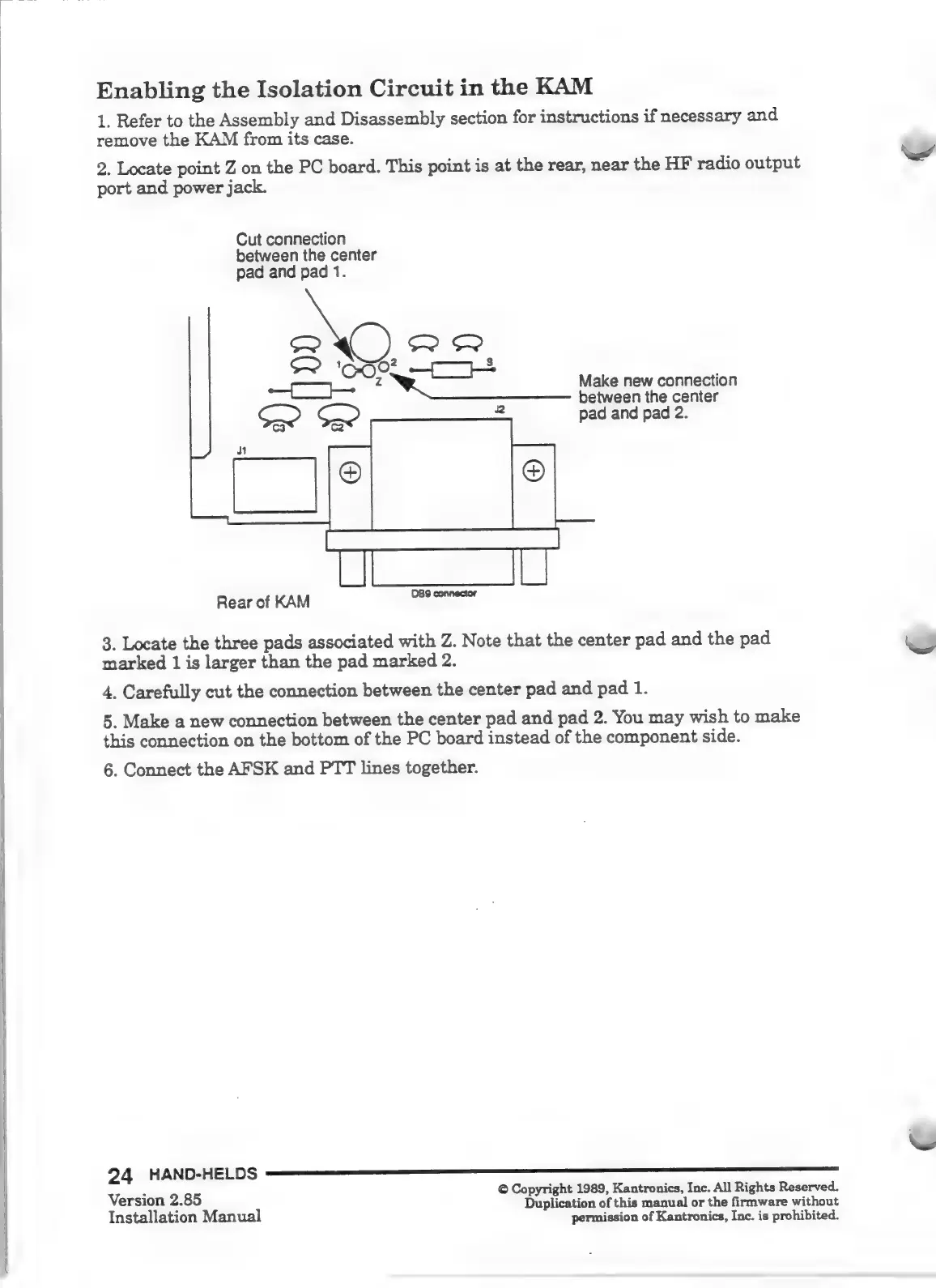
2.
Locate
point
Z
on
the
PC
board.
This
point
is
at
the
rear,
near
the
HF
radio
output
port
and
power
jack.
Cut
connection
between
the
center
pad
and
pad
1.
Cc
پټ󰾯
Bel
10-30?
شح󰾯
2
Make
new
connection
between
the
center
pad
and
pad
2.
Rear
of
KAM
n
3.
Locate
the
three
pads
associated
with
Z.
Note
that
the
center
pad
and
the
pad
marked
1
is
larger
than
the
pad
marked
2.
4.
Carefully
cut
the
connection
between
the
center
pad
and
pad
1.
5.
Make
a
new
connection
between
the
center
pad
and
pad
2.
Wu
may
wish
to
make
this
connection
on
the
bottom
of
the
PC
board
instead
of
the
component
side.
6.
Connect
the
AFSK
and
PTT
lines
together.
version
2.85
©
Copyright
1989,
Kantronics,
Inc.
All
Rights
Reserved.
ersion
2.
Duplication
of
this
manual
or
the
ſirmware
without
Installation
Manual
permission
of
Kantronics,
Inc.
is
prohibited.

Other manuals for Kantronics KPC-2

Related product manuals