CG3000
Quick
Installation
Guide
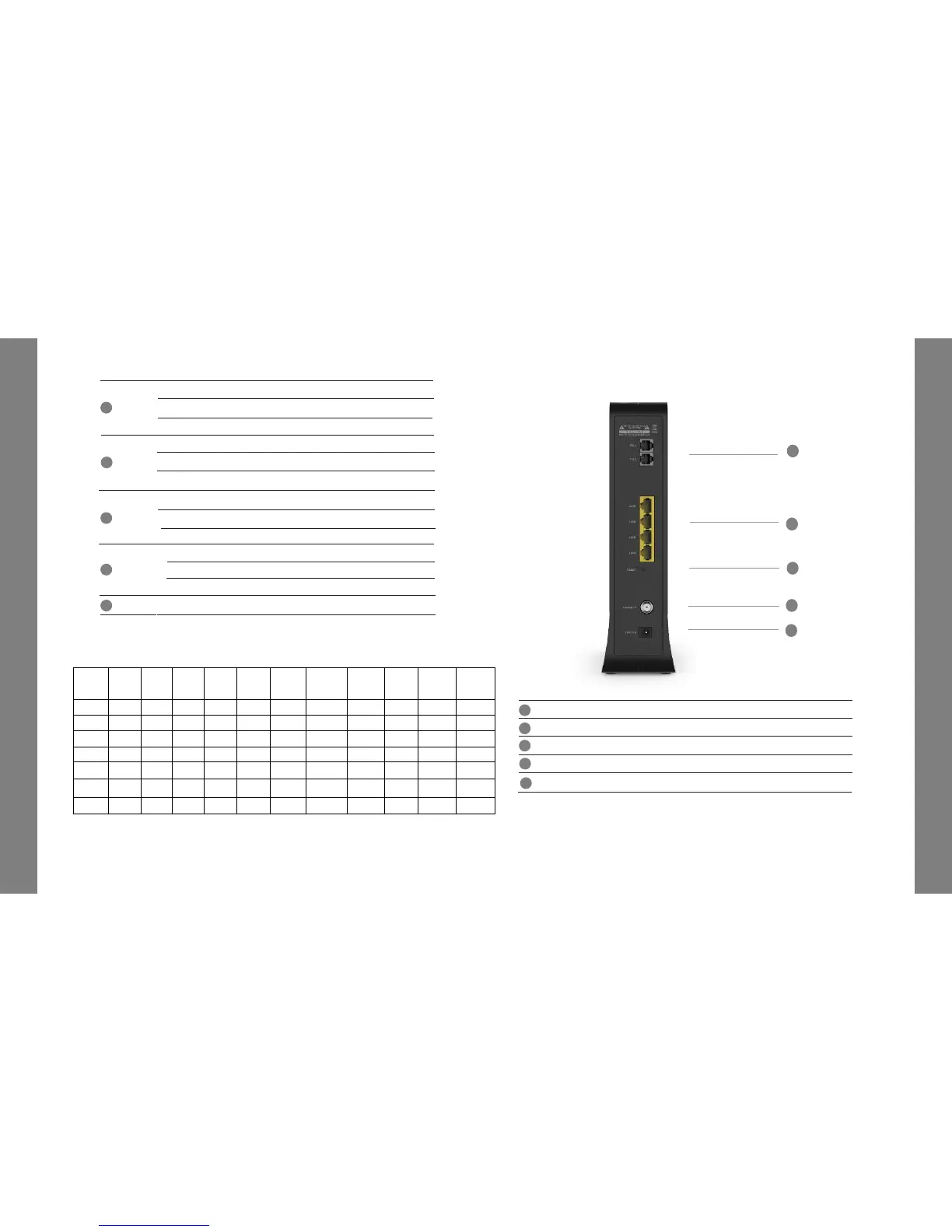
3. Rear Panel
CG3000
Quick
Installation
Guide
3
5G
Off
5G WiFi Interface disabled.
On
5G WiFi Interface enabled.
2.4G
5
6
7
8
Off 2.4G WiFi Interface disabled.
Flashing 2.4G WiFi is sending or receiving data.
On 2.4G WiFi Interface enabled.
Flashing
5G WiFi is sendingor receiving data.
Push
Button for WPS configuration.
WPS
9
3
2
1
4
5
2. LED Status
LED
Power
up
Initial
DS
scan
DS
locking
US
ranging
Off On/Off On/Off On/Off On/Off On/Off On/Off On/Off On/Off On/Off On/Off
ETH1~4 Off On/Off On/Off On/Off On/Off On/Off On/Off On/Off On/Off On/Off On/Off
TEL1~2 Off Off Off Off Off Off Off Blinking Blinking Blinking On
TEL1~2
Off
The telephony service isnot available.
Flashing
The telephony line is in use.
On
The telephony service is available.
ETH 1~4
Off
The LAN port is not connected.
Flashing
The LAN port is sendingor receiving data.
On The LAN port is connected.
CG2200
Quick
Installation
Guide
CG2200
Quick
Installation
Guide
RESET
Pin-hole for factory reset.
LAN1~4
RJ45 Ethernet ports to connect your PC or home network devices.
CABLE IN Connects the coaxial cable for cable internet service.
3
2
1
4
TEL1~2
RJ11 Telephone ports to connect your phone or fax.
5
12VIN
Connects the unit to DC 12V power.


 To Next Page