CG3000
Quick
Installation
Guide
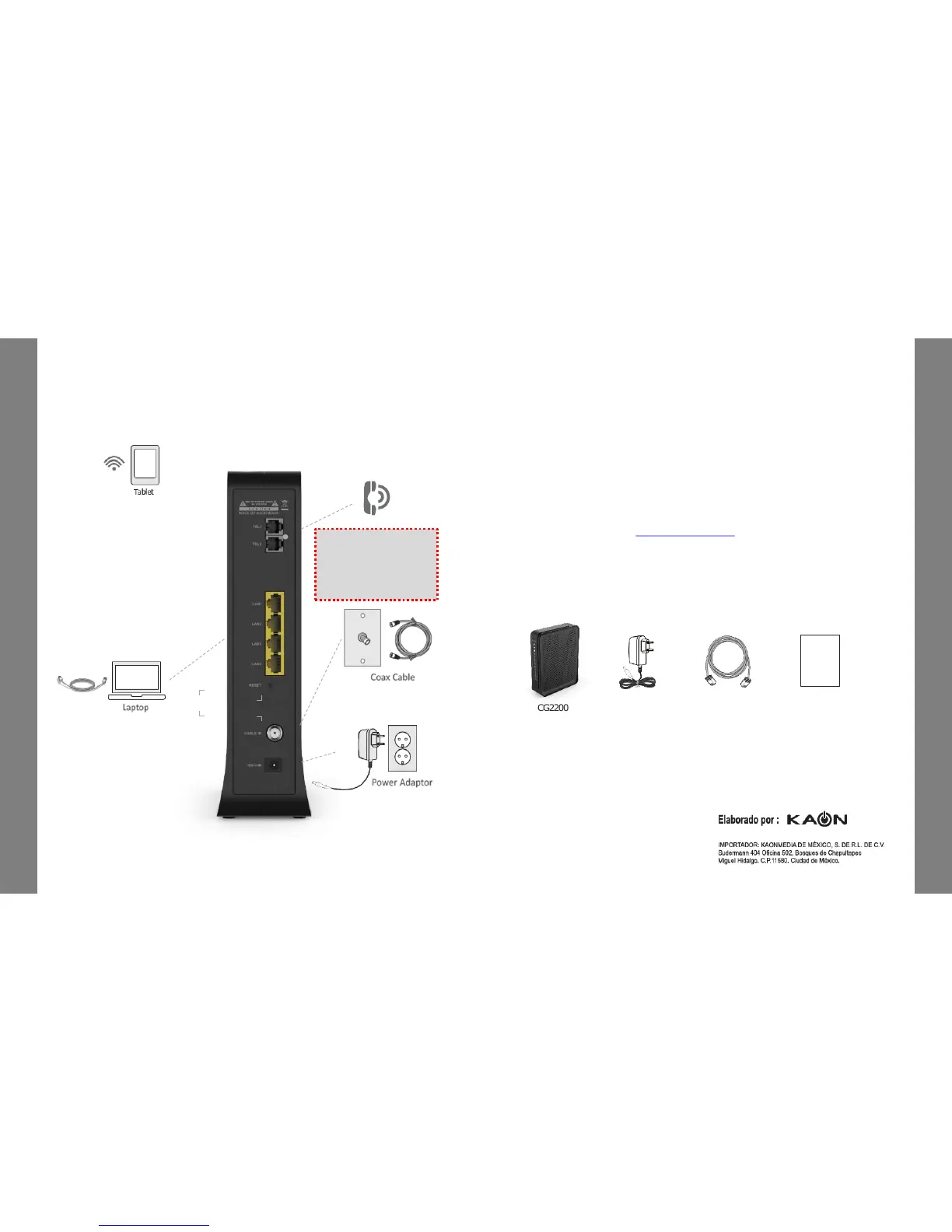
4. Connecting and Installing devices
Before installation, please check with your service provider to ensure that
the cable broadband is active.
CG3000
Quick
Installation
Guide
Phone
6. PackageContent
CG2200
PowerAdaptor
EthernetCable
(CAT5/RJ45)
QuickGuide
Quick Guide
5. Instruction for Connecting Modem – PC
1) Make sure the following:
- Your Cable Modem is powered ON. The power LED will be turned ON.
- Your PC is turned-on and connected to Cable Modem using an Ethernet cable.
- Connect tightly the coaxial cable to the cable outlet.
- After Online LED is ON, Cable Modem becomes online.
2) Configure your PC to obtain an IP address from a DHCP server.
3) From your PC, start your web browser application like Chrome, InternetExplorer,
or etc.
4) Type a valid URL such as “www.kaonmedia.com” and <Enter>.
The web site should be open if connectedcorrectly.
CG2200
Quick
Installation
Guide
CG2200
Quick
Installation
Guide
Adaptador ca/cc
Entrada: 100-240 Vca 50/60 Hz 0.8ª
Salida: 12 Vcc 2.5A
This Device must be
installed at a distance of 1
meter or more away from
the telephone, as this may
cause frequency
interference


 To Next Page