This document describes the Kärcher Air Purifier AF 20, a device designed to improve indoor air quality.
Function Description
The AF 20 air purifier operates by drawing in ambient air, filtering out fine dust particles, and releasing purified air. Its core functionality revolves around a multi-stage filtration system that includes fine filters to achieve a high efficiency of 99.95% for particles down to 0.3 µm. The device features an integrated air quality sensor that automatically measures the PM 2.5 index in the room and adjusts its operation accordingly.
The control panel, located on the top of the device, provides various operational settings and displays. Key indicators include:
- PM 2.5 Air Quality Index (3): Displays the concentration of fine dust numerically in µg/m³ and uses a color-coded index (Blue for Good, Yellow for Moderate, Red for Poor) to indicate air quality.
- Fan Level Display (5): Shows the current fan speed (I, II, or III).
- Timer Display (9): Indicates the set operating time (2, 4, 6, or 8 hours).
- Filter Service Life Display (11): Shows the remaining filter lifespan in hours, with symbols indicating different ranges (e.g., 2401-3000h, 1-600h).
- Air Quality Display and Device Display (13): Provides a visual representation of the air quality and device status.
The device can operate in several modes:
- On/Off (1): Powers the device on or off.
- Function Lock (2): Locks the control panel to prevent accidental changes to settings, useful for households with children or pets.
- Display Off (4): Turns off the display lights.
- Auto Mode (6): Automatically adjusts the fan level based on the detected air quality. If air quality is poor, the fan speed increases.
- Fan Level Adjustment (7): Allows manual selection of fan speeds (I, II, or III).
- Sleep Mode (8): Runs the fan at the lowest speed for quiet operation, with all light symbols turned off.
- Timer (10): Sets an operating duration after which the device automatically switches off.
- Filter Reset (12): Resets the filter service life indicator after a filter change.
Important Technical Specifications
- Electrical Connection:
- Mains voltage: DC24V
- Phase: ~ 1
- Power frequency: 50 - 60 Hz
- Nominal power: 24 W
- Standby power: <0.5 W
- Device Performance Data:
- Clean air flow rate: 220 m³/h
- Usable floor space: 20 m² (based on 3m ceiling height and 3 air changes per hour)
- Filter efficiency at 0.3 µm: 99.95%
- Maximum filter working time: 3000 hours (depending on environment)
- Ventilation levels: 3
- Dimensions and Weights:
- Weight: 2.7 kg
- Length x width x height: 220x220x343 mm
- Ambient Conditions:
- Ambient temperature: -10 °C to +40 °C
- Determined Values (according to EN 60335-2-69):
- Sound pressure level: 27-52 dB(A)
Usage Features
The AF 20 is designed for straightforward operation.
- Switching On/Off: Press the On/Off button (1). The device starts automatically. After switching on, the control panel displays and buttons briefly light up, and the integrated air quality sensor begins measuring. To switch off, press the On/Off button again.
- Auto Mode: Press the Auto mode button (6) to activate or deactivate. In this mode, the device intelligently adjusts fan speed based on real-time air quality.
- Sleep Mode: Press the Sleep mode button (8) to activate or deactivate. This mode ensures quiet operation with minimal fan speed and all lights off, ideal for nighttime use.
- Fan Level Adjustment: Repeatedly press the Fan level button (7) to cycle through fan speeds I, II, or III. The selected level is shown on the display. For effective air purification, especially for smoke, running at maximum speed (level III) for 15-20 minutes is recommended, with windows and doors closed.
- Timer Setting: Repeatedly press the Timer button (10) to set an operating duration of 2, 4, 6, or 8 hours. The device will automatically turn off after the set time. The fan level can be adjusted during timed operation.
- Control Panel Lock: Press and hold the Function lock button (2) for 3 seconds to lock or unlock the control panel, preventing unintended changes.
Maintenance Features
Regular maintenance ensures optimal performance and longevity of the air purifier.
- Filter Insertion: Before initial use, unpack the pre-installed fine filters. Turn the device over, rotate the filter cover lock (14) 45 degrees clockwise, remove the filter cover (15), unpack and insert the filters (17) ensuring the pull tabs (16) are visible and facing inwards. Then, replace the filter cover and rotate the lock 45 degrees anticlockwise.
- Filter Replacement: The filters should be replaced after 2500-3000 operating hours, or sooner if the device becomes louder, emits unpleasant odors, or the filters are visibly dirty. The filter service life display (11) will flash to remind you. To replace, switch off the device, unplug it, turn it over, rotate the filter cover lock 90 degrees clockwise, remove the old filters, unpack and insert new ones, then reassemble and reset the filter indicator by pressing the Filter reset button (12) for 3 seconds.
- Cleaning: Always switch off the device and unplug the power supply unit (20) before cleaning. Wipe the device with a soft, dry cloth. Do not use abrasive or corrosive detergents, and never immerse the device or power supply unit in water. Ensure the air inlet and outlet are not covered.

 Need help?
 General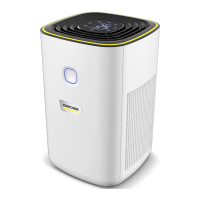

 To Next Page