28 English
Our Kärcher branch will be pleased to help you further in the case of questions or
faults. See address on the reverse.
Remove the battery from the battery compartment until the indication on the
display has completely gone out.
or
The settings are reset by pressing the OK button for 5 seconds.
Only use original accessories and spare parts, they ensure the safe and trouble-free
operation of the device.
For information about accessories and spare parts, please visit www.kaercher.com.
Subject to technical changes.
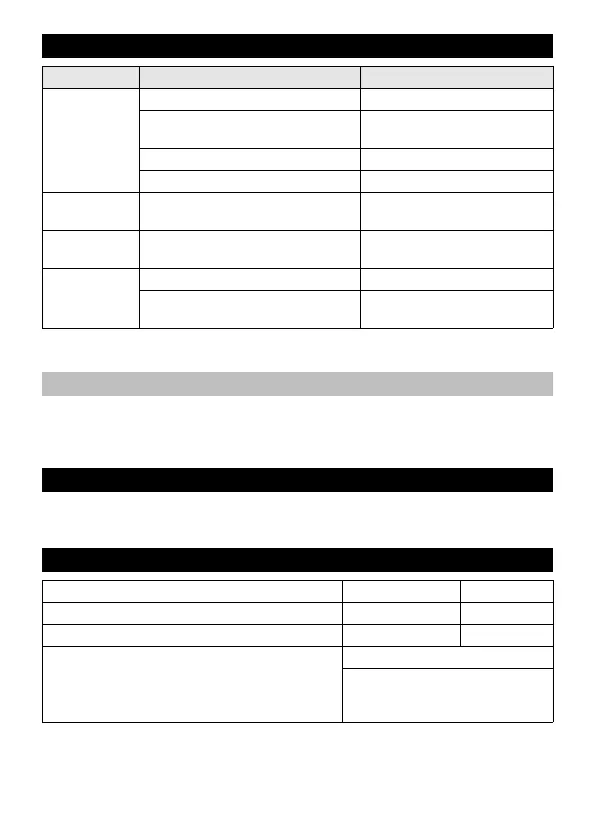
Troubleshooting
Fault Cause Correction
The irrigation
does not take
place in spite
of the pro-
gramming.
Water tap is closed. Open tap.
Battery depleted. Insert a new 9V battery (type
6LR61).
Battery contacts oxidized. Clean the contacts.
Filter gaskets blocked. Clean the filter gasket.
Valve does not
open / close.
When the control unit is removed,
the valve cannot open / close.
Attach the control unit to the
valve unit.
No display in-
dication
Battery empty or contacts oxidised. Insert a new 9V battery (type
6LR61) or clean contacts.
Leakage at the
water connec-
tion.
Filter gasket defective. Replace the filter gasket.
The water connection at the water
tap has become loose.
Reconnect the water connec-
tion.
Performing a reset
Accessories and Spare Parts
Technical specifications
Operating pressure 0,1 - 1,0 (1 - 10) MPa (bar)
Max. feed temperature 35 °C
Ambient temperature +1 -> +60 °C
Battery type 9V (6LR61 / Alkaline)
9V (size as: 6LR61 / Rechargea-
ble battery with low self-discharge
and at least 250 mAh)


 To Previous Page