24
Connectivity
A
CONNECTING A WRCE90RF CEILING HOOD WITH A
VICEROY HOB
Setting up new linking method
Stage A - Congure hob
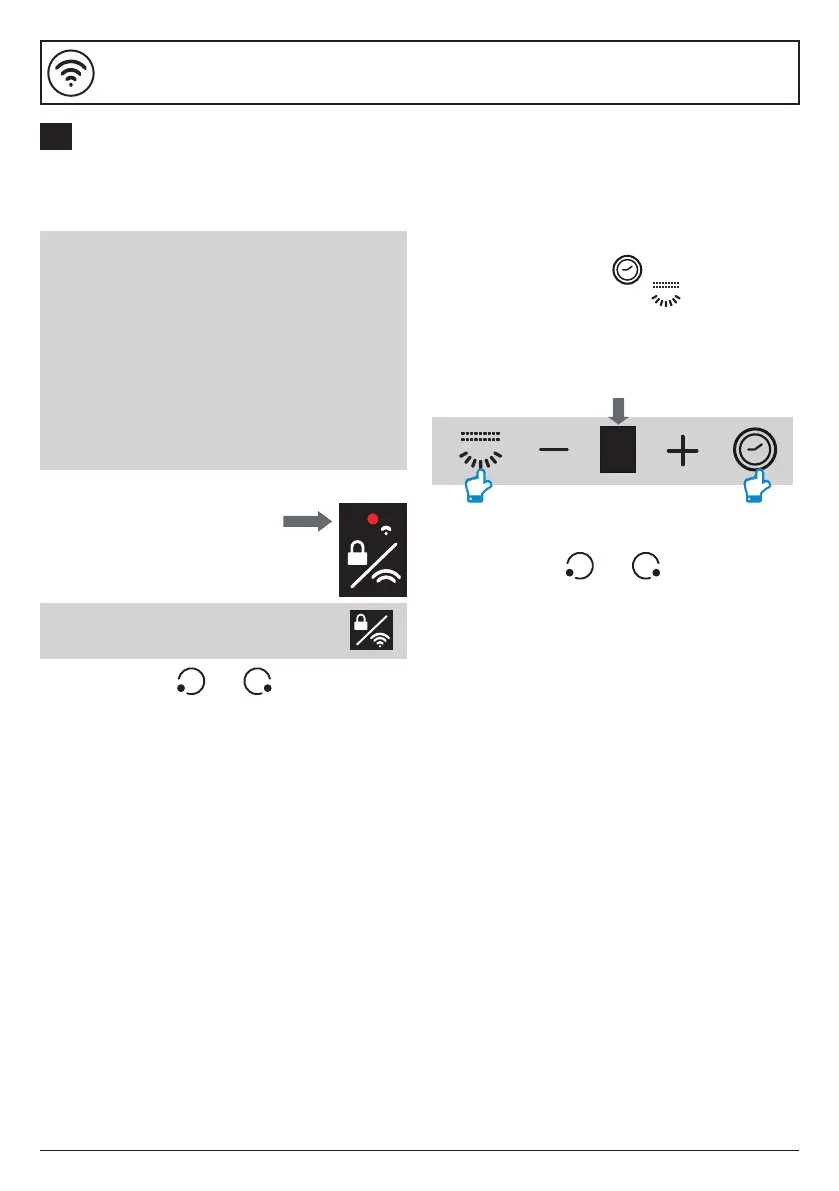
1. Turn on the hob and make
sure the Connectivity Indicator
lamp is lit up.
2. Press the keys and together on
the hob and the connection indicator will
ash to conrm connection.
Note: Touch the Connectivity Key
if the Connectivity Indicator is o.
Stage C - Pairing Complete
1. Press the keys and together on the
hob one more time to store the connectivity
settings.
The process for connecting a WRCE90RF
ceiling hood to a Viceroy hob happens
in 3 stages:
A: Congure the hob to transmit a radio
frequency signal.
B: Congure the ceiling hood to receive
this signal.
C: Lock the connectivity between the
two appliances and complete the
pairing process.
Stage B - Congure ceiling hood
1. Make sure that the hood is o.
2. Touch the Timer Key
and the Light On/O Key on the hood
control panel simultaneously for more than
2 seconds. All icons will blink in blue/white
alternately for 2 minutes whilst waiting for
the pairing code from the hob.


 To Next Page