7
Format: “* * <Management Code> # 1 9 9 # “
Example: “* * 888888 # 199 # ”
Successful setting: 1 rising tone and 1 long beep, red LED.
Unsuccessful setting: 2 short beeps.
9 Troubleshooting
1. If the keypad is locked, it means you’ve entered the wrong programming code more than 3 times. Please
wait 2 minutes OR power cycle the lock by inserting 1pcs batteries in and out.
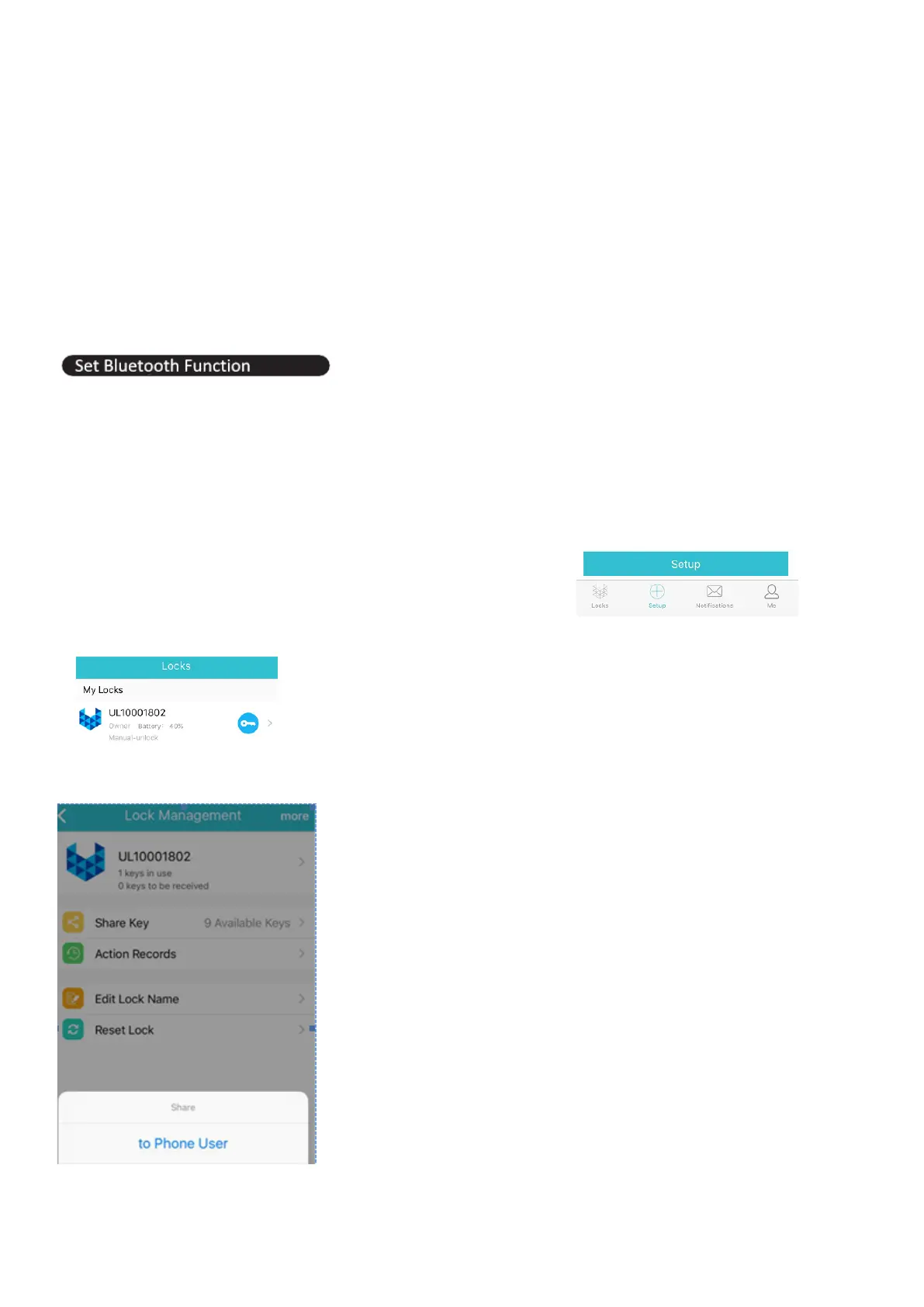
Download APP on your Smartphone and open Bluetooth function.
Search for ‘LockKeeper’ in your app store.
1. Sign In LockKeeper APP
New user click “Sign Up” to register, input your phone number, password and the verification code.
Sign in with the account and password.
2. Connect to Bluetooth Lock
Click “Setup” button to match and activate the Bluetooth door lock.
3. Click Key button to open the door lock
4. Share key to other users:
4.1 Click to Phone User:


 To Next Page