1001, Building 5 HuaDing, No.1 HuaKe 3 Road, 6 TEL: 86 22 2634 5859
Binhai hi-tech Industrial Development Zone, Tianjin, China FAX: 86 22 8371 9955
Email: apt@ap develop.com
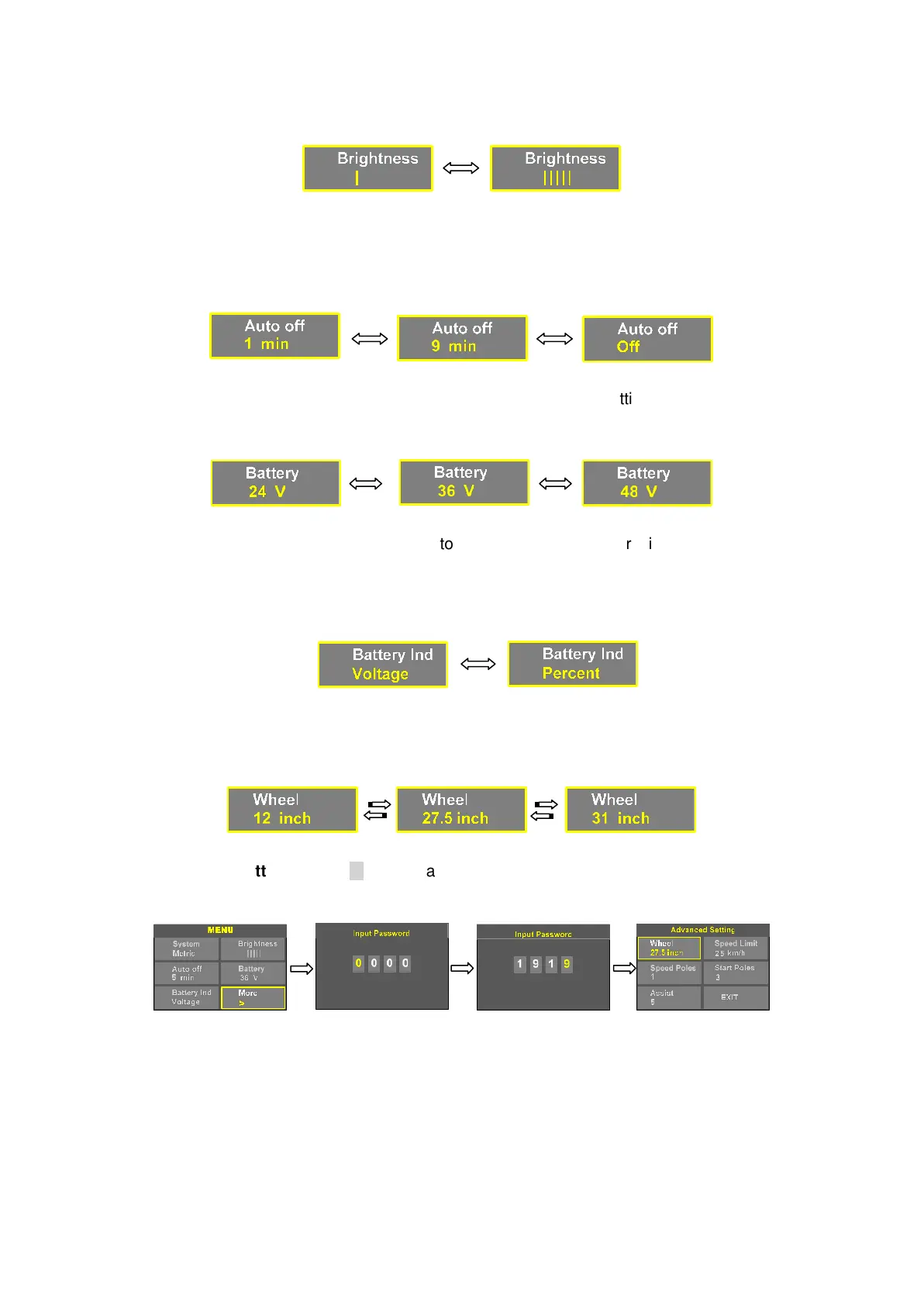
8.3 Auto off : Press UP/DOWN button to change the auto power off time, from 1 to 9/OFF,
the number represent time (minutes) to shutdown, OFF means disable auto off function,
default value is 5 minutes.
8.4 Battery : ress UP/DOWN will c nge battery voltage s g, optional value is
24V/36V/48V.
8.5 Battery In : ress UP/DOWN b n to change the bat dicator, Voltage /
Percentage / OFF.
*Accurate percentage needs communication with battery.
8.6 Wheel : Press UP/DOWN can change the wheel setting, optional wheel diameter is
12/14/16/18/20/22/24/26/27/27.5/28/29/30/31 inch.
8.7 Advance se ng : Press M button c n et into the advanc etting menu, default
password is ‘1919’.
8.8 Speed limit : Press UP/DOWN will change speed limit, range 10km/h~60km/h.
Default value is 25km/h.


 To Next Page