The KAT Walk C2 Core is a gaming VR treadmill designed to provide an immersive and physically active virtual reality walking experience. It combines core functionality with a compact design, making it more accessible for VR gamers.
Function Description:
The device translates physical movement into VR, allowing users to walk, run, squat, and jump in any direction within virtual environments. It features dedicated shoes with foot sensors and an inner sensor to track body direction and movement. The system is designed for personal VR entertainment and is not intended for medical rehabilitation or commercial use.
Important Technical Specifications:
- Suitable Age: 14-60 years
- Suitable Weight: Below 130kg (286 lbs.)
- Supported Height: 1.55m-2.00m (5'1" - 6'7")
- Recommended Height: 1.60m-1.95m (5'3"- 6'5")
- Product Weight: 56kg
- Base Height: 0.230m (9")
- Squat Width: 0.620m (2'1")
- Product Size: 1.250m x 1.250m x 1.860m (4'1"x4'1"x6'1")
- Base Diameter: 0.940m (37")
- Footprint: 1.2 m² (12.91 Square Feet)
- Charging Time: Approximately 1 hour
- Battery Life: 7 hours
- Voltage: 110~240V
- Operating Temperature: 0°C~40 °C
- Working Humidity: 20%Rh~85%Rh
- Working Altitude: <2000m
- Foot Sensor (WK321): Input 5V-500mA, Battery 3.7V Li-Ion Polymer 370mA
- Inner Sensor (WK322): Input 5V-500mA, Battery 3.7V Li-Ion Polymer 370mA
Usage Features:
- Dedicated Shoes: Special friction-customizable footwear designed for use with the KAT Walk C2 Core. They feature two layers of insoles (sports functional and size-adjustable) to ensure natural foot and leg movement on the low-friction platform. Users should ensure a firm fit and tightly tied shoelaces for the best experience. The size-adjusting insole can be removed if shoes are too tight. These shoes are exclusively for the KAT Walk C2 Core platform.
- Foot Sensors: Mounted on the bottom of the dedicated shoes, these sensors translate physical movement into VR for accurate walking simulation.
- Inner Sensor: Mounted on the front top shell, it collects body direction data and transfers it to the game. It includes a direction calibration button for quick adjustments.
- Sensor Status Indicators:
- Charging: Flashing Foot Sensor Light / Dimming Inner Sensor Light. Continuous bright lights indicate charging state detected, then blink.
- Normal Operation: Normal, continuous light.
- Low Battery: Slow, flashing light (3-sec intervals).
- Unpaired Connection: Flashing light (1-sec intervals).
- Pairing: Quick flashing light (0.5-sec intervals).
- Sleeping Mode / No Power: No light.
- Friction Level Adjustment: The shoe friction can be adjusted by adding or removing stripes. "VR VETERAN" is recommended for daily use, "NOVICE" for first-time users, and "VR Expert" is a popular choice among users.
- Anti-Slip Lock: Located at the back of the shoe, it increases stability for safe entry and exit from the platform. It should be enabled when stepping on and off the platform and unlocked once the waist harness is securely fastened.
- Wake-Up Function: The device enters sleep mode after 30 minutes of no movement. To wake it up, click the main button and shake the shoes.
- Waist Harness: Essential for safety and stability. It should be adjusted vertically near the thinnest part of the waist, with belts extended and secured using Velcro for a snug fit. The buckle should be fastened, and belt length adjusted as needed. Kneepads should be worn.
- Practice Walking: Users should pack up the anti-slip lock, stand straight with feet at the back of the base, lean forward slightly until shoe wheels roll, and take small steps to practice the simulated gait.
- Rotation Adjustment: If the rotational structure tends to turn continuously (due to uneven ground or other reasons), users can stand straight and turn the knob clockwise (if turning clockwise) or counter-clockwise (if turning counter-clockwise) to adjust.
- Calibration: Calibration is recommended every time a game is entered or if walking direction, jump status, or vibration is incorrect. This can be done via the HMD (holding controller Menu button or both triggers, or Oculus button for Meta Standalone), the Gateway platform dashboard, or by clicking the button on the device.
- Micro-Operation: Single-foot micro-operation allows for subtle movement in corresponding directions. Continuous movement (other than forward) can be triggered by standing still with one foot in the middle of the platform, sliding the other foot from the outside into the middle (in the desired direction), and raising it above the platform. Movement continues until the foot steps back on the platform.
- Cruise Mode: Allows continuous movement without walking. When 'on', strafing can be triggered by placing a foot on the platform, sliding it forward or backward, and maintaining a stable position. Side strafing works similarly.
- HMD Cable Management (Giveaway): A system to manage the HMD cable, keeping it away from the user during play. It involves wrapping Velcro around the cable, threading the USB end through a fixing loop, and using a clip to attach it to the top shell. A fixing loop can be stuck to the ceiling or a nearby wall to pull up the cable.
Maintenance Features:
- Platform Cleaning: Before each use, the platform should be wiped clean of any objects, substances, or dust. Scratches on the surface are normal wear and tear and do not affect performance.
- Shoe Sole Cleaning: Before each use, the soles of the dedicated shoes should be clean and free of any substances or dust.
- Foot Sensor Laser Head Cleaning: Before each use, check if the laser head surface of the foot sensor is smooth and clean. Any foreign matter should be cleaned to avoid affecting sensor performance.
- Structural Checks: Regularly check for loose elements and ensure all screws are tightened. Weekly checks are recommended for components prone to wear and tear, such as the waist harness. Replacements should be obtained by contacting customer service.
- Maintenance Oil: The provided maintenance oil is for base maintenance only, not for daily use or friction adjustment. Apply one drop once a month, spread evenly with a dry cloth. Do not use chemical agents or other liquids on the device, except for the maintenance oil.
- Anti-Collision Strip: If the body collides with the device during play, soft strips can be pasted where needed.
- Disassembly: For relocation, disassemble the device in reverse order of installation (remove USB cable, waist harness, back support plate, support rods). Components should be placed in original packaging with original materials for safe transportation. Ensure sufficient help to avoid injuries during moving.

 Need help?
 General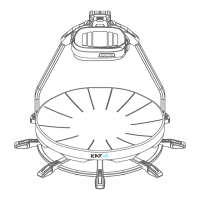

 To Next Page
