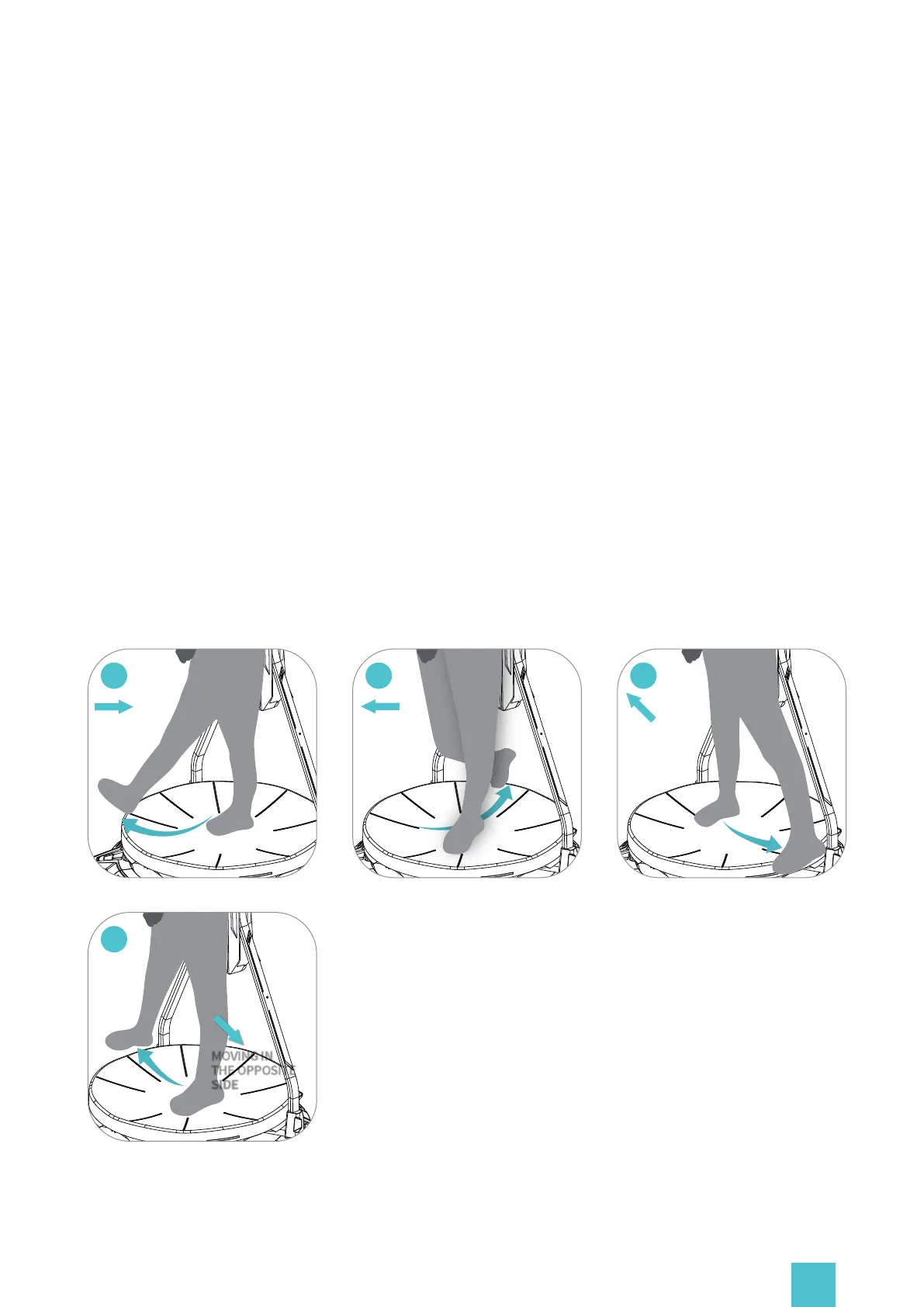
Controller: Options of the device main functions
03
MOVING IN
THE OPPOSITE
DIRECTION
01
MOVING
BACKWARD
02
MOVING
FORWARD
04
MOVING IN
THE OPPOSITE
SIDE
a.Walking Speed: Adjustment of the walking speed for the selected game.
b.Walking Accuracy: Adjustment of the walking accuracy for the selected game. Higher accuracy
provides more realistic locomotion with a feeling of moving forward step by step. Higher
fluency makes movement smoother. Default: Click ‘Default ′ to reset the game profile.
c.Cruise mode: Enables you to trigger smooth, continuous movement forward without
constantly walking.
You may turn on or off the cruise mode which allows you to move continuously without walking.
When ′on ′, you can trigger strafing by putting your foot on the platform, sliding it forward or
backward and keeping in a stable position. continuous strafing to the sides can be triggered in
a similar way.
Follow Recommended Settings (The following are consistent):
You can also enable the 'Follow Recommended Settings' option to play on our pre-set default
profiles.
20


 To Next Page