Function key combination
Remain set after the power is turned
off.
To change from grams to ounces, press
Button F, A+ and A- Button at the same
time once.
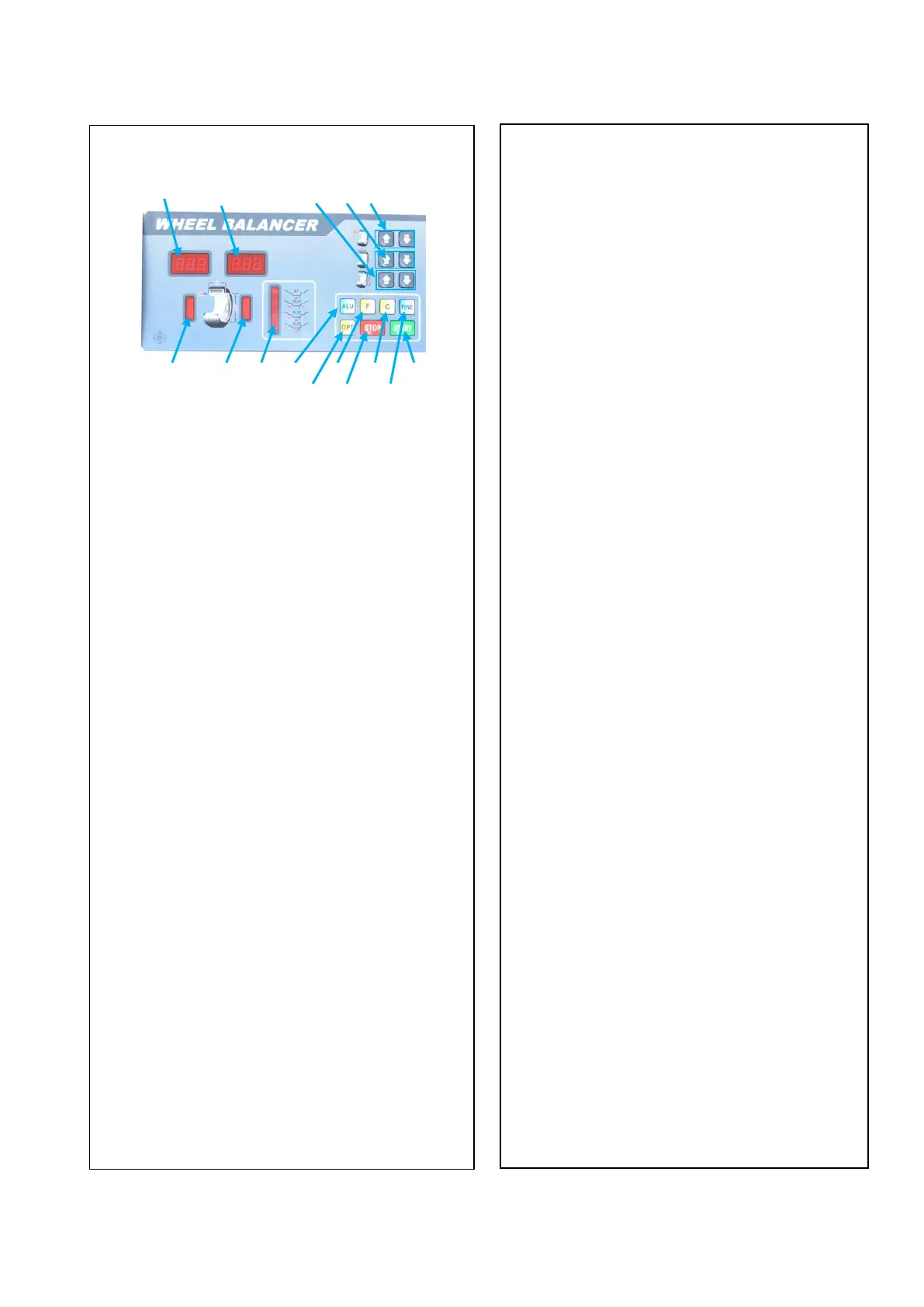
1.Inner unbalance value and
parameter of the tire display
2.Outside unbalance value and tire
parameter display
3.Inner unbalance position lamp.
4.Outside unbalance position lamp.
. 5.Balancing modes display lamp
6.A value input key
7.B value input key
8.D value input key
9.Start key
10.Dynamic/Static Balancing mode
selection key
11.Balancing mode selection key
12.Self-calibration key
13.OPT key
14.Emergency stop key
15.Residual unbalance value display
key.
(F)+(STOP), Lower down the cover, the machine
starts automatically.
Loose set after the power is turned off.
(F)+(b+), MM / INCH SELECTION “b”
SETTING / WHEEL WIDTH
(F)+(d-), MM / INCH SELECTION “d”
SETTING / WHEEL DIAMETER
Balancing mode selection key
Press (F) key to change from Dynamic
balancing to Static Balancing
Press ALU to select different balancing
mode(ALU1,ALU2,ALU3)
Control panel and display


 To Next Page