W H E E L B L A N C E R
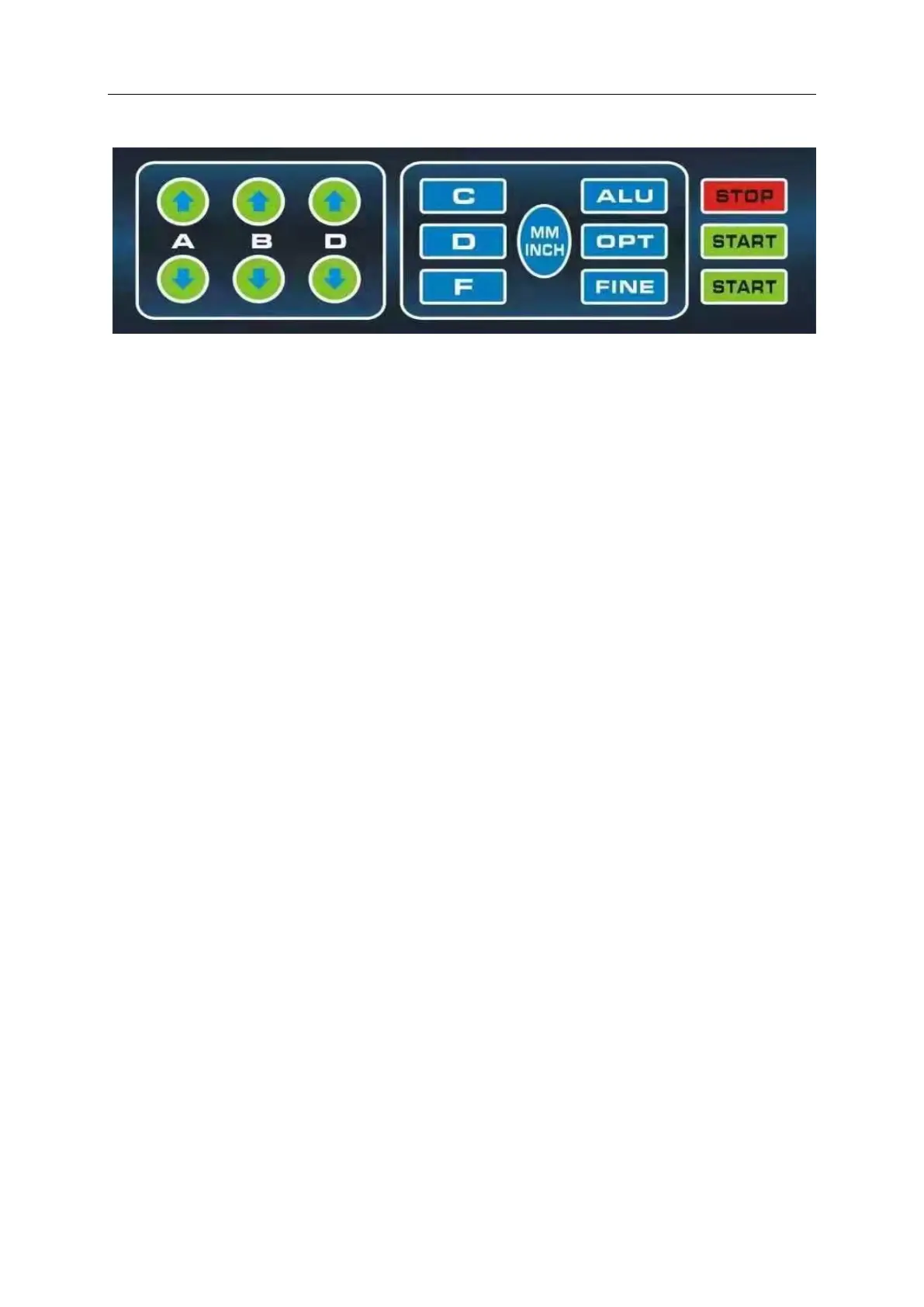
Keyboard:
(A) A = Distance of machine to wheel. Manually enter the reference distance size with button
A, press the arrow to go up, increase the input size, press the arrow to go down, reduce the
input size.
(B) B = Width of wheel (Measured with rim caliper) B Manual input size B, press the arrow
to go up, the input size increases, press the arrow to go down, the input size decreases.
(D) D = Diameter of wheel. Manually enter size D, press the arrow to go up, the input size
increases, press the arrow to go down, the input size decreases.
(C) C correction key/reset key.
(ALU) Aluminum wheel measurement and dynamic balance measurement selection key.
(OPT) Balancing machine optimization function operation key, used for tire rim optimization
combination.
(F
) Static and static balance function switch key.
(FINE) Button displays < 5g(0.3oz) actual unbalance value 10, mm/inch for size unit mm/inch
switch display
(Start) button, engages the motor to spin the wheel and begin balance sequence.
(STOP) emergency STOP and electromagnetic lock button


 To Next Page