EasyManua.ls Logo

Kawai K3 - General Connection Information

Kawai K3
60 pages
Print Icon
To Next Page IconTo Next Page
To Previous Page IconTo Previous Page
Loading...
1.2
General
Connection
Information
Note:
Always
connect
and
disconnect
equipment
with
all
power
'
switches
off.
For
connections,
see
the
section
on
the
MIDI
interface.
2
KAWAI
.
66060
©6660
x
NE
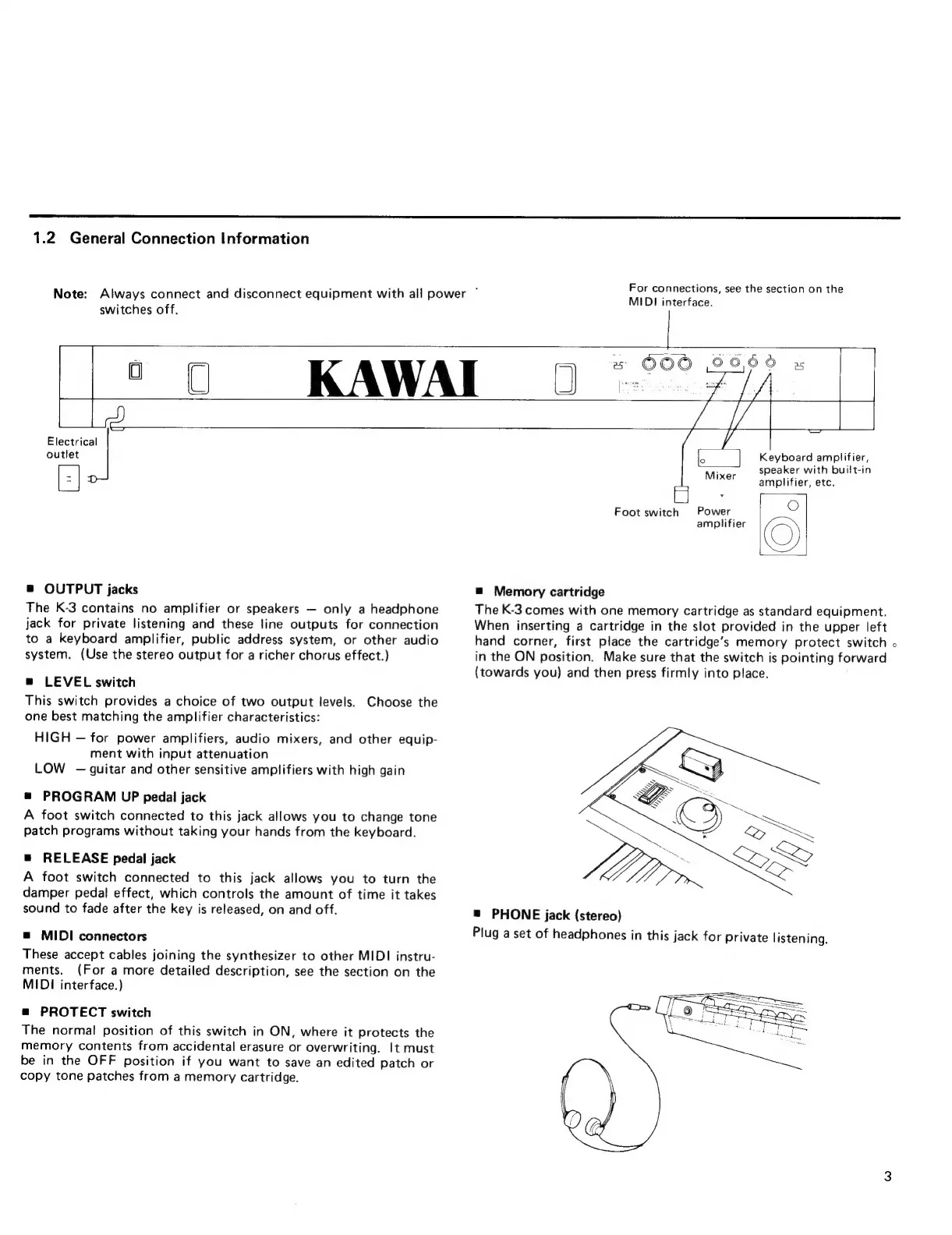
Electrical
outlet
s
OUTPUT
jacks
The
K-3
contains
no
amplifier
or
speakers
only
a
headphone
jack
for
private
listening
and
these
line
outputs
for
connection
to
a
keyboard
amplifier,
public
address
system,
or
other
audio
system.
(Use
the
stereo
output
for
a
richer
chorus
effect.)
@
LEVEL
switch
This
switch
provides
a
choice
of
two
output
levels.
Choose
the
one
best
matching
the
amplifier
characteristics:
HIGH
for
power
amplifiers,
audio
mixers,
and
other
equip-
ment
with
input
attenuation
LOW
-
guitar
and
other
sensitive
amplifiers
with
high
gain
=
PROGRAM
UP
pedal
jack
A
foot
switch
connected
to
this
jack
allows
you
to
change
tone
patch
programs
without
taking
your
hands
from
the
keyboard.
=
RELEASE
pedal
jack
A
foot
switch
connected
to
this
jack
allows
you
to
turn
the
damper
pedal
effect,
which
controls
the
amount
of
time
it
takes
sound
to
fade
after
the
key
is
released,
on
and
off.
s
MIDI
connectors
These
accept
cables
joining
the
synthesizer
to
other
MIDI
instru-
ments.
(For
a
more
detailed
description,
see
the
section
on
the
MIDI
interface.)
as
PROTECT
switch
The
normal
position
of
this
switch
in
ON,
where
it
protects
the
memory
contents
from
accidental
erasure
or
overwriting.
It
must
be
in
the
OFF
position
if
you
want
to
save
an
edited
patch
or
copy
tone
patches
from
a
memory
cartridge.
Keyboard
amplifier,
speaker
with
built-in
amplifier,
etc.
Foot
switch
Power
O
amplifier
(O
=
Memory
cartridge
The
K-3
comes
with
one
memory
cartridge
as
standard
equipment.
When
inserting
a
cartridge
in
the
slot
provided
in
the
upper
left
hand
corner,
first
place
the
cartridge's
memory
protect
switch
o
in
the
ON
position.
Make
sure
that
the
switch
is
pointing
forward
(towards
you)
and
then
press
firmly
into
place.
Mixer
=
PHONE
jack
(stereo)
Plug
a
set
of
headphones
in
this
jack
for
private
listening.

Other manuals for Kawai K3

Related product manuals