EasyManua.ls Logo

Kawai K3 - Page 8

Kawai K3
60 pages
Print Icon
To Next Page IconTo Next Page
To Previous Page IconTo Previous Page
Loading...
2.
Selecting
a
Tone
Patch
2.1
Tone
Patch
Numbers
The
K-3
holds
fifty
tone
patches
in
its
internal
memory
and
another
fifty
in
a
removable
memory
cartridge.
Changing
tone
patches
is
as
easy
as
pressing
two
switches.
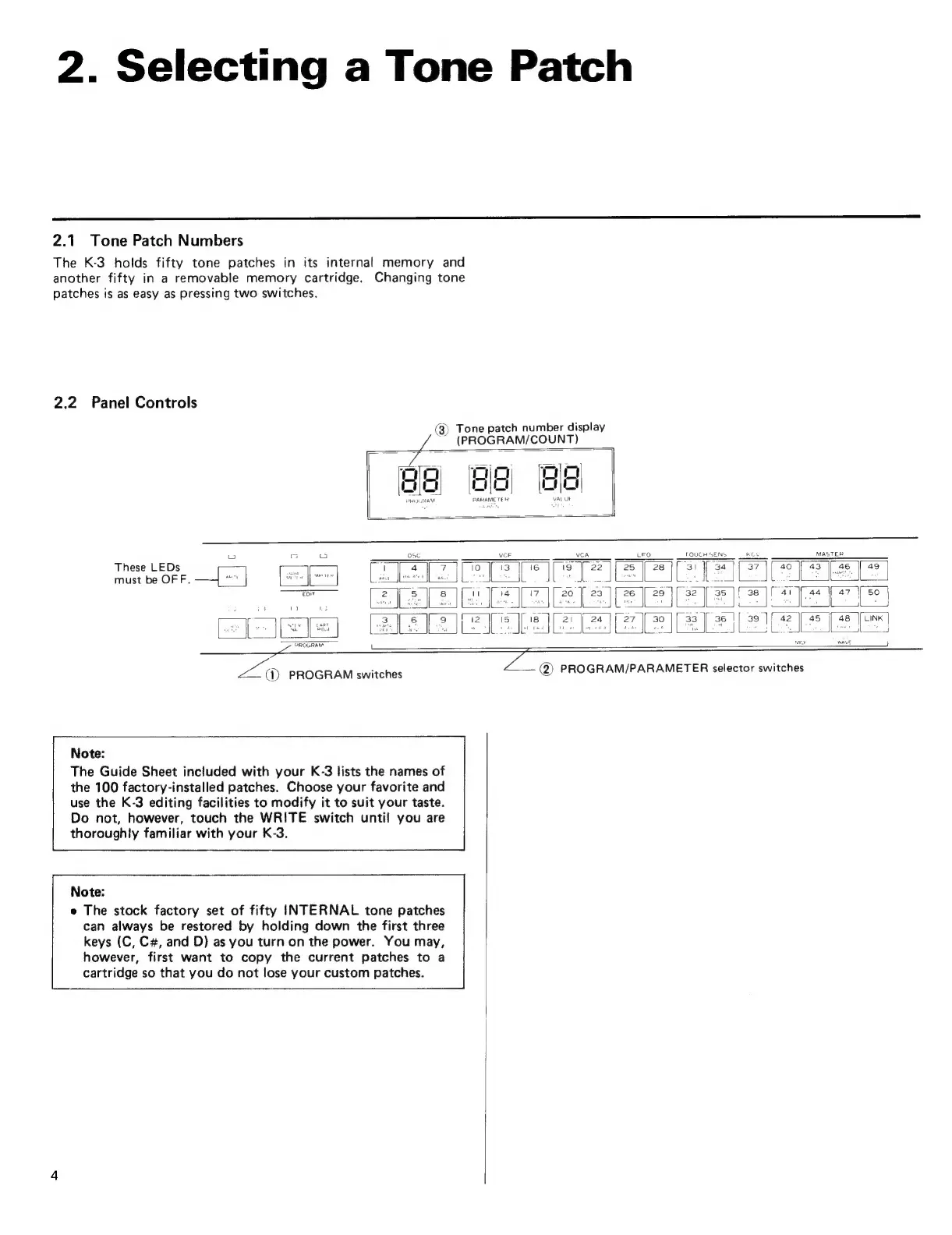
2.2
Panel
Controls
(8)
Tone
patch
number
display
(PROGRAM/COUNT)
3j
Ba
8
g
|
Li
=
Cc
cuo
co
|
N
Ri
"
PARAMETER
VAL
Ut
-j
LU
C
Ld
OSC
vor
VCA
LFO
TOUCH
SENS
Key
MASTER
ee
Wee
Eee
ee
4?
|
45
EX
LINK
ram
WAVE
CLPRÜGHEW
Pd
zZ:
@
PROGRAM/PARAMETER
selector
switches
(D
PROGRAM
switches
——
43
|
46
|
49
These
LEDs
ES
Tr
4
|
7
IE
must
be
OFF.
—4
^^
BR
CUN
LAO
Jp
BONES:
zs
EA
ESI
E
EIE
Ea
E
Note:
The
Guide
Sheet
included
with
your
K-3
lists
the
names
of
the
100
factory-installed
patches.
Choose
your
favorite
and
use
the
K-3
editing
facilities
to
modify
it
to
suit
your
taste.
Do
not,
however,
touch
the
WRITE
switch
until
you
are
thoroughly
familiar
with
your
K-3.
Note:
e
The
stock
factory
set
of
fifty
INTERNAL
tone
patches
can
always
be
restored
by
holding
down
the
first
three
keys
(C,
C#,
and
D)
as
you
turn
on
the
power.
You
may,
5
however,
first
want
to
copy
the
current
patches
to
a
cartridge
so
that
you
do
not
lose
your
custom
patches.