EasyManua.ls Logo

Kawai K3 - Page 9

Kawai K3
60 pages
Print Icon
To Next Page IconTo Next Page
To Previous Page IconTo Previous Page
Loading...
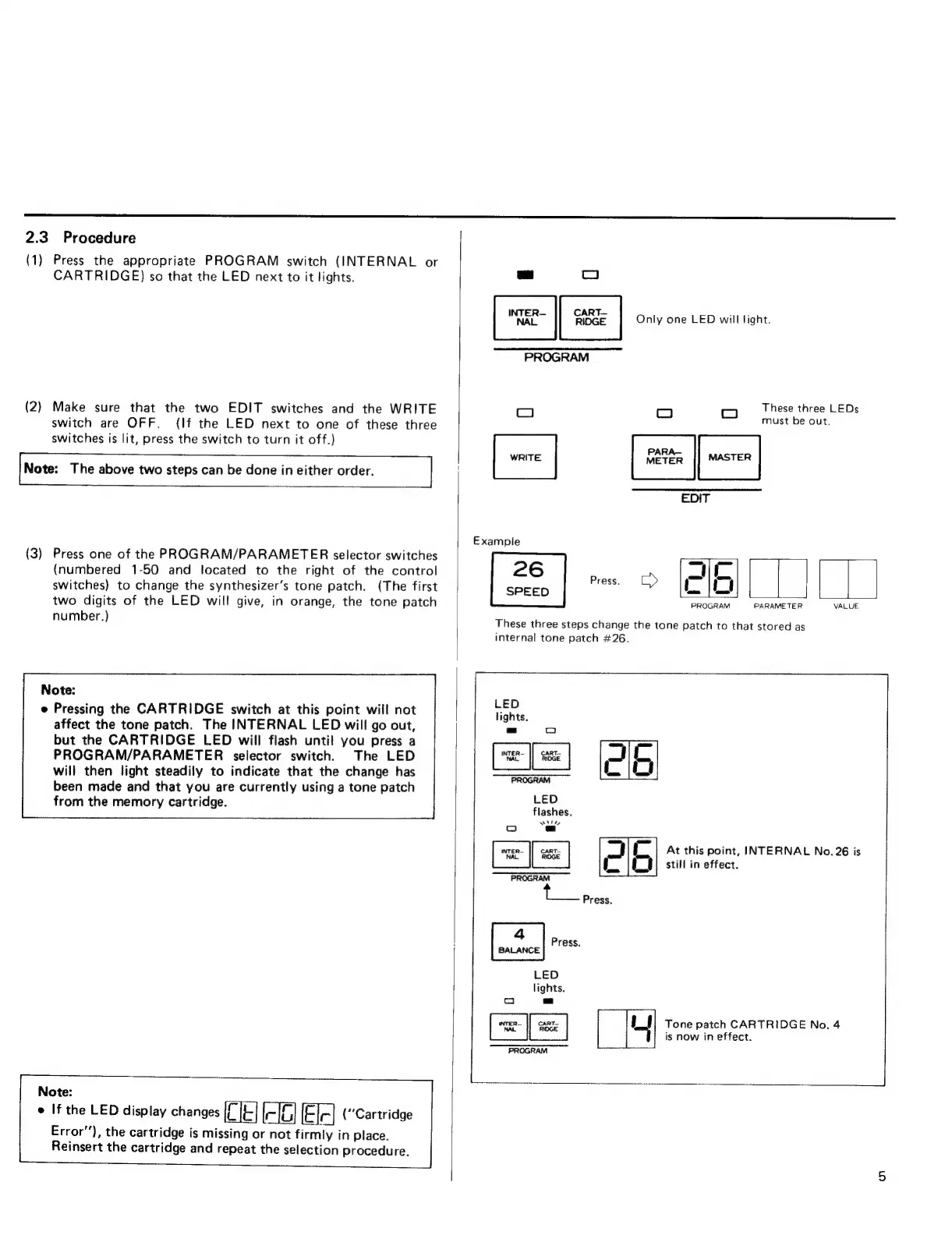
2.3
Procedure
(1)
Press
the
appropriate
PROGRAM
switch
(INTERNAL
or
CARTRIDGE)
so
that
the
LED
next
to
it
lights.
(2)
Make
sure
that
the
two
EDIT
switches
and
the
WRITE
switch
are
OFF.
(If
the
LED
next
to
one
of
these
three
switches
is
lit,
press
the
switch
to
turn
it
off.)
[Note:
The
above
two
steps
can
be
done
in
either order.
|
(3)
Press
one
of
the
PROGRAM/PARAMETER
selector
switches
(numbered
1-50
and
located
to
the
right
of
the
control
switches}
to
change
the
synthesizer’s
tone
patch.
(The
first
two
digits
of
the
LED
will
give,
in
orange,
the
tone
patch
number.)
Note:
e
Pressing
the
CARTRIDGE
switch
at
this
point
will
not
affect
the
tone
patch.
The
INTERNAL
LED
will
go
out,
but
the
CARTRIDGE
LED
will
flash
until
you
press
a
PROGRAM/PARAMETER
selector
switch.
The
LED
will
then
light
steadily
to
indicate
that
the
change
has
been
made
and
that
you
are
currently
using
a
tone
patch
from
the
memory
cartridge.
Note:
e
If
the
LED
display
changes
(“Cartridge
Error’),
the
cartridge
is
missing
or
not
firmly
in
place.
Reinsert
the
cartridge
and
repeat
the
selection
procedure.
L-]
e
Only
one
LED
will
light.
"PROGRAM
=
E.
duy
een:
DEEST.
RE
Example
26
PROGRAM
PARAMETER
VALUE.
SPEED
These
three
steps
change
the
tone
patch
to
that
stored
as
internal
tone
patch
#26.
LED
lights.
=
c
JE
—_—
LIU
PROGRAM
LED
flashes.
XA
e =
NAL
RIDGE
PROGRAM
4
Press.
BALANCE
LED
lights.
ce
am
LJ)
Tone
patch
CARTRIDGE
No.
4
^d
is
now
in
effect.
PROGRAM
Jj
m
At
this
point,
INTERNAL
No.
26
is
E
Ll
still
in
effect.
Press.