i n f o @ k b g o o d i c e.c o m
DISPENSER USE
Flush the unit with clean potable water once a week to prevent high
water TDS and hardness.
Descale the unit with citric acid once a month to prevent sediment
buildup.
Sanitize the unit with chlorine bleach twice a month to prevent
bacteria growth.
Use potable water only.
Use purified or distilled water to improve ice making performance.
Water TDS level must be 5~100 mg/L (PPM).
Water Hardness must be no greater than 50 mg/L (3 grains/gal).
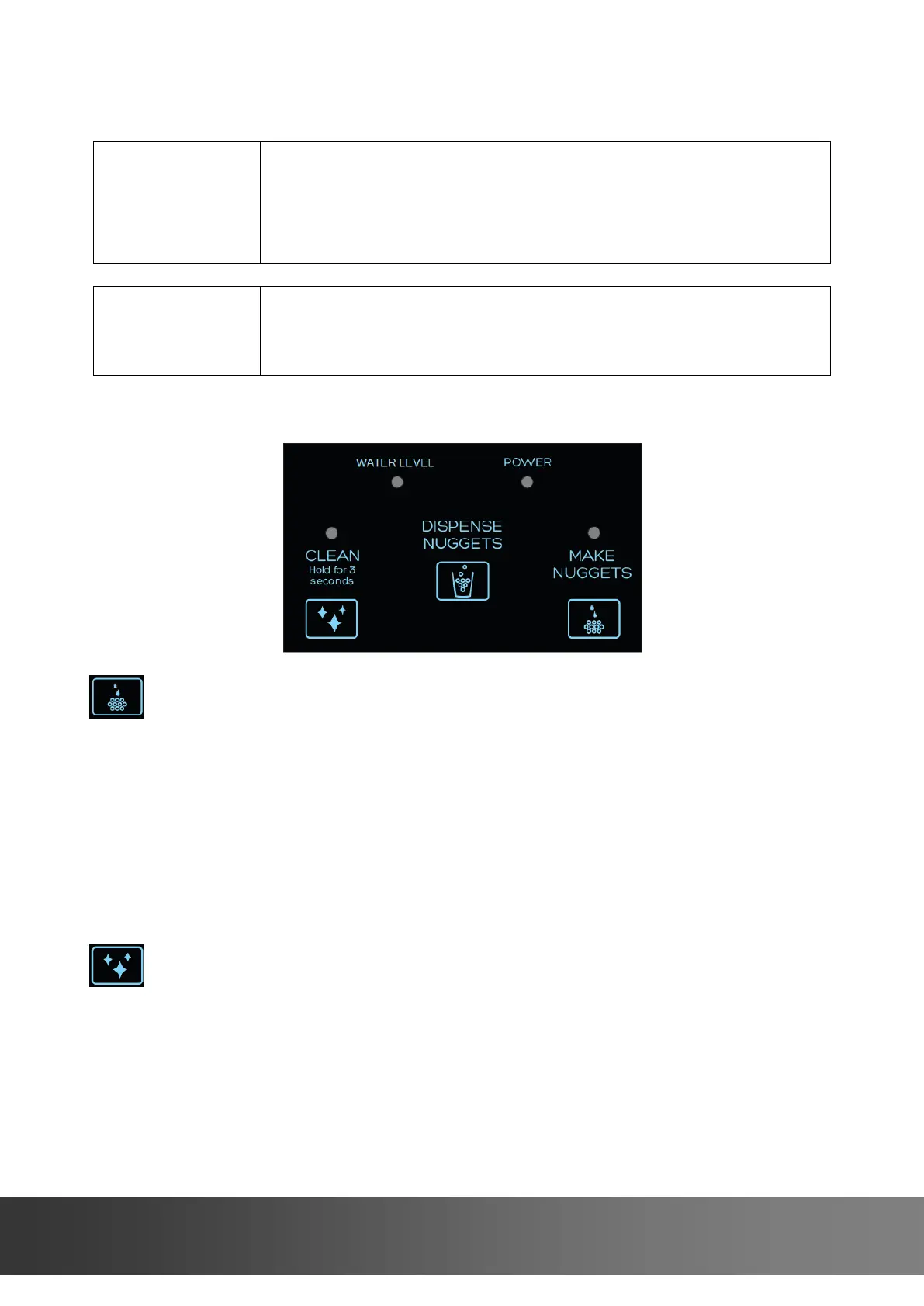
Display
Make Nuggets Button& LED
It will be disabled when the unit is in the cleaning mode.
Blue LED flashes slowly while the unit is currently making ice.
Blue LED illuminates once the ice bin is full.
Press once to start making ice, the Make Nuggets LED flashes slowly.
Press and hold for 3 seconds to stop making ice, the Make Nuggets LED
goes off.
Clean Button& LED
It will be disabled when the unit is in the ice making mode.
It can be used for defrosting, flushing, descaling or sanitizing process.
Blue LED flashes quickly once cleaning cycle is needed.
Blue LED flashes slowly while the unit is currently in the cleaning cycle.


 To Next Page