
EasyManua.ls Logo

kbice FDFM1JA01 - User Manual

kbice FDFM1JA01
16 pages
Print Icon
To Next Page IconTo Next Page
Loading...
1
w w w . k b g o o d i c e . c o m
U S E R I N S T R U C T I O N S
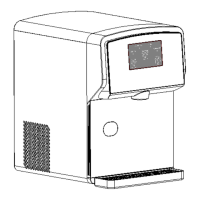
P o r t a b l e N u g g e t I c e D i s p e n s e r
F D F M 1 J A 0 1
Safety Instructions ----------------------------------------------------------------------------------2
Features & Specifications ---------------------------------------------------------------------------4
Dispenser Use ---------------------------------------------------------------------------------------6
Dispenser Care -------------------------------------------------------------------------------------10
Installations ----------------------------------------------------------------------------------------14
Troubleshootings -----------------------------------------------------------------------------------15
Service & Warranty --------------------------------------------------------------------------------16
G E N E R A L O P E R A T I N G I N S T R U C T I O N
Read these instructions before use and save them for future reference.
Let the unit rest and remain unplugged for 24 hours before use.
Remove all external and internal packaging materials. Be sure that all parts
have been included before discarding any packaging materials. You may
want to keep the packaging materials for use at a later date.
Contact customer service at 800-433-9938 or info@kbgoodice.com.

Other manuals for kbice FDFM1JA01

Questions and Answers

  • S
    Sherry LeeAug 7, 2025
    Why is my kbice Ice Maker not making ice?
    • I
      ipetersenAug 7, 2025
      Your kbice Ice Maker might not be producing ice for several reasons. First, ensure the ice maker is turned on by pressing the Make Nuggets button once. Also, check that the clearances are adequate and the ambient temperature meets requirements. If the Water Level red LED flashes quickly, refill the water reservoir with clean, potable water. If the unit has dispensed all ice, press and hold the Make Nugget button for more than 10 seconds to restart ice production. If the Clean LED flashes quickly, initiate defrosting by pressing and holding the Clean button for over 3 seconds. If all LEDs flash simultaneously, drain the unit and plug it back into power. If none of these steps work, the water pump, water level sensor, ice engine motor, or cooling system may be defective, requiring service.
  • A
    Alexander YoungAug 15, 2025
    How to fix a kbice FDFM1JA01 Ice Maker when the power LED is not lit?
    • K
      Kenneth BryanAug 15, 2025
      If the power LED on your kbice Ice Maker isn't lit, it indicates a power issue. First, check the outlet and breaker/fuse to ensure there is power. Make sure the power cord is properly plugged in. If the cord is broken, or the control PCB or display PCB is defective, service is required.
  • A
    Amanda ThomasAug 22, 2025
    What to do if my kbice FDFM1JA01 Ice Maker doesn't dispense ice?
    • J
      Juan JenkinsAug 22, 2025
      If your kbice Ice Maker isn't dispensing ice, there might be a few reasons. First, make sure there is ice in the ice bin. If the bin is full but ice is jammed, try using the Dispense Ice and Clean button combination to break it up. If the ice is jammed at the dispense point, carefully remove it with a spoon. If none of these resolve the issue, the ice bin auger or motor, control PCB, or display PCB may be defective, requiring service.
  • C
    ctannerAug 29, 2025
    Why is my kbice FDFM1JA01 Ice Maker leaking water?
    • Y
      ybradfordAug 29, 2025
      If your kbice Ice Maker is leaking water, it could be due to several reasons. Avoid overfilling the water reservoir. Make sure you empty the drip tray if it's overflowing. If the water reservoir or tubing is broken, or the water level sensor is defective, service is required.

Summary

Safety Instructions

Electrical Safety

Essential precautions for safe electrical connection and usage to prevent shock, property damage, and injury.

Child and Cleaning Safety

Guidelines for child safety around the appliance and precautions to take during cleaning procedures.

Disposal Safety

Instructions and considerations for the safe and compliant disposal of the appliance.

Features & Specifications

Product Overview and Components

Description of the product's key features and identification of its main parts with a diagram.

Technical Specifications

Detailed technical specifications including ice production, storage, dimensions, and electrical ratings.

Dispenser Use

Control Panel Display

Explanation of the control panel interface, buttons, and LED indicators for operation.

Ice Dispensing and First-Time Use

Steps for dispensing ice, using button combinations, and initial setup procedures.

Water Level Management

Procedures for filling the water reservoir and addressing water level LED indicators.

Operational Modes and States

Information on energy saving, idle modes, and preparation for holidays or vacations.

Dispenser Care

Draining and Emptying Procedures

Procedures for draining water and emptying the ice bin and water reservoir.

Water Level and Cleaning Indicators

Troubleshooting water level issues and understanding cleaning cycle LED indicators.

Error Handling and Jamming Solutions

Solutions for cleaning errors, LED flashes, and ice jamming at the dispense point.

Regular Cleaning and Maintenance

Steps for flushing, descaling, and sanitizing the unit for optimal hygiene.

Component Cleaning

Instructions for cleaning the air vent and pump protector to ensure proper function.

Installations

Location and Clearance Requirements

Guidelines for selecting an appropriate location and required clearances for ventilation.

Electrical Connection Requirements

Necessary electrical connections, grounding, and safety precautions for the power supply.

Troubleshootings

Power and Ice Making Issues

Solutions for problems with the power LED not lighting up and the unit not making ice.

Dispensing and Water Leakage Issues

Diagnosing and resolving problems with ice dispensing and water leaks from the unit.

Service & Warranty

Warranty Policy and Contact Information

Details about the limited warranty, coverage, exclusions, and how to contact customer service.

kbice FDFM1JA01 Specifications

General IconGeneral
Brandkbice
ModelFDFM1JA01
CategoryIce Maker
LanguageEnglish