EasyManua.ls Logo

KDK FM-2016A - Page 7

KDK FM-2016A
16 pages
Print Icon
To Next Page IconTo Next Page
To Previous Page IconTo Previous Page
Loading...
ng
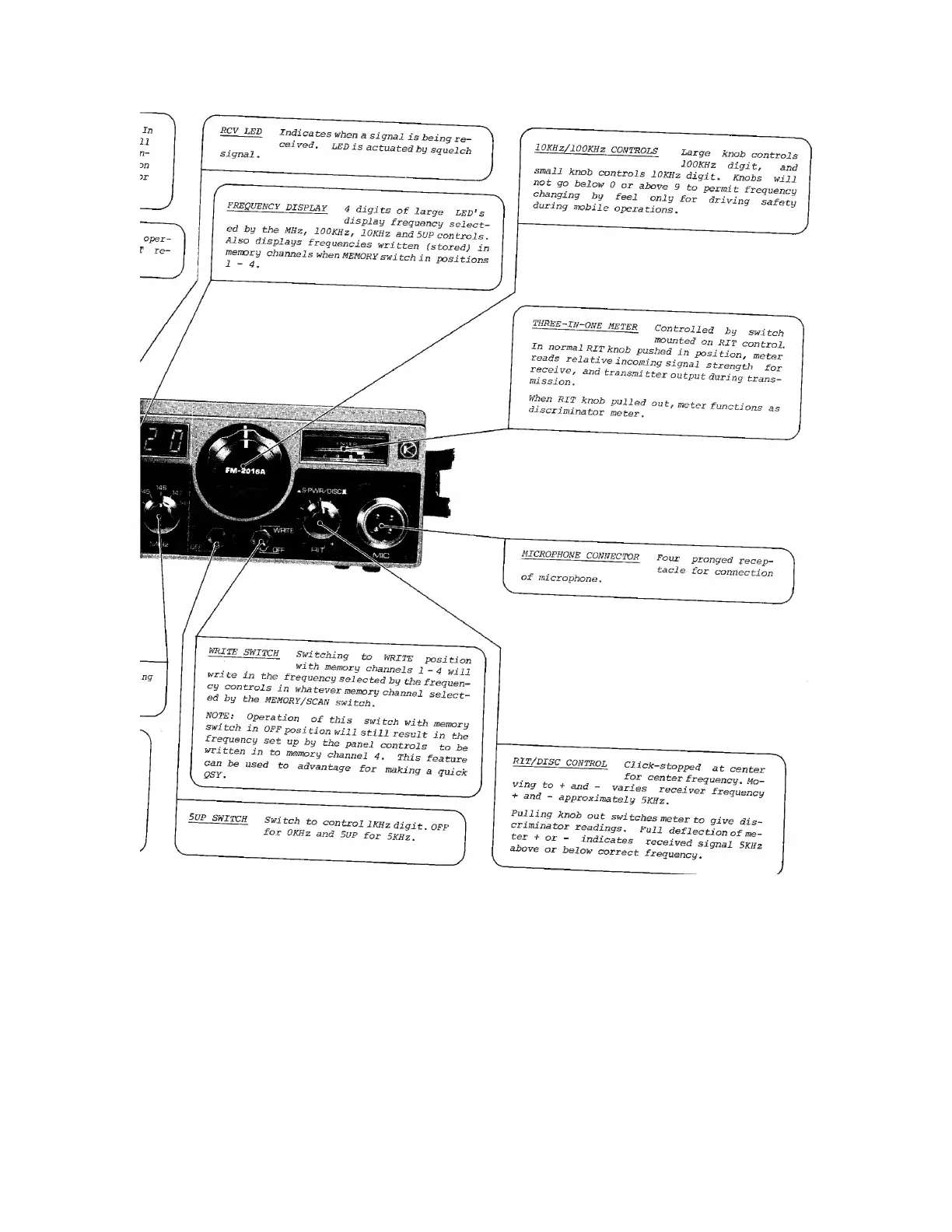
RCV
LED
Indicates
when
asi
gnal
is
being
re-
ceived.
LEDis
actuated
by
squelch
signal.
FREQUENCY
DISPLAY
4
digits
of
large
LED's
display
frequency
select-
ed
by
the
MHz,
10OKHz,
10KHz
and
5uP
controls.
Also
displays
frequencies
written
(stored)
in
memory
channels
when
MEMORY
switch
in
positions
l-
4.
WRITE
SWITCH
Swi
tching
to
WRITE
position
with
memory
channels
1-4
will
write
in
the
frequency
selected
by
the
frequen-
cy
controls
in
whatever
memory
channel
select~
ed
by
the
MEMORY/SCAN
switch.
NOTE:
Operation
of
this
switch
with
memory
switch
in
OFF
position
will
still
result
in
the
frequency
set
up
by
the
panel
controls
to
be
written
in
to
memory
channel
4.
This
feature
can
be
used
to
advantage
for
making
a
quick
OSY.
5UP_SWITCH
Switch
to
control
1KHz
digit.
OFF
for
OKHz
and
5UP
for
5KHz.
LOKH2/100KHz
CONTROLS
ee
RON
ROLS
Large
knob
controls
100KHz
digit,
and
small
knob
controls
l0KHz
digit.
Knobs
will
not
go
below
0
or
above
9
to
permit
frequency
changing
by
feel
only
for
driving
safety
during
mobile
Operations,
THREE-IN-ONE
METER
Controlled
by
switch
mounted
on
RIT
control.
In
normal
RIT
knob
Pushed
in
Position,
meter
reads
relative
incoming
Signal
strength
for
receive,
and
transmitter
output
during
trans-
mission,
When
RIT
knob
pulled
out,
meter
functions
as
discriminator
meter,
MICROPHONE
CONNECTOR
Four
pronged
recep-
LON
NECTOR
tacle
for
connection
of
microphone.
RIT/DISC
CONTROL
Click-stopped
at
center
for
center
frequency.
Mo-
ving
to
+
and
-
varies
receiver
frequency
+
and
-
approximately
5KHz.
Pulling
knob
out
switches
meter
to
give
dis-
criminator
readings.
Full
deflection
of
me-
ter
+
or
-
indicates
received
signal
5kHz
above
or
below
correct
frequency.

Related product manuals