Operational Modes
The cam has three basic operational modes: 「OFF」, 「ON」 and 「SETUP」
●「OFF 」Mode
When cam in OFF mode, you can do the following:
• replacing the SD card or batteries
• connecting cam with other device via USB port
●「ON」Mode
Once in ON mode no manual controls are needed or possible (the control keys have no effect). The cam will take photos or videos automatically
(according to its current parameter settings) when it is triggered by the PIR sensor′s detection of activity in the area it covers.
●「SETUP」Mode
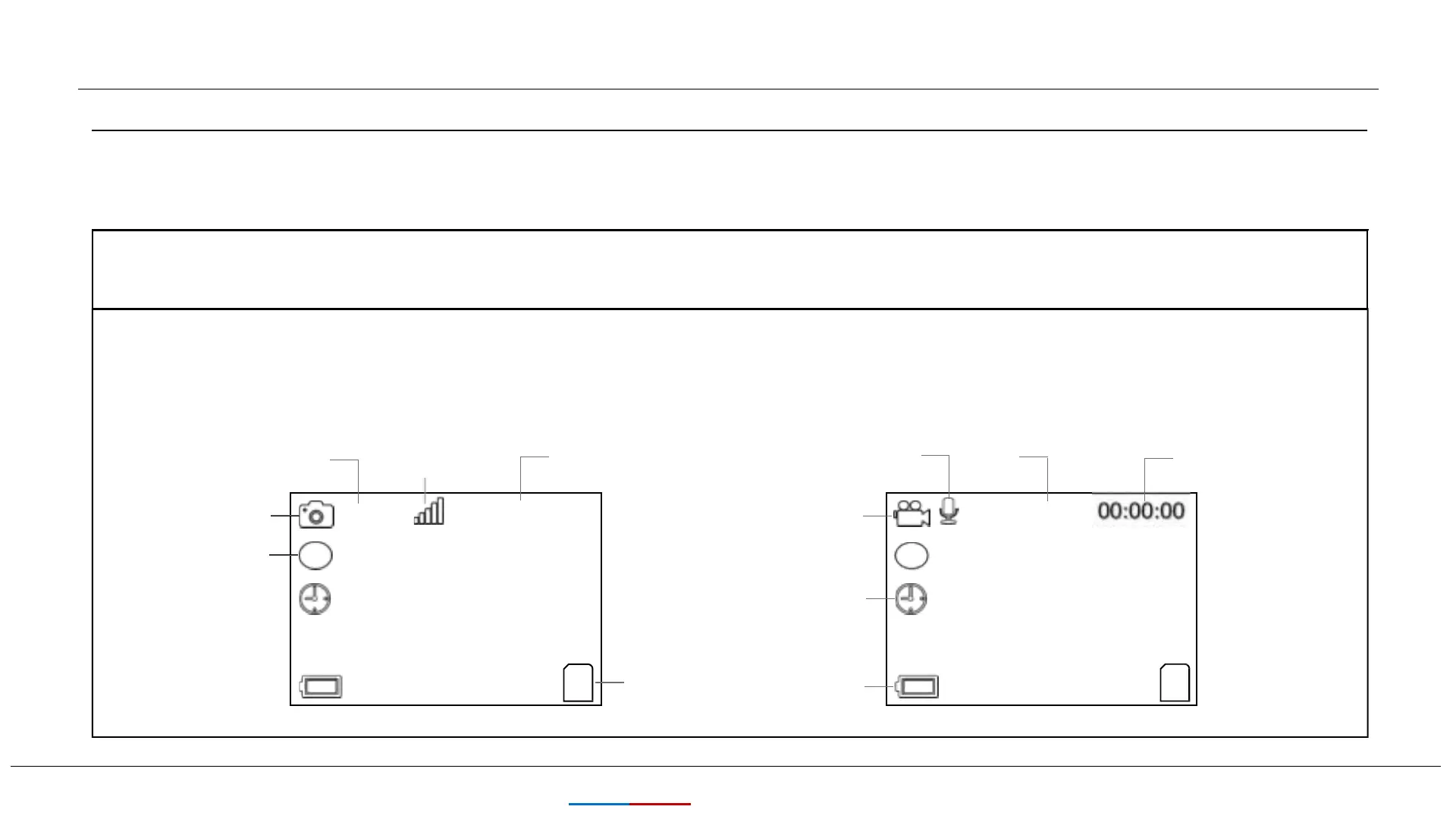
In the SETUP mode you can check and change the settings of the cam with the help of built-in LCD. Moving the power switch to the
SETUP position will turn on the LCD display and you will see an information screen.
8
KEEPTIME
Image Resolution
of Photos Taken
Audio Rec ON
Video Resolution
Signal
0000/0888
Video Mode
Available Video
Recording Time
Camera Mode
Time Stamp ON
T
T
Time Scan ON
SD Card
Battery Level
5M
1080P


 To Next Page