EasyManua.ls Logo

KeepGuard KG762 - User Manual

Default Icon
14 pages
Print Icon
To Next Page IconTo Next Page
Loading...
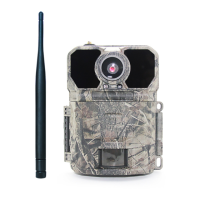
This KeepGuard cam is the best-selling scouting camera which is designed for activity and is resistant against water and snow. It is
equipped with built-in infrared LEDs, so that it can be triggered by any movement in a location, then take high quality pictures or
video clips. Please refer to the notes below and instructions in this manual to ensure that you are completely satisfied with this
product.
Highly Recommended by Outdoor Explorers - KeepGuard Wildlife Scouting Cam KG Cams Instruction Book
Contents
Quick Start 2
Notes before use 2
Camera Overview 3~4
Operation Part 4
Accessories 4
Power Supply 5
SD Card 5
Operational Modes 6
Settings 7~11
Mounting and Positioning 12
Specification 13
Warranty Card 14
KEEPTIME
Applicable models:KG691, KG762, KG785
Question and Answer IconNeed help?

Do you have a question about the KeepGuard KG762 and is the answer not in the manual?

Summary

Quick Start Guide

Important Notes Before Use

Camera Components Overview

Camera Operation Controls

Included Accessories

Power Supply and Battery Installation

SD Card Usage and Capacity

Camera Operational Modes

Camera Settings Configuration

Clock Settings

Configure the camera's internal clock for accurate time recording.

Capture Mode Selection

Choose between Photo, Video, or Dual capture modes.

Image Resolution Settings

Select photo resolution (3-16MP) affecting quality and file size.

Capture Number Settings

Set the number of photos taken per trigger in sequence.

Video Size and Length

Configure video resolution and duration for recordings.

Camera Naming and Interval

Set camera name and adjust the interval between captures.

Coordinate Input and Time Period

Input location coordinates and define operational time periods.

Time Scan and Language

Enable Time Lapse and select the user interface language.

SD Card Formatting and Defaults

Format SD card and restore factory default settings.

Firmware Version Information

View the current firmware version of the camera.

Mounting and Positioning Guide

Camera Mounting Methods

Instructions for mounting the camera using the web belt or tripod socket.

Sensing Angle and Distance Test

Test the camera's detection range and angle for optimal placement.

Technical Specifications

Warranty Information

KeepGuard KG762 Specifications

General IconGeneral
BrandKeepGuard
ModelKG762
CategoryDigital Camera
LanguageEnglish

Related product manuals